The new NodeBox forum is live! Everything from support.nodebox.net moved here: sign in with the same email to pick up your old posts. Something not working? Write to forum-support@nodebox.net.

General DiscussionFrom the old forum

BIG NEWS! Nodebox 3.1.0 for Apple Silicon Macs

11 replies Last reply

  1. Frederik De Bleser, the inventor of Nodebox, has just released Nodebox version 3.1.0 for Apple Silicon based Macs.

    If you are running on a PC or an ancient Intel-based Mac, you can ignore this and stay on version 3.0.52.

    From the release notes:

    Version 3.1.0 (14 June 2026)

    • NodeBox is now a native Apple Silicon (arm64) application — it no longer runs through Rosetta and will keep working on macOS releases after Apple removes Rosetta. The bundled Java runtime, ffmpeg, and native libraries are all native arm64.
    • Intel Macs: this release is Apple Silicon only. Intel Mac users should stay on v3.0.52.
    • macOS and Windows builds are now produced, signed, and notarized reproducibly via GitHub Actions.

    I have installed 3.1.0 on my Mac M3 Pro and it seems to run fine - and noticeably faster!

    I rendered an animation I was working on today. Under 3.0.52 this took 7:52 minutes. Under 3.1.0 it took 5:06 minutes, an improvement of 55%.

    I also timed how long it took to open my vast Cartan Node Library from inside Nodebox: 10.7 seconds under 3.0.52, 4.8 seconds under 3.1.0 - more than twice as fast!

    So far the output seems unchanged. I did notice one very minor difference. When rendering my movie under 3.1.0, clicking on the rendering progress dialog caused the current window to switch to the app instead of the render window, which does not happen under 3.0.52. This is a minor window management quirk and had no effect whatsoever on the output or render process. I mention it only because it is an observable difference. If I spot any other differences I will reply to this discussion with an update. But for now I am satisfied that 3.1.0 is safe to use.

    Mac users can download it here: https://www.nodebox.net/download/

    BACKGROUND

    This update secures the long term viability of NodeBox on the Mac. The latest release of the Mac OS, OS 27 Golden Gate, continues to support legacy Rosetta-based apps like NodeBox. But at their dev conference last week, Apple warned that this would be the last OS to do that. So when OS 28 comes out, presumably next year, users upgrading to that OS would find that Nodebox would no longer run.

    Nodebox 3.1.0 eliminates that concern. Mac users should be able to use Nodebox under the latest operating systems for many years to come. And the significant speed improvement is a great bonus!

    Thanks, Frederik!
    Copy link
  2. This is fantastic news! Thanks, Frederik, and thanks, John for posting about it!

    Copy link
  3. great news! thanks for the update John as 'the long term viability of NodeBox on the Mac' which was a concern for me and this is great that NodeBox is remaining compatible — thanks Frederik!!!

    Copy link
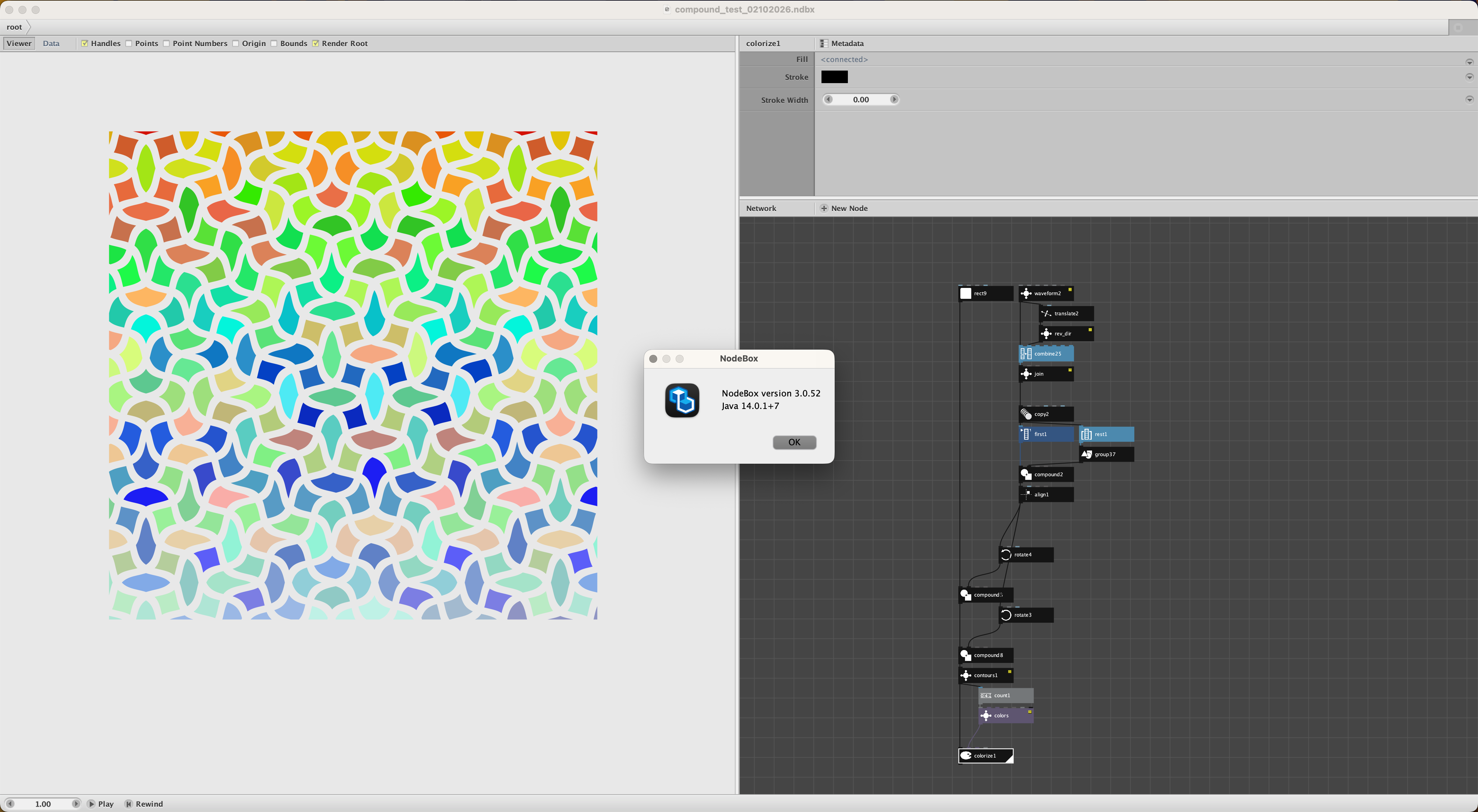
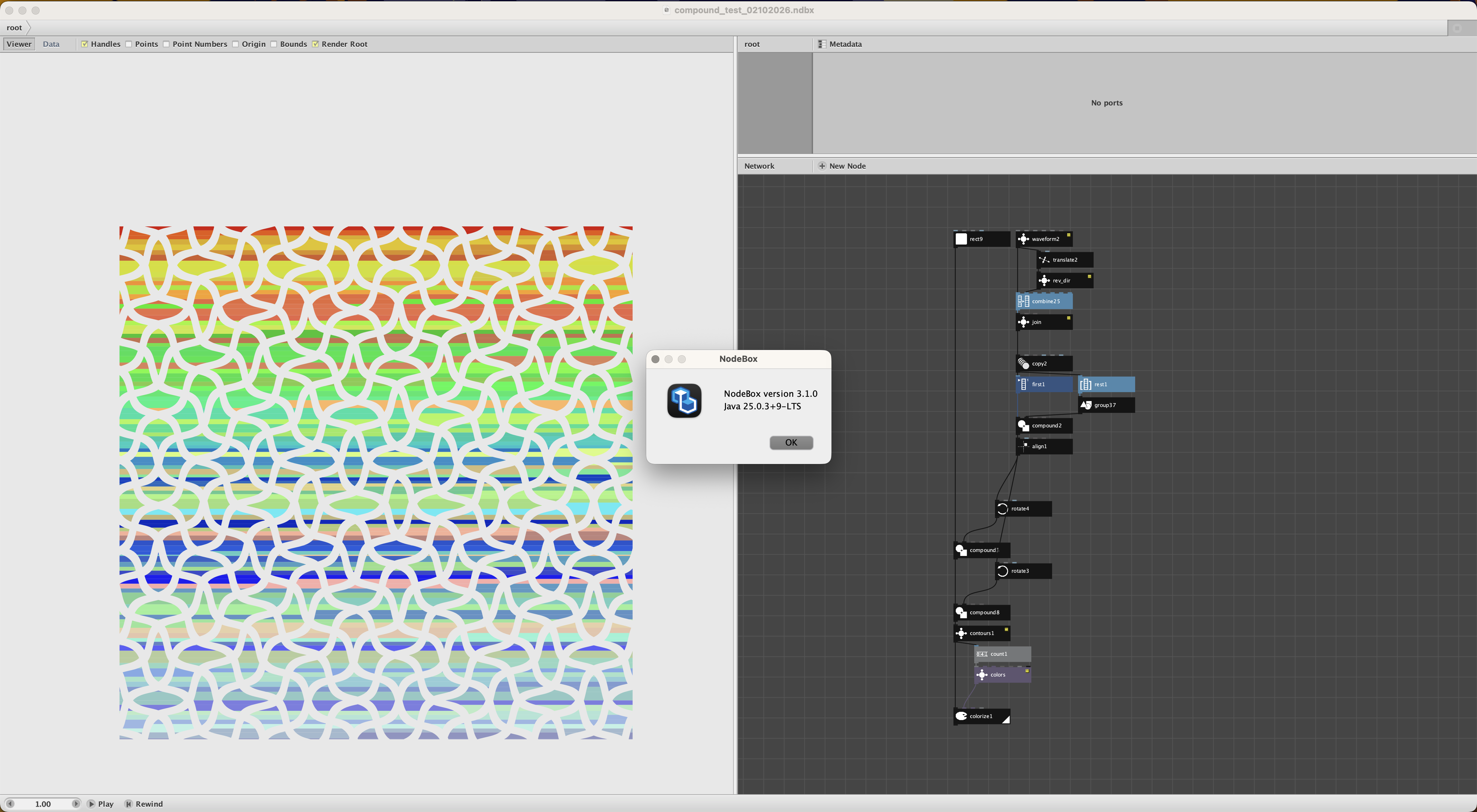
  4. Just ran into an error with Nodebox 3.1.0. The compound node behaves differently in comparison to 3.0.52. See attached screenshot with contours and colorize node to make this visible (these are the same networks just opened with different version of Nodebox). This occurred to me when trying to open old files with the latest version and it would subsequently crash/gave errors.

    Floris

    Copy link
  5. Floris.

    Could you please attach a zipped file of your ndbx file so I can try this myself?

    Thanks!

    Copy link
  6. Floris,

    Thanks. I can confirm that there appears to be a problem with the compound node.

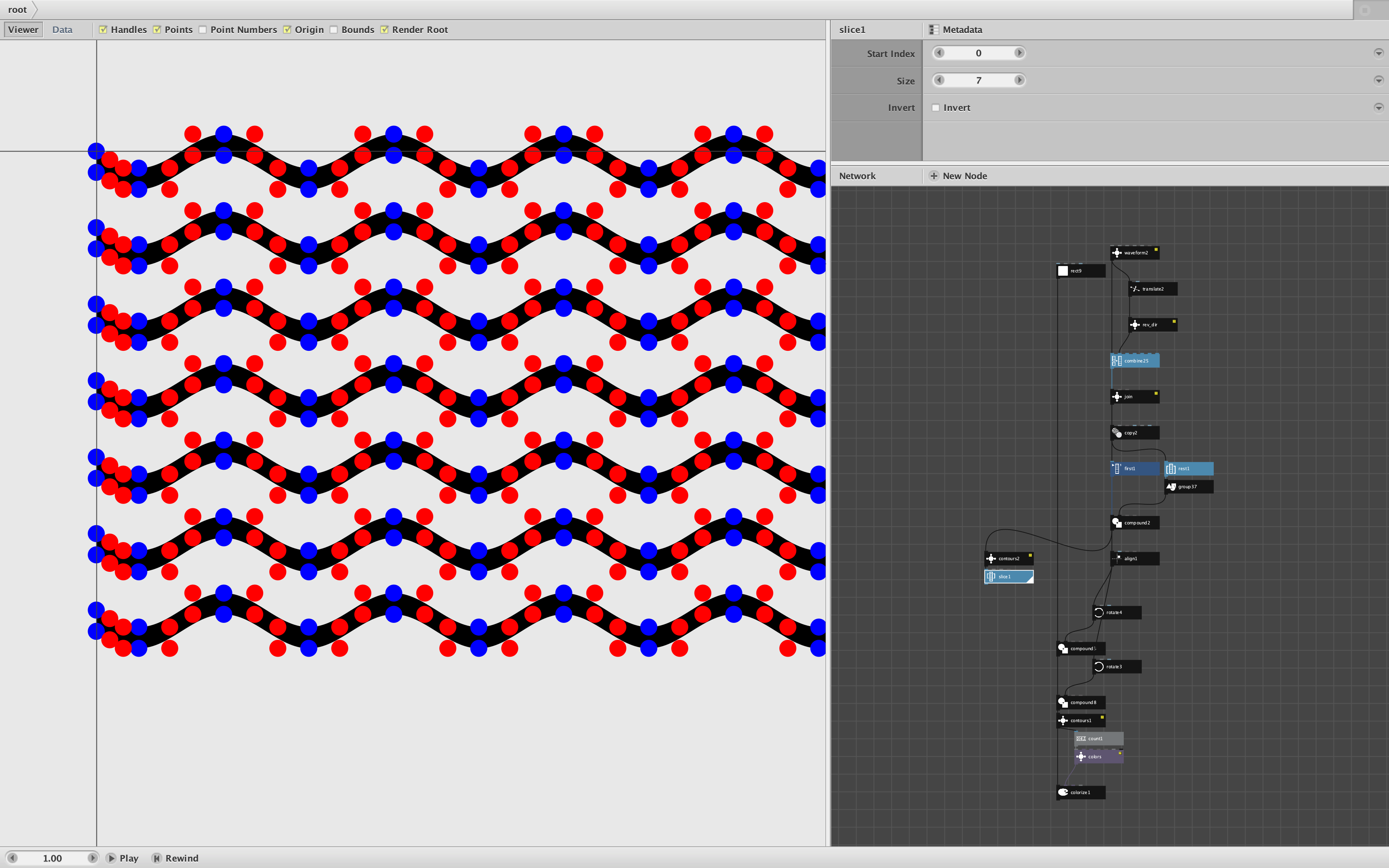
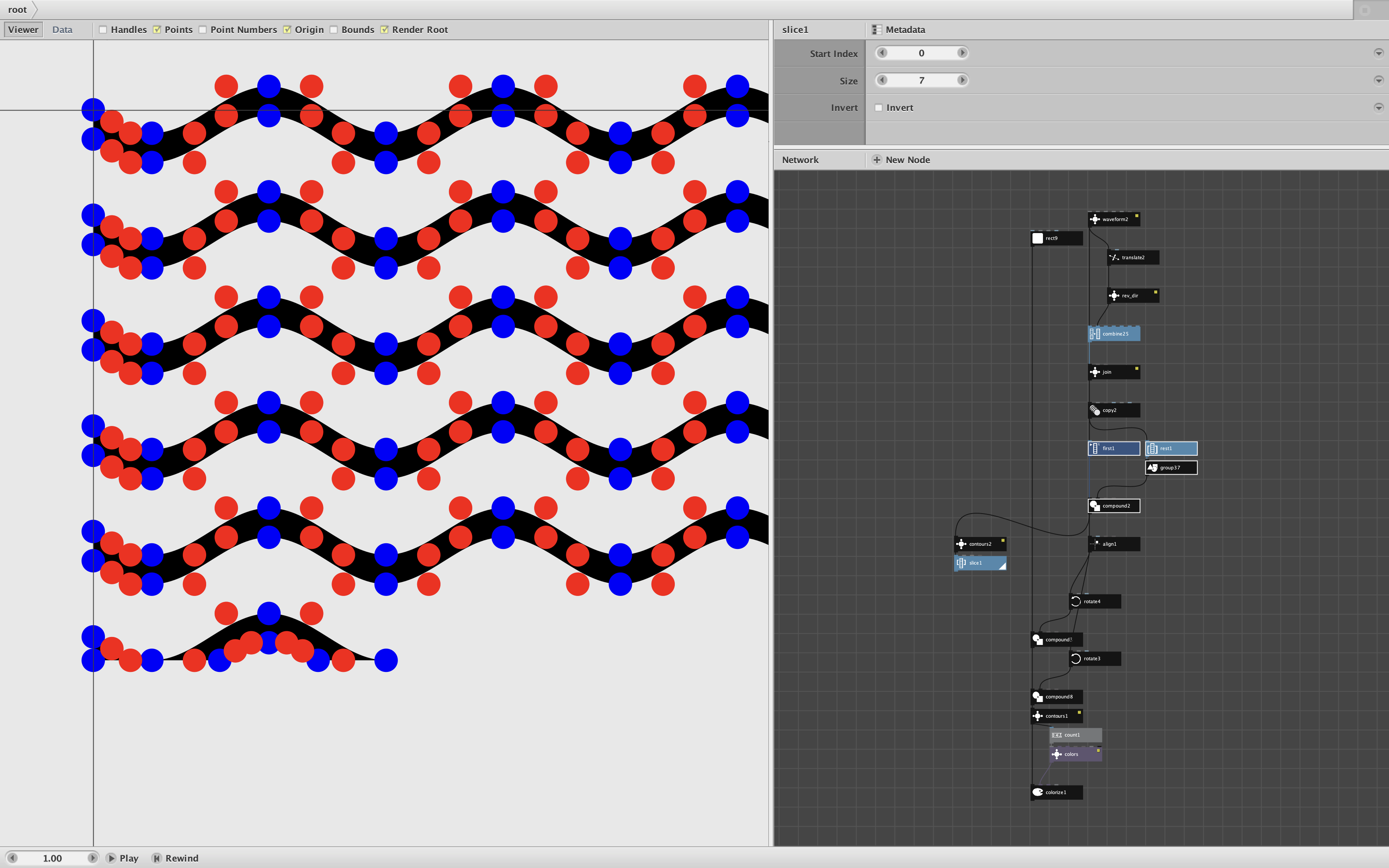
    The problem begins from the first occurrence with the compound2 node. You form 30 wavy stripes then simply do a union between the first and the rest. In 3.0.52 the result is a path with 30 contours as you would expect. But in 3.1.0 the exact same compound node creates a path with 169 contours.

    To show this I attached another contours node to compound 2 and then sliced it to view the first 7 contours.

    In 3.0.52 you can see the first 7 wavy stripes. But in 3.1.0 you see 5 normal stripes and then 2 fragments. I turned on the points so you could see the differing control points. It looks like stripe 6 somehow got cut in half along its equator so that the upper half of each wave breaks into separate contours. Of the remaining stripes, some remain intact, others break into fragments. See comparison screenshots (attached).

    I have also attached the slightly modified version of Floris's original test file.

    I've been using 3.1.0 on an almost daily basis and so far have not run into this or any other problem. I know from many years of experience, though, that the Nodebox compound node has always been fussy. It constantly creates what I call "dust", microscopic contours smaller than a single pixel. And very similar inputs often come out very differently, with contours in different orders, some going clockwise, some counterclockwise. I am constantly having to inspect and clean it.

    Still, this shouldn't happen. After I get some more sleep, I will see if I can find a workaround.

    Meanwhile, Frederik, are you there? Do you have any idea why this is happening?

    Thanks for bringing this to our attention, Floris.

    Copy link
  7. Update.

    Several findings:

    • The Nodebox compound node is based on the java.awt.geom.Area class. There have always been some issues associated with its add, subtract, intersect, and XOR functions caused by rounding errors and quirks with the way paths are reassembled. But none of this would seem to explain the problem Floris found. What he was doing was dirt simple: creating a union of 30 non-overlapping shapes. There is nothing particularly challenging about this particular use case.
    • I thought about making a Python external module to replace compound, but this would require a special library. And Clojure imports its area functions from Java. So I don't think external modules would provide a workaround.
    • I tried MANY different ways of modifying Floris's code to fix this problem - including fattening the curves, resampling the curves, reducing the number of curves, changing length or period or amplitude, translating the curves, using triangle waves instead of sine waves, combining the waves 2 at a time, changing the order of the compound operations, etc. NOTHING WORKED. Some changes caused random changes to where the compounding operation failed, but in each case the changes were arbitrary and limited. There was no rhyme or reason that I could see.
    • I printed a poster of my current library with demos for over 200 nodes - some of which use the compound node - and found only one problem. The demo of my Hilbert curve node, which intersects the curve with a circle, was affected in 3.1.0. Instead of breaking the curve into one big path and 15 small edge paths, it broke it into 24 paths including several different large chunks. As a result my demo shows a semi-circular Hilbert curve instead of a full circle. I can fix the demo by plotting multiple segments, but this is now a confirmed issue. The good news is that the vast majority of my library emerged unscathed. The bad news is that any network with a compound node needs to be checked. I have nearly 500 art pieces; I am now worried that one or two of them may no longer render correctly.

    The upshot is that I see no easy fix for this problem. From now on, whenever you use a compound node you need to doublecheck the output. And in some cases, effects that used to be fairly easy may now be impossible.

    Frederik, I don't know if you are following any of this, but I would dearly love to hear your thoughts about how your relatively simple change could cause such a bizarre side effect. Does Nodebox 3.0.1 use a slightly different version of Java? Any ideas how we could fix this?

    Copy link
  8. Frederik, All,

    I asked the Google Gemini AI about this issue and it came up with a likely cause and several possible fixes:

    https://share.google/aimode/77QbW6JGfBrZmhpfy

    The fixes require a new release of Nodebox, so it's something only Frederik could do.

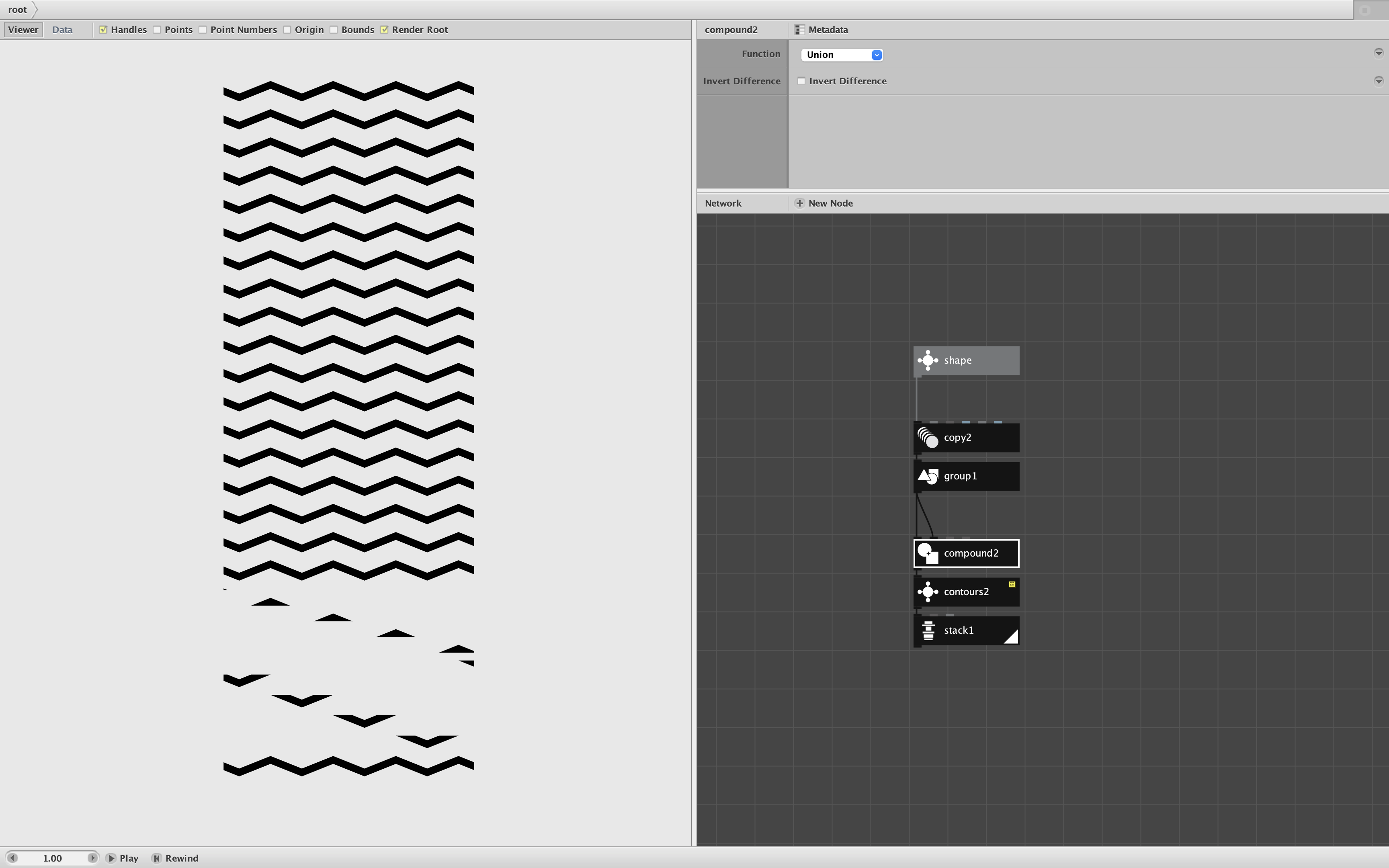
    To help with diagnosis, I devised an extremely simple Nodebox network that causes this issue to occur (see screenshot and attached zip file). I take a very simple shape with no Bézier curves, make 20 copies, compound them into a single path, then stack the resulting contours. The 19th contour fragments into multiple pieces.

    This does not happen in 3.0.52.

    If an improved version of Nodebox can produce 20 clean contours, we will have solved this problem.

    John

    Copy link
  9. NodeBox team

    Thanks for pointing this out! And John thanks for the test network, that's very useful!

    I'm Currently working on 3.2.0 that should be much faster; I'll make sure this is also rolled in as a fix.

    Copy link
  10. NodeBox team

    For the compound node: thanks for the detailed breakdown. That made it easier to track down.

    It's not actually change in NodeBox itself: the compound node code is identical between 3.0.52 and 3.1.0. What changed is the Java version underneath: 3.0.52 shipped with Java 14, 3.1.0 with Java 25. Somewhere in between, Java's own shape boolean code (java.awt.geom.Area) got a memory optimization that kicks in once a shape gets complex enough. It has a bug, though: it closes off whatever shape it's in the middle of, which cuts it in two horizontally! That's exactly the stripe 6 you saw, and it repeats every few stripes after that, which is where the 169 contours come from.

    I can't really patch the JDK; instead I've put a fixed copy of that specific Java code inside NodeBox, so it no longer depends on which Java version is bundled. With the fix, your file gives 30 contours at compound2 again and the final output matches 3.0.52. This will go out in 3.2.0

    The "dust" and the varying contour order are a separate, older story. That's how this Java code has always behaved, so this fix doesn't change it. We might want to revisit the boolean code in the future, though.

    Copy link

Know something that helps?

Sign in with your email address to reply. No password needed.

Sign in to reply