Graft as in plants, attaching a scion to a root. My new graft node attaches the subpath of a scion shape to the gap in a subpath of a root shape.
I got the idea from looking at "French Curves", templates that dressmakers use to trace out pieces of curves into open sections of a pattern. I soon realized, though, that the possibilities for this graft are much more diverse.
Graft takes six inputs:
- Root Path. A shape that will form the foundation of the graft. If open, the node will close it before forming a subpath.
- Scion Path. A shape the will form the added section of the graft. If open, the node will close it before forming a subpath.
- Root Start/End. Two percentages defining the start and end of a subpath of the root path. Values below 0 will be treated as 0%; values above 100 will be treated as 100%. The graph will be added to the straight line gap remaining in the root shape. To achieve some gaps you may need to reverse the direction of the root path using my rev_dir node.
- Scion Start/End. Two percentages defining the start and end of a subpath of the scion path. Values below 0 will be treated as 0%; values above 100 will be treated as 100%. The resulting subpath will be rotated and scaled so that the remaining gap in the scion subpath will match the gap in the root subpath. To achieve some gaps you may need to reverse the direction of the scion path using my rev_dir node.
- Flip. Depending on the input shapes and subpaths, the resulting graft will either stick "in" or "out". Check this box to flip that direction.
- Output. Three possible outputs:
- Root Preview. A light blue preview of the root path and current subpath. Helpful for defining the root gap.
- Scion Preview. A light red preview of the scion path and current subpath. Helpful for defiining the scion subpath.
- Graft. The final graft, a blue closed shape with the scion added to the root.
Note: the graft path will have the same direction as the root path. If the root path is clockwise, the graft will also be clockwise, regardless of the direction of the scion path. In order to prevent confusion when a scion is scaled to fit the root gap, scions will not be allowed to scale to more than 10 times their original size. If after scaling a scion is still too small to fit a gap, the gap will be reduced.
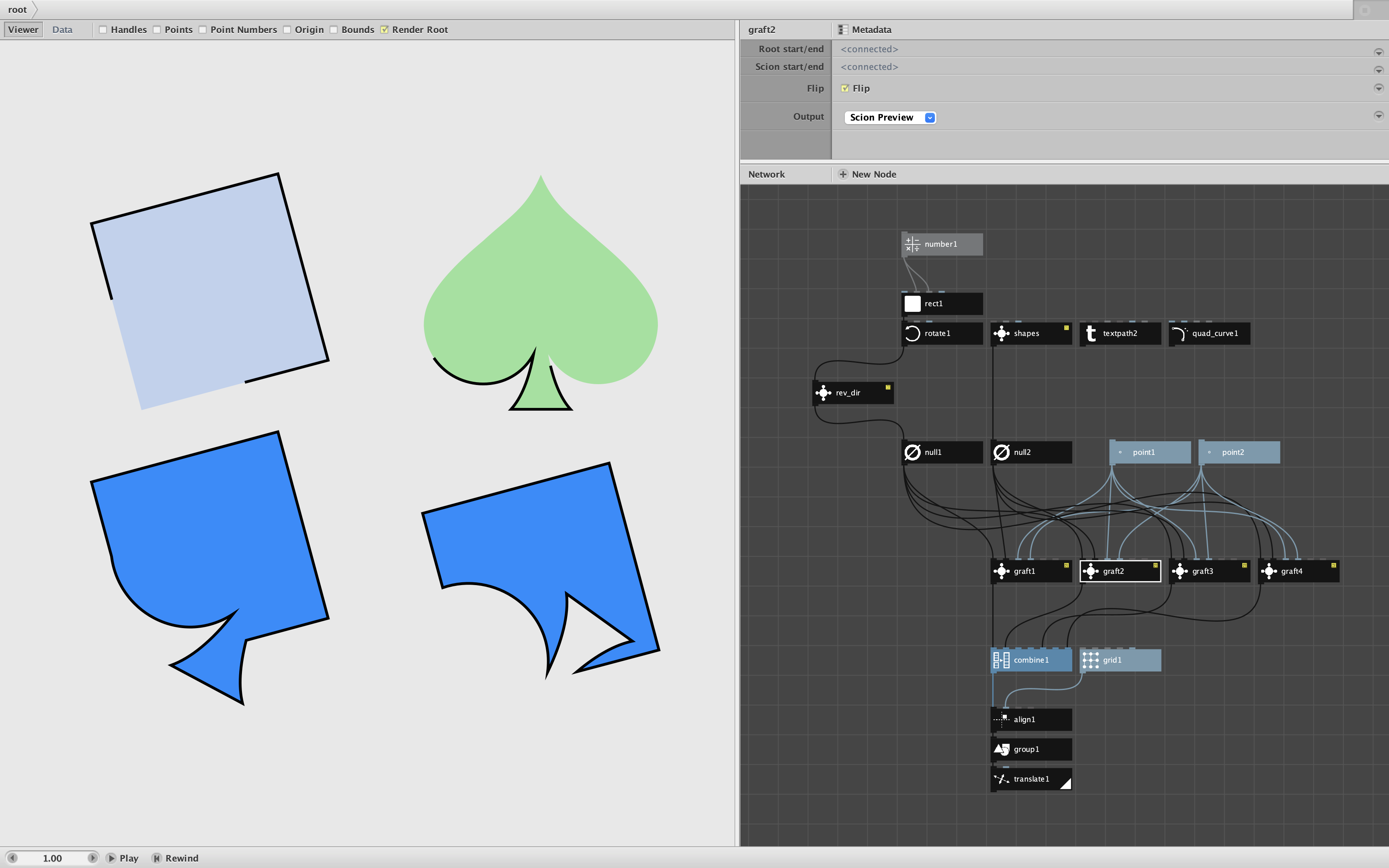
This is one of those nodes that you have to play with to really understand. The attached demo allows you to play with a square-shaped root and several different scion paths (see screenshot).
For subpath values defined in point1 and point2, the demo shows four outputs:
- The root preview
- The scion preview
- The graft with Flip off
- The graft with Flip on
In the screenshot you can see the lower part of a spade shape grafted into the the southwest corner of a square.
Things to try:
- Switch the scion path to a lowercase t or a quad curve
- Adjust the subpath start and stop percentages for the root path
- Adjust the subpath start and stop percentages for the scion path
- Change the size of the root or scion
- Bypass the rev_dir node to change the direction of the root path (or add it to the scion path).
This is a wild and crazy node, full of surprises and raw power. Go nuts!