Crystallization, coffee stains, accumulating snow on branches, the boundary of a spreading forest fire, and the edge of a growing colony of bacteria all display a universal growth pattern. This pattern is a fractal that can be drawn using the Kardar-Parisi-Zhang equation:
https://en.wikipedia.org/wiki/Kardar–Parisi–Zhang_equation
My KPZ_growth node makes it possible to draw boundaries like this. It requires an external Python node that I created with the (substantial) help of Google's Gemini AI. The node produces a list of heights. You can plot these heights horizontally to create a curve or extend them from the boundary of a shape.
KPZ_growth takes seven parameters:
- Amount. The number of heights.
- T. The number of discreet time steps to run. Low values (e.g. 100) will run almost instantly; high values (e.g. 100,000) may take a few seconds. The higher the value, the greater the average height. By providing a range of T values you can simulate growth. With low T values the heights will fluctuate rapidly from step to step; with higher T values these fluctuations will decrease. The formula takes integer values for T, but if you give T a fractional value, the node will interpolate between the floor and ceiling of T. In movies, dividing the frame into finer fractions will produce smoother animations (over narrower ranges).
- Seed. A random seed for the noise factor. The overall effect will vary wildly from one seed to the next.
- Magnitude. A multiplication factor for values coming out of the formula. Adjust upwards to magnify the heights.
- Surface Tension. Varies from 50 to 300. Higher values smooth out the curve into gentle rolling hills. Lower values make it jagged and rough.
- Growth Factor. Varies from -200 to 200. Controls how sharp of asymmetric the peaks are. Setting it to 0 removes the KPZ behavior entirely. Negative values will tend to cause contraction instead of expansion.
- Noise Strength. Varies from 5 to 50. Some noise is required for the formula to work. Higher values will cause heights to increase over time.
Tips
The ratio of Noise Strength / Surface Tension determines how bumpy your curve looks. For a rugged, fractal-like curve, decrease the surface tension (50) and increase the noise (40). For a smooth, fluid-like wave, increase surface tension (250) and lower the noise (5).
The ratio of abs(Growth Factor) / Surface Tension determines how strong the KPZ effect is. KPZ curves are asymmetric - they look like mountain ranges with sharp peaks and broad, smooth valleys (or vice versa). To see strong KPZ effects, the growth factor should be equal or slightly greater than the surface tension (e.g. growth factor = 180, surface tension = 100). If abs(growth factor) is much smaller than surface tension, the surface tension will flatten out the growth features, making the curve look like standard random noise.
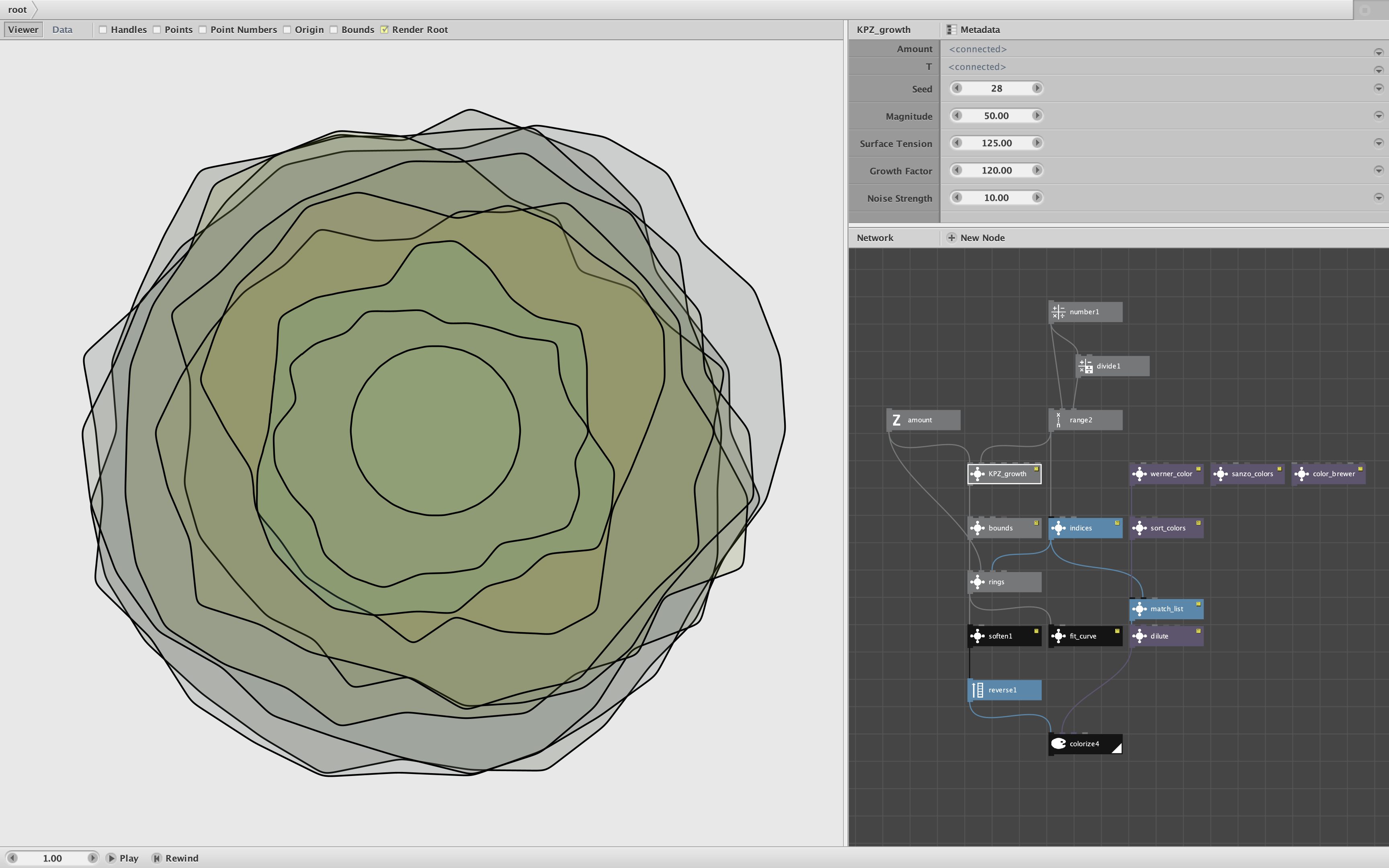
The bottom line is that you can achieve a wide range of effects by turning all these knobs. My demo provides even more knobs to play with (see screenshot).
The demo feeds heights from the KPZ_growth node into a "rings" subnetwork that draws successive growth rings around a starting circle; these expanding boundaries are then colored. You can change many different values:
- Number1. Maximum T value. Decrease for more intense variation, increase to smooth out the effects.
- Divide1. Number of rings (currently 10)
- Amount. Number of inflection points (currently 30).
- KPT_Growth Settings:
- Seed. Increment to quickly step through a wide variety of designs.
- Magnitude. Shrink or Expand the overall drawing.
- Surface Tension. Decrease to see more of the asymmetric KPZ effect.
- Growth Factor. Set to zero to remove the KPZ effect entirely (normal random noise)
- Noise Strength. Effects how much additional energy and growth goes into the system.
- Bounds. Currently set to prevent negative heights; set Option to "Neither" to allow dips into the base circle.
- Rings. Change radius of base circle.
- Soften. Sands off the rough edges; set amount to zero to see the raw boundary.
- Fit_Curve. Replace the Soften Node with this node to create a more curvy boundary
- Dilute. Change the transparency of the overlapping regions.
- Colors. You can switch between Werner_Color, Sanzo_Colors, or Color_Brewer. Each of these nodes offer many settings to play with.
- Sort_Colors. Check "Reverse Sort" checkbox to reverse the order of colors.
KPZ_growth requires the KPZ_CURVE.PY external code module (included in the zip file). Enjoy!