
I was curious about the history of our Show Your Work posts and did an archeological dig. It turns out that the very first post in this category was this one, by Frederik, in May 2013:
https://forum.nodebox.net/t/11663090/superformula-in-nodebox-3
The node shared in that post, supershape, was an implementation of the so-called superformula described here;
https://en.wikipedia.org/wiki/Superformula
This node could create a wide variety of organic forms. Ironically, it was written in Python, not Nodebox. This may have been in part done to show people how to reference Python modules from inside Nodebox. Also, math in Nodebox does require a lot of wiring.
Now that we have a brand new refurbished forum, it seems only appropriate that the first Show Your Work post is a refurbished version of that original node.
In remaking this node, I had several goals:
- Do it entirely in Nodebox
- Use Bézier curves instead of resampled line segments
- Extend the functionality to include twisting
- Allow recursively improving generations for animations
My demo shows 9 possible outputs:
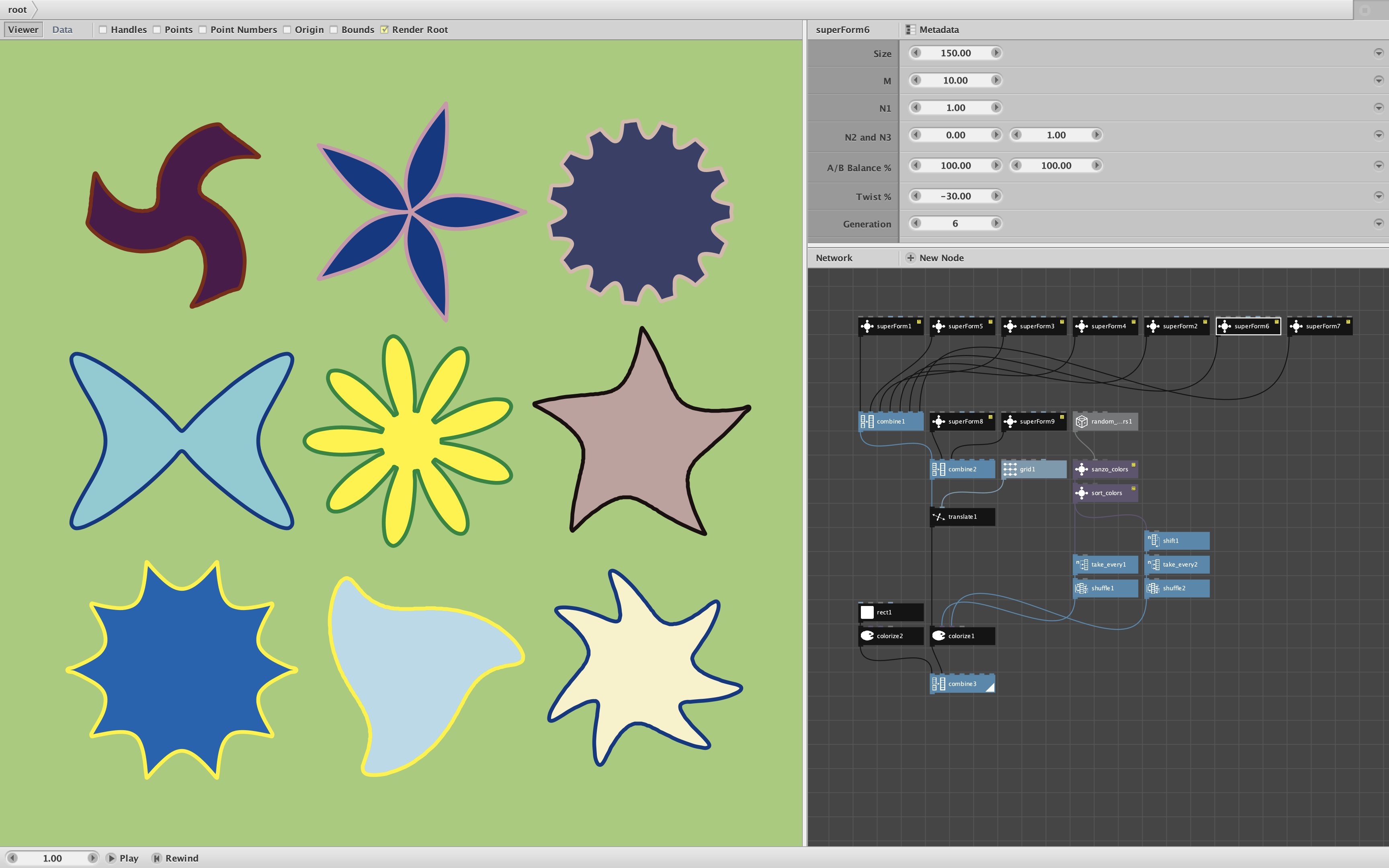
My superform node take 7 parameters:
- Size. The overall size of the shape. After you are satisfied with the other settings, you can adjust the final size here.
- M. The symmetry, the number of arms, bumps, sides, or petals. This normally works best as an integer, but fractional values are sometimes useful, especially if your A/B balance is not even.
- N1. Acts as the primary anchor for how flat or expanded the shape behaves.
- N2 and N3. These govern the behavior of specific halves of the symmetry calculation. When they match, your shape's points are identical. When mismatched, one side of each petal or point slants sharply while the other curves softly, yielding dynamic asymmetric gears, waves, or wind-swept flowers.
- A/B Balance %. Varying these alters the stretching in opposing directions, in a way more complex than the A,B values in the original equation. If A=B, the layout stays in balance. If A is larger or smaller than B, some of its indentations or bulges will inflate or deflate relative to its others. If the M value is even, this will proceed smoothly. If M is odd a sharp edge dividing one of the arms will appear; you can sometimes compensate for this by giving M a fractional value. Default is 100% for both values. To avoid division by zero errors, zero values for A or B will be treated as 1%.
- Twist %. The amount by which the extremities of the shape are twisted relative to its core. O% is normal. Positive percentages twist clockwise, negative percentages twist counterclockwise.
- Generation. Fineness of detail from 0 to 8. Generation 0 starts as roughly circular. Subsequent generations refine the detail, adding more Bézier curves to the outline. 6 generations is enough for most shapes; 8 generations may be needed for sharper corners.
By hooking the frame node to the the generation port of all nine sample shapes I made a short looping animation showing the progressive refinements of each shape:
Obviously it takes some playing around to get used to these parameters. The nine shapes shown in this demo are just the tip of the iceberg of what shapes are possible.
This is my first post using the new forum software. If you like it, please feel free to try out our new like button!
Zipped NDBX demo file attached below: