First of all, thank you for 3.0.30. I like new components. While playing with this, I found that both save and save as are not working.. I cannot save my sketch. Help me!
The new NodeBox forum is live! Everything from support.nodebox.net moved here: sign in with the same email to pick up your old posts. Something not working? Write to forum-support@nodebox.net.
NodeBox 3From the old forum
New version save error
-
-
NodeBox team Hey Q,
I just tried saving a simple script without issues. So I require some more details to solve the isue:
-
Could you give a list of steps that reproduce the problem? Being able to reproduce the issue is essential to being able to solve it.
-
Where do you encounter the error? Is the file not saved or is it impossible to open again?
-
What operating system are you using?
Thanks,
F
-
-
Hello Frederik,
Thnak you for your response. Yes, I tried to save several times. If I choose directory and name file then it seems it is working. However, if I go to the actual folder, there is nothing. My os is snow leopard 10.6.8. Is it because of my os? Please let me know. Thank you.Best,
QJan 30, 2013 4:43 AM Frederik De Bleser tender2+d374a8c3b1f1669b4e2b5fbde79daf8b1087e116b@tenderapp.com 작성:
-
NodeBox team I'll try to find a system with Snow Leopard to test on.
Are there specific nodes you are using? Do you use subnetworks? Can you save just the default script (with just one rectangle in it?)
Kind regards,
F
-
Thank you Frederik. I couldn't save the default sketch.
Cheers,
QJan 30, 2013 8:06 AM Frederik De Bleser tender2+d374a8c3b1f1669b4e2b5fbde79daf8b1087e116b@tenderapp.com 작성:
-
NodeBox team Hi,
I just tried on a machine with OS X 10.6.8 and it worked correctly. So unfortunately I can't reproduce the error.
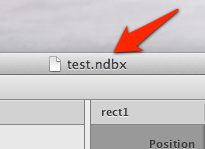
When you save the file, do you see the file name in the header of the document? (see screenshot) If so, you should be able to click it while holding the Command key, which shows the entire file path. From there you should be able to select the parent folder (e.g. "Desktop") This should show the file on the Desktop.
Alternatively, could you try relaunching the Finder. By Ctrl-Option-clicking the Finder icon and selecting "Relaunch". My Finder also occasionally "forgets" about files until I relaunch the Finder or restart.
Kind regards,
F
-
-
I had the same issue. Worked 4 hours in a project, tried to save, and woops, no file saved at all. Created another folder outside of "my documents" and worked ok. Never experienced this issue before.
My specs: vista64.
-
NodeBox team Hi,
We've found the problem. If anywhere in the file path, there are spaces (e.g. the "My Documents" folder, a subfolder called "Test Project" or even a file named "NodeBox Demo.ndbx") NodeBox will flip out and silently discard the file.
As a work-around you can save your files in directories that do not contain spaces (e.g. "c:\Projects\nodebox-test\test_project.ndbx" is ok but "c:\My Projects\nodebox_test\test_project.ndbx" is not okay).
We're fixing this issue and will post a new version ASAP.
Kind regards,
Frederik
-
Thank you!!
Best,
Q
Q / K y u h a S h i m
Data Visualization Specialist | Senseable City Lab, DUSP, MIT
Lecturer | MFA Digital+Media, RISDMIT, 9-209, 77 Mass. Avenue,
Cambridge, MA 02139 USAe qshim@mit.edumailto:qshim@mit.edu || qshim@risd.edumailto:qshim@risd.edu
t +1.401.924.1002
w http://kyuhashim.com -
NodeBox team Hi, the latest version of NodeBox fixes the issue. Download it here.