The new NodeBox forum is live! Everything from support.nodebox.net moved here: sign in with the same email to pick up your old posts. Something not working? Write to forum-support@nodebox.net.
I am using Nodebox 3 with Mac OS 10.6.8. Today I installed Apple's Security Update 2013-002, Java Update16 and Nodebox 3.0.35. So far everything worked fine (Security Update 2013-001, Java Update15, Nodebox 3.0.34). Now when starting Nodebox 3 it still brings up the main screen (also when opened by double-clicking a saved ndbx-file), but it doesn't react to most user-actions:
When I click a node, it doesn't become selected, so I can't move it. The viewer doesn't pan or zoom, nor can I switch to the data-view. When I click one of the tiny triangles, for example, the value doesn't change. Sometimes the dialogs to create a new node or to load an example open, sometimes not; and when they open, they also don't react to user-actions; often some part of the content of the dialog is missing. The preferences-dialog only shows a "save"-button, the about-screen only an "ok"-button; the buttons don't work, so I can't close the dialog again, (the red cross left in the title-bar also doesn't work). When in the about-screen, I even can't quit the application any more, so I have to "kill" it via the Finder.
The reason clearly is an incompatibility of Nodebox with the Apple-updates, because: On a first run of 3.0.35 before installing the Apple-updates, it also worked fine. 3.0.34 now behaves the same way. All my other Java-applications still are running as before.
Hope you can fix this! Thank you!
JD
JDJohannes Drescher
Hello again,
some more information after playing around a bit longer: It seems that mouse-events are stored in a buffer, but are ignored at first. That is, if I click the menubar and select a menu with active entries (e.g. Help) or an entry with a submenu (e.g. Nodebox-->Services), the mouse-event is executed thereafter.
LL
LLLL
I am experiencing the same issues as above. It does not show the app has frozen but it it entirely unresponsive. "Force Quit" the app seems to be the only recourse, very frustrating.
QU
QUqubex
I’d also like to chime on this.
As the original poster, I’m also noticing that Nodebox3 has become completely inert and unresponsive after updating 10.8.4 with the latest patches.
Likewise 10.9 DP1 is also completely static.
This does not portend well.
FB
FBFrederik De BleserNodeBox team
Hmm that doesn't sound good. Do you use other Java software that is also affected by this update? For example IntelliJ IDEA / PyCharm / RubyMine / ... ?
FA
FAFabian
same here. doesn´t run under 10.8.4. Starts up but thats it.
FB
FBFrederik De BleserNodeBox team
Fabian, what system are you running?
FA
FAFabian
OS X 10.8.4 and Nodebox3 on Macbook Pro 15" 2,4 GHz, Retina. Like James said ist completly unresponsive. Also when you try to open something nothing happens. and when you choose Preferences or About a Dioalog Box opens but only with Buttons without Text and also unresponsive. You have then to kill the Process.
Hope this helps. Really like do try it out. Looks awsome for 2D. Want to try out some stuff for my Graphic Design Studys.
LU
LUlucasnijs
Hmm, strange, I am running 10.8.4 on MB Air, no problem. Stefan is running 10.8.4 on a MBPro 15 retina and has no problem either.
FA
FAFabian
hmm thats strange. which java version you use.
my is
Java(TM) SE Runtime Environment (build 1.6.0_51-b11-456-11M4508)
Java HotSpot(TM) 64-Bit Server VM (build 20.51-b01-456, mixed mode)
FA
FAFabian
some observation. maybe it helps.
if i start up nodebox and click on whatever (Data, Points, Origin ... whatever) and then resize nodebox then updates the informations.
QU
QUqubex
Uhm... yeah... and no...
Clicking on "something" and then resizing did give me a modicum of interactivity (e.g., a blank "New Node" window appeared) but it actually did nothing. More random fiddling did reward me with blue points and labels on the vertices of the standard square, but absolutely nothing useful.
This is not a terribly useful diagnostic.
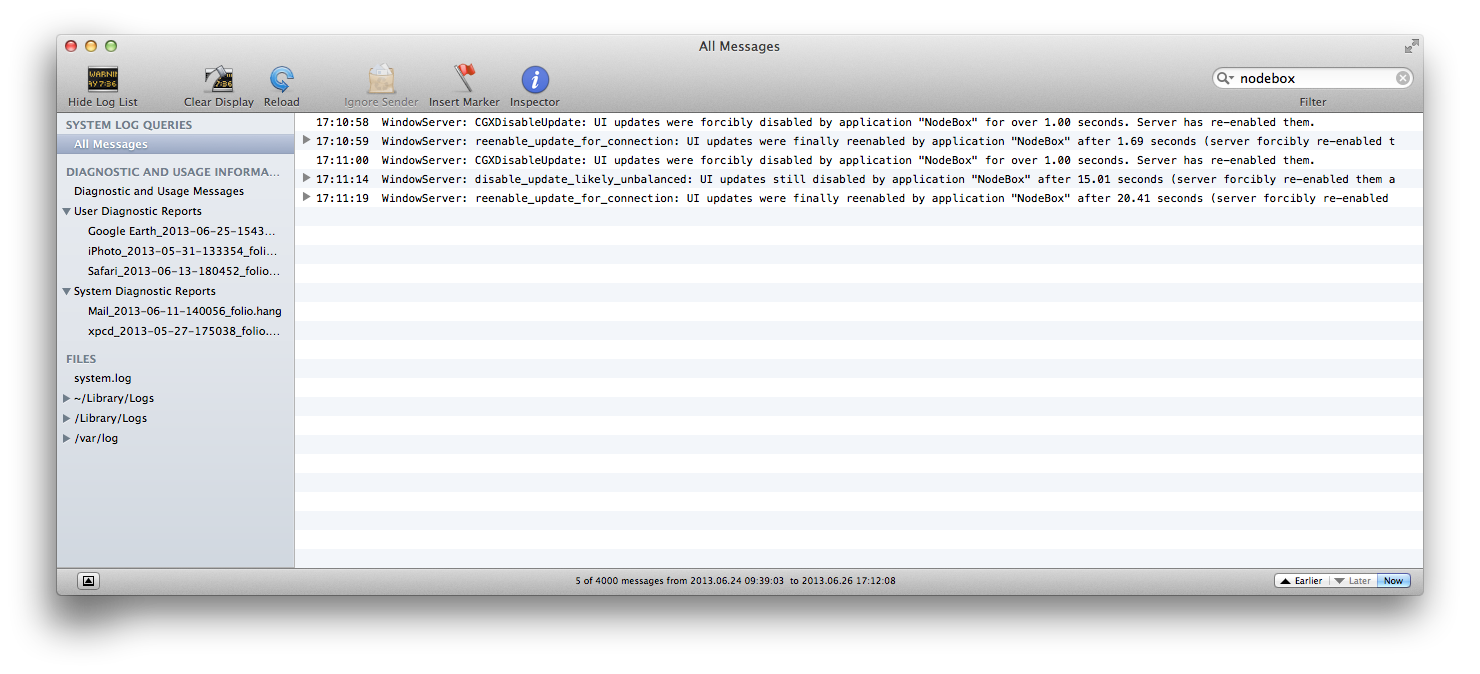
However, later, scouring my logs in the Console I did find the mentions I hereby attach.
QU
QUqubex
I'm writing this again because I think my previous post failed to upload correctly... or has otherwise disappeared into an unknowable limbo of moderation.
As I was saying... the procedure mentioned by fabian does give me a modicum of interactivity, mainly limited to a totally blank "New Node" widows appearing and letting itself be resized. A few other GUI elements eventually reacted too, and I got the coordinate points on the vectors of the displayed square. Nothing terribly exciting and the application remains totally unusable.
...However...
Doing this did succeed in prompting some output to appear in the system's logs, which I found by scouring them with the Console app:
2013.06.26 5:10:58.781 PM WindowServer[109]: CGXDisableUpdate: UI updates were forcibly disabled by application "NodeBox" for over 1.00 seconds. Server has re-enabled them. 2013.06.26 5:10:59.391 PM WindowServer[109]: reenable_update_for_connection: UI updates were finally reenabled by application "NodeBox" after 1.69 seconds (server forcibly re-enabled them after 1.08 seconds) 2013.06.26 5:11:00.403 PM WindowServer[109]: CGXDisableUpdate: UI updates were forcibly disabled by application "NodeBox" for over 1.00 seconds. Server has re-enabled them. 2013.06.26 5:11:14.404 PM WindowServer[109]: disable_update_likely_unbalanced: UI updates still disabled by application "NodeBox" after 15.01 seconds (server forcibly re-enabled them after 1.00 seconds). Likely an unbalanced disableUpdate call. 2013.06.26 5:11:19.799 PM WindowServer[109]: reenable_update_for_connection: UI updates were finally reenabled by application "NodeBox" after 20.41 seconds (server forcibly re-enabled them after 1.00 seconds)
This is the first indication I have seen of something going visibly wrong under the hood. Hopefully it helps in diagnosing the matter.
SP
SPShinji Pons
Hello,
Same here, I'm using a mid 2012 MBP with OSX 10.8.4 and I can't use Nodebox beyond the default start screen.
FB
FBFrederik De BleserNodeBox team
Apparently there is a new Java update out that should fix the problem.
I am experiencing the same issue as the original post by Johannes Drescher, OSX 10.6.8, latest Java update, Nodebox 3.0.35, 3.0.34, etc.. are now unresponsive.
(I also posted before and my post never showed up?)
SP
SPShinji Pons
The Java update posted by Frederik fixed the issue for me.
Thank you Frederik!
FA
FAFabian
allright installing the Java Update solves the problem.
the strange thing is that i updated java before with the software update service.
LL
LLLL
OSX 10.6.8 , Nodebox 3.0.35
Seems to work for me also now, it stopped working after using the Apple "Software Update" for the Java Update the other day, but seems resolved using the manual update now:
/usr/libexec/java_home -v 1.6 -exec java -version
Before (Software Update) = 456-10M4508
java version "1.6.0_51"
Java(TM) SE Runtime Environment (build 1.6.0_51-b11-456-10M4508)
Java HotSpot(TM) 64-Bit Server VM (build 20.51-b01-456, mixed mode)
After (Manual Update) = 457-10M4509
java version "1.6.0_51"
Java(TM) SE Runtime Environment (build 1.6.0_51-b11-457-10M4509)
Java HotSpot(TM) 64-Bit Server VM (build 20.51-b01-457, mixed mode)
FB
FBFrederik De BleserNodeBox team
As far as I understand, Apple has pulled the old update (build 1.6.0_51-b11-456-10M4508) and replaced it with a newer one (build 1.6.0_51-b11-457-11M4509). Everyone who was quick to update got the broken version of Java and will need to manually update Java again using this link:
Everyone who updates now seems to get the newer version which doesn't have the issue.
Unfortunately, these kinds of things are outside of our control. If you encounter the Java error, all I can advise is to install the update (again) and see if that helps.
Thanks for your help in hunting down the issue!
Best,
Frederik
Know something that helps?
Sign in with your email address to reply. No password needed.