The new NodeBox forum is live! Everything from support.nodebox.net moved here: sign in with the same email to pick up your old posts. Something not working? Write to forum-support@nodebox.net.
I wish the GUI would separate the 'click' from the 'move' areas / or react less sensitve on moves / in the text fields to enter values.
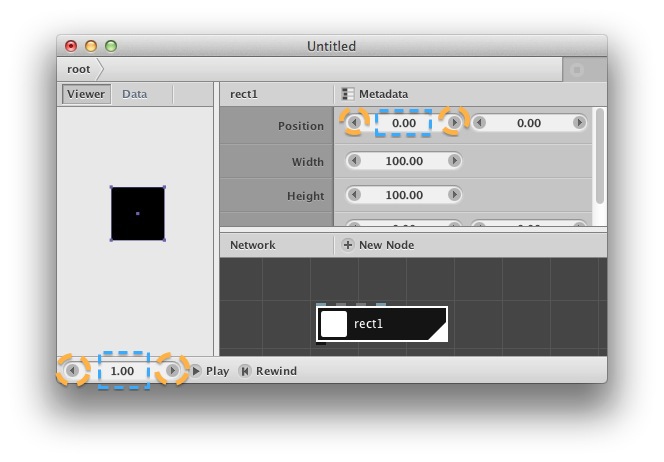
NodeBox reacts quite quick on mouse/user action in the value fields. When using a pen&tablet (instead mouse) unfortunately I am not able to 'click only' on one of the arrows without moving the cursor slightly. So it might happen that a click on a LEFT ARROW does move the cursor to the right slightly and encreases the value to the RIGHT - instead of reducing it.
It might be useful to strictly separate this two areas from each other: Arrows for click only.
Also I struggle when I double-click a value (to alter it via keyboard). It needs several double clicks to get the value highlighted (to type a new value) – instead highlighting it the value gets encreased/reduced. And, NodeBox reacts quite quick, I need to wait that the preview window gets update before I might enter/type a desired value.
GU
GUgustaf
This is very similar to what i reported in the bug tracker just a few days ago. Why dont you drop a comment there with your experience to show that theres more than one loonie with a wacom pen ;)
Ah, Frederik, thank you for such fast response and for taking it over to github. Meanwhile there it's closed, so I write here again:
I would prefer to CLICK ONLY on ARROWS, no drag on arrows at all, please! Reason:
The arrows fortunately support also clicks with option- and command-key hold down (for desicmal or ten jumps /sorry, bad english). So I want to use the arrows for precise setting. Whereas the drag method is good for fast and rough jumps. But, also, there seems to be something "wrong": See last paragraph in first message.
@ Gustav & github:
I am aware of that site, and also about the direct link from nodebox. I just don't undestand how to handle this. – It's not just register and write, right? (And, why doesn't it just accept my registration for this forum?)
GU
GUgustaf
it should just be register and write, that is if you want to open a new ticket for bugs/suggestions.
There is probably a bit of an overlap between a bug tracker and a forum on a piece of software that is so specialised and used by developeresque people, but in my opinion (im really new to nodebox) the forum should have discussions/questions about nodebox and github is for reporting bugs or specific requests for improvement. (please correct me if Im wrong here, Frederik)
Gusty
FB
FBFrederik De BleserNodeBox team
You're welcome to report bugs or suggest features both on GitHub and here on the forum: we read both. Normally, if something comes up in the forum I will make a GitHub issue out of it (or several issues!)
The fix makes the arrows click-only: you can't drag on them anymore. We still have to make a release with this new fix, though. This will come in the coming days/weeks.
As for the double-click to type: this is also related to using a Wacom pen I guess? With a mouse double-clicking auto-selects the number so you can overwrite it. I'm not sure if I can control the "sloppiness" of the double-click, so to speak :-)
GU
GUgustaf
seems to be a "common" problem with wacom users. Maybe this can help?
I'm not sure if I can control the "sloppiness" of the double-click, so to speak :-)
Besides Gustafs link: Could you check please if there is something wrong in these text/value fields at least visually: I see two cursors when a single cursor got placed somewhere within/infrontof/behind an existing value:
One long vertical stroke (with the height of the field) and another, much shorter, blinking. The shorty becomes more obvious if you move a placed cursor with the arrow keys: The placed cursor remains (the long stroke) and the tiny one moves and blinks. – A redraw issue?
[ The most weird thing (redraw issue?) was recently this: I had the cursor placed behind a value but still moving the mouse (pen) still changed the object in the preview window but the shown value in the field remained at the same numbers. ( I had this only once, but it had happened) ]
Also it would help if the user could change values with arrow keys up/down to enlarge/reduce the value. (I had read this somewhere for a NB version, don't remember where. It appears not to work).
So, my suggestions are:
• move with mouse down over text/value –> value changes (slider)
• first single mouse down (click) on text/value –> select all (highlight) **
• second single click (no move) over text/value –> place cursor at this position **
• arrow keys up/down when a cursor got placed –> enlarge/reduce value
• arrow keys left/right when a cursor got placed –> move cursor left/right
• arrow buttons left/right –> enlarge/reduce value
• arrow buttons or keys AND command/option/shift keys hold –> change value in tens or singles or tenths or hundreths (sorry, lack in english – try it and see, it seems to work already ;)
** these should NOT work vice versa, because to just encrease/decrease the value you can use the arrow buttons and/or keys. So, a click on the value will mean you want to type a new, totally different value <– therefore a single click should already highlite, and another single click on highlighted text would place the cursor.
Know something that helps?
Sign in with your email address to reply. No password needed.