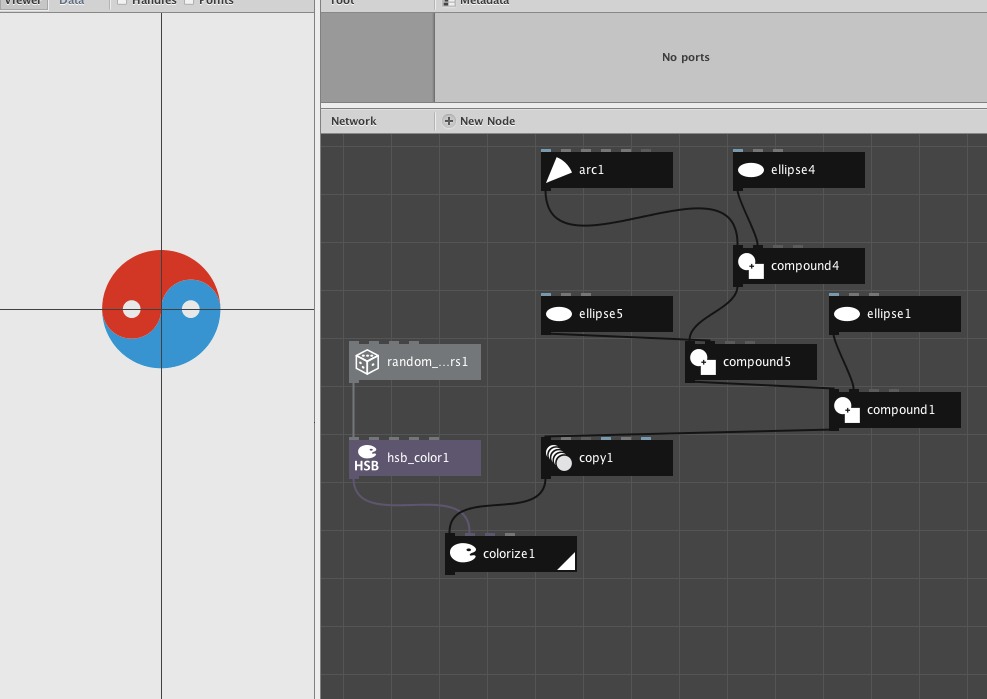
Greetings, I recently started using NodeBox. I have been using Adobe Illustrator for the past 12 years and NodeBox grabbed my interest because I had been using nodes in Blender, http://www.blender.org. I quickly saw that NodeBox allowed me to do things that would be quite tedious in Illustrator.
One of the projects I'm interested in doing with NodeBox is making a 'yinyang' symbol. In Illustrator I would make a semicircle path then copy that path and resize it 50% and copy that also then I would mirror one of the copies and from there I would average the necessary endpoints of the paths and have half of the yinyang symbol. Without going into further detail this gets very busy and tedious.
Now with NodeBox I believe this can be generalized but the problem I'm having is when I use the arc node the shapes I'm making are closed and when I use the compound node the result is not acting as a closed path. I believe what I need to do is to turn these arcs into open paths and then join them in such a way that they become closed paths.
If anyone has any ideas how I can accomplish, any feedback would be much appreciated.
The new NodeBox forum is live! Everything from support.nodebox.net moved here: sign in with the same email to pick up your old posts. Something not working? Write to forum-support@nodebox.net.
NodeBox 3From the old forum
Paths and the Compound Node
-
-
Hi arfgraf,
Just start with an arc of 180 degrees. You add a circle with compound union. Then you subtract a circle on the other side with difference. To finish of you subtract a smaller circle with compound difference. Then I copy the yin (or yang?) with a 180 degree rotation and the exact translation Then you give it any color you want. See screenshot.
There are other ways, I also made a longer one, just with circles.good luck
-
-
btw: if you already have a yinyang symbol in illustrator, you can just import the svg file.
-
I tried your node set-up and got lost along the way...
-
Yeh tonight I did the svg import, but when you do that you don't have
control over the scaling. I'll have to take another wack at making the
yinyang from scratch, but I'm pooped for now. I like to believe that this
will start a paradigm change in the way graphic design is done. I've
watched the screencasts and they mention the grind of production work in
programs like Adobe Illustrator and you get to point in Illustrator where
you just can't find anything new to conquer.
I got used to using nodes in Blender and that is what has brought to
NodeBox, there's something strangely attractive about how you can go about
doing design. I hope they bring. I saw the compass rose demo on YouTube and
that bowled me over :) -
NodeBox team Lucas, maybe you could post the NDBX file?
-
Yes, I could ;-)
My +30years of teaching experience holds me back from making it students too easy... I like to challenge them. so by doing it completely themselves I believe they grasp it better..
Anyway, here it is! -
One more thing: artgraf what do you mean by not having any control over scaling?
-
When I used the Import SVG node I could not scale it as an individual ellipse or arc node like I could in NobeBox, being that the SVG came as a file.
But I find using nodes to do vector graphic design very intriguing.
Are you guys planing on making nodes that will emulating joining Bezier curves like you can in Illustrator or am I missing something? -
Thanks for attaching the yingyang.ndbx file this will give me an opportunity to break it down and better understand it :)