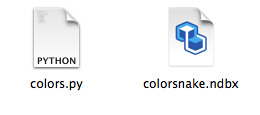
Hey all, I keep getting the unknown name space error while trying to import code through the code library- python. I am not sure why but I am wondering if its the location of the code folder. anyone familiar with this problem please help.
Thanks in advance
The new NodeBox forum is live! Everything from support.nodebox.net moved here: sign in with the same email to pick up your old posts. Something not working? Write to forum-support@nodebox.net.
NodeBox 3From the old forum
Unknown name space while creating extension node
-
-
NodeBox team Hi,
We're adding a packaging mechanism to NodeBox where code needs to be located in the "code" subfolder of your project.
Are you using the latest release or running directly from git? The version in git has the packaging built in already.
-
Hey Frederik, thanks for your response. I am using the latest release downloaded from this site. Any solution for the error?
thanks
Ruth -
NodeBox team Then it's probably a code placement issue.
The Python file should be in the same folder as the ndbx file. Don't use complex names, just lower-case letters and underscores.
The namespace is the name of the file + "/" + the name of the function. For example, if you have a file called "colors.py" that contains a function "add_color", the function reference should be
colors/add_color. -
-
Thanks I figured the problem. For some reason the text editor I was using was not right. It worked after using python compiler.
Thanks
Ruth