The new NodeBox forum is live! Everything from support.nodebox.net moved here: sign in with the same email to pick up your old posts. Something not working? Write to forum-support@nodebox.net.
Sorry for what is most likely an extremely basic question.
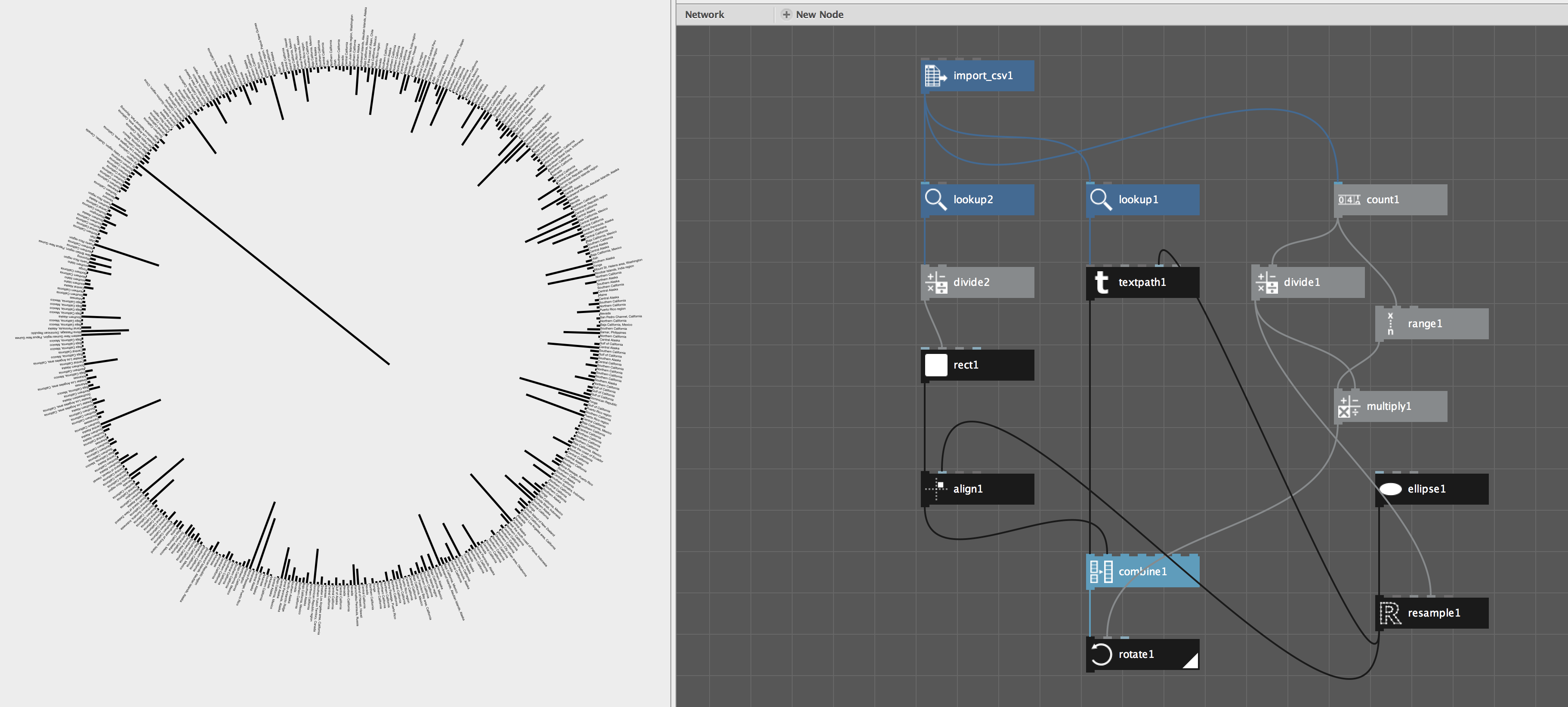
I am doing the Earthquakes tutorial (http://nodebox.net/node/documentation/using/data-visualization.html ) using Nodebox 3 and no matter what I try I can't seem to get all the text in a circle.
The tutorial asks to create an ellipse node and a resample node but does not explain how these connect with the rest of the construct.
Any clues or suggestions would be welcomed.
Also, is there somewhere that I can find more tutorials or explanations of different nodes? Help is giving me a two line explanation of Zip maps and I'm find it difficult to track down good examples.
Any suggestions welcomed.
Cheers,
Sean.
SW
SWSean Wood
The screen shot might give someone else who is having issues insight into how it can be solved.
Cheers.
LI
LIlievenmenschaert
hello,
i don't understand the problem. In your screenshot the text info seems to be attached to the points derived from the resampled ellipse node.
The idea is that you create an ellipse, resample it based on the amount of elements of text. When sending that output to a points node it will show you the actual points. The translate node uses these points to translate the textpaths on.
As for tutorials. There are a lot of examples in the example browser. File >> Open Examples. There is an example on zipmap under Topics >> Data Visualisation >> Zip Map
regards,
lieven
SW
SWSean Wood
Hi lieven,
Thanks for pointing out the examples in the examples browser.
Having this as a reference has been a real help to understanding the approach and order of how to do thing"s (as you explain above).
Thanks for taking the time to reply. I'm on the right track now :-)
Cheers,
Sean.
Know something that helps?
Sign in with your email address to reply. No password needed.