The new NodeBox forum is live! Everything from support.nodebox.net moved here: sign in with the same email to pick up your old posts. Something not working? Write to forum-support@nodebox.net.
Where it is quite esay to do in nodebox 3 I have difficulties making the same behavior work in Nodebox 1:
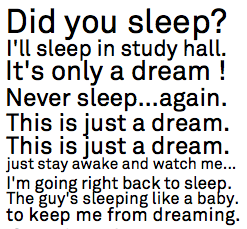
I want text blocks to have different font sizes, so that they align vertically. See the attached photo. My current code does it quite good bot not perfect, it depends on the text input. Does anyone know a better attempt to do this?
width=500
last_y=0
for txt in ['Hi', 'Hello', 'Width!']:
  path = textpath(txt,0,0)
  path.fit(0, last_y, width)
  last_y = last_y + path.bounds.size.height
  drawpath(path)
FB
FBFrederik De BleserNodeBox team
Indeed, The "fit" approach is also how NodeBox 3 does it.
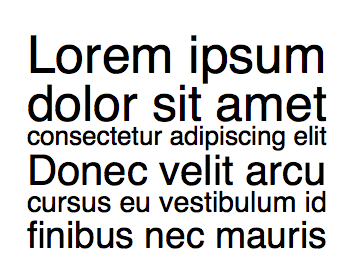
I've also tried your approach, and it seems to work fine, only the commas and question marks at the end throw things off. Here's my version and the result:
lines = """Lorem ipsum
dolor sit amet
consectetur adipiscing elit
Donec velit arcu
cursus eu vestibulum id
finibus nec mauris"""

y = 100
line_height = 0.95
desired_width=300
for line in lines.split('\n'):
    fontsize(100)
    w_draft = textwidth(line)
    scaled_font_size = 100 * desired_width / w_draft
    fontsize(scaled_font_size)
    text(line, 100, y + scaled_font_size * line_height)
    y += scaled_font_size * line_height
Know something that helps?
Sign in with your email address to reply. No password needed.