The new NodeBox forum is live! Everything from support.nodebox.net moved here: sign in with the same email to pick up your old posts. Something not working? Write to forum-support@nodebox.net.

Show your WorkFrom the old forum

Toroidal Polyhedron code based on "Torus" by Mark Meyer

3 replies Last reply

  1. Hello,

    I think the following Nodebox-Python rendering will be useful for people interested in Toroidal Polyhedra geometries. I manipulated the original "Torus" code by Mark Meyer (https://www.nodebox.net/code/index.php/Mark_Meyer_|_Parametric_surfaces_|_torus) to achieve the graphic attached. What I basically did was to center the figure on the correct rotational axis, and change the light shade coloring.

    Enjoy!
    Assoc. Prof. Dr. Ozan Yarman
    www.ozanyarman.com


    "Toroidal Polyhedron" (by Dr. Ozan Yarman @ http://www.ozanyarman.com )

    Based on the original "Torus" code by Mark Meyer @

    https://www.nodebox.net/code/index.php/Mark_Meyer_|_Parametric_surfaces_|_torus

    size(486, 486)
    background(1)
    nofill()
    stroke(0.6, 5.6, 2.7, 0.35)
    strokewidth(1.0)

    translate(WIDTH/2, HEIGHT/2)

    n defines how many vertices we find: the number will be n^2.

    Large values of n can take a while to render!

    Utilize only even numbers since v=2.0 * ... further below.

    n = 8

    --- TORUS EQUATION --------------------------------------------------------

    Define parametric equations for each axis.

    Although we define an z coordinate,

    it is only used in transformations and shading;

    it is not used in the drawing

    (although it could be if you wanted to add perspective).

    r1 = 165
    r2 = 55
    def x(u, v): return (r1 + r2 * cos(v)) * cos(u)
    def y(u, v): return (r1 + r2 * cos(v)) * sin(u)
    def z(u, v): return r2 * sin(v)

    def fit_to_domain(u, v):
    u = 1.0 * u/n * pi2
    v = 2.0 * v/n * pi
    2
    return u, v

    from Numeric import *
    def matrix(u, v, index):
    u, v = fit_to_domain(u, v)
    return where(index==0, x(u, v),
    where(index==1, y(u,v),
    where(index==2, z(u,v), 1)
    )
    )

    --- MATRIX ROTATION ------------------------------------------------------

    def rotate_matrix(matrix, x, y, z):
    rot_x = array(
    ([0, 1, 0],
    [cos(y), 0, sin(y)],
    [-sin(y), 0, cos(y)]
    ), Float
    )
    rot_y = array(
    ([0, 0, 1],
    [sin((1.5pi/e)z), cos((1.5pi/e)z), 0],
    [cos((1.5
    pi/e)z), -sin((1.5pi/e)z), 0]
    ), Float
    )
    rot_z = array(
    ([1, 0, 0],
    [0, cos(1.25
    x), -sin(1.25
    x)],
    [0, sin(1.25x), cos(1.25x)]
    ), Float
    )
    matrix = matrixmultiply(matrix, rot_x)
    matrix = matrixmultiply(matrix, rot_y)
    matrix = matrixmultiply(matrix, rot_z)
    return matrix

    --- VECTOR NORMALIZATION -------------------------------------------------

    def length(vector):
    return sqrt(vector[0]**2 + vector[1]**2 + vector[2]**2)

    def normalize_vector(face):
    """ Calculate the normal vector between -1 and 1 for a flat surface """
    norm = cross_product((face[0,0] - face[1,1]), (face[1,0] - face[0,1]))
    return norm / length(norm)

    --- ORTHOGRAPHIC PROJECTION ----------------------------------------------

    def project(rows):
    """
    Go through the array and draw rectangles.
    There is probably a more efficent way to do this.
    """
    for i in range(len(rows) -1):
    for j in range(len(rows[i])-1):
    face = rows[i:i+2, j:j+2]
    normal = normalize_vector(face)
    light_angle = (dot(normal, light))
    if (light_angle < 0):
    light_angle = 0
    fill(
    light_angle - 1.25,
    light_angle + 0.3,
    light_angle + 0.4,
    1.0
    )
    # Draw only forward facing facets.
    if (dot(view, normal) > 0):
    beginpath(
    face[0, 0, 0],
    face[0, 0, 1]
    )
    lineto(
    face[1, 0, 0],
    face[1, 0, 1]
    )
    lineto(
    face[1, 1, 0],
    face[1, 1, 1]
    )
    lineto(
    face[0, 1, 0],
    face[0, 1, 1]
    )
    path = endpath()
    # Save z with path for later z sorting.
    path.z = face[1,0,2]

    --- ROTATION SLIDERS -----------------------------------------------------

    var("rot_x", NUMBER, 1.00, -pi, pi)
    var("rot_y", NUMBER, pi/4, -pi, pi)
    var("rot_z", NUMBER, -e, -pi, pi)

    --- LIGHTING SLIDERS -----------------------------------------------------

    var("light_x", NUMBER, 0.50, -1.0, 1.0)
    var("light_y", NUMBER, -0.60, -1.0, 1.0)
    var("light_z", NUMBER, -0.25, -1.0, 1.0)

    light = array([light_x, light_y, light_z], Float)

    --- FACET CULLING --------------------------------------------------------

    Draw only forward facing facets.

    view = array([0, 0, 1], Float)

    sphere = fromfunction(matrix, (n+1, n+1, 3))
    sphere = rotate_matrix(sphere, rot_x, rot_y, rot_z)
    project(sphere)

    z-sort to avoid problems with overlapping surfaces:

    sorted_grobs = list(canvas)
    sorted_grobs.sort(lambda p1, p2: cmp(p1.z, p2.z))
    canvas._grobs = sorted_grobs
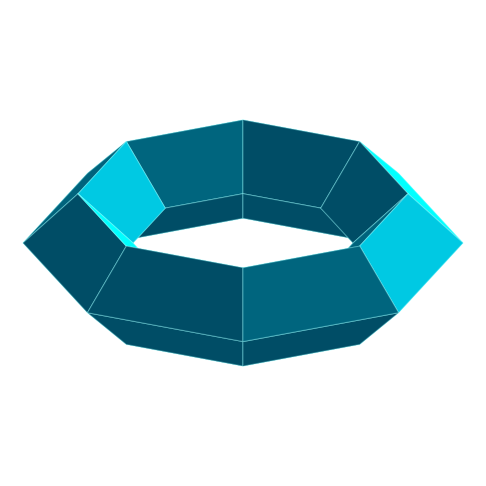
    Copy link
  2. The following replacement in the appropriate section for the code above can ease vertex manipulation:


    n defines how many vertices we find: the number will be n^2.

    Large values of n can take a while to render!

    Utilize only integer numbers for n, w, q.

    n = 10
    w = float(n)/10 # number of sides along the axis of revolution
    q = float(n)/4 # number of sides around the poloidal axis

    --- TORUS EQUATION --------------------------------------------------------

    Define parametric equations for each axis.

    Although we define an z coordinate,

    it is only used in transformations and shading;

    it is not used in the drawing

    (although it could be if you wanted to add perspective).

    r1 = 165
    r2 = 55
    def x(u, v): return (r1 + r2 * cos(v)) * cos(u)
    def y(u, v): return (r1 + r2 * cos(v)) * sin(u)
    def z(u, v): return r2 * sin(v)

    def fit_to_domain(u, v):
    u = w * u/n * pi2
    v = q * v/n * pi
    2
    return u, v

    Copy link
  3. After correcting a glitch in the rotational matrix, re-aligning the torus to face directly at RUN, and assigning all three (x, y, z) axes to appropriate rotational manipulations, I copy/paste the updated code below. Notice also, the vertex input section is more obvious now.

    Enjoy!
    Assoc. Prof. Dr. Ozan Yarman
    www.ozanyarman.com


    "Toroidal Polyhedron" (by Dr. Ozan Yarman @ http://www.ozanyarman.com )

    Based on the original "Torus" code by Mark Meyer @

    https://www.nodebox.net/code/index.php/Mark_Meyer_|_Parametric_surfaces_|_torus

    size(486, 486)
    background(1)
    nofill()
    stroke(0.6, 5.6, 1.7, 0.35)
    strokewidth(1.0)

    translate(WIDTH/2, HEIGHT/2)

    n defines how many vertices we find: the number will be n^2.

    Large values of n can take a while to render!

    Utilize only integer numbers for n, w, q.

    n = 10 # number of sides along the axis of revolution
    m = 6 # number of sides around the poloidal axis
    q = float(n)/m
    w = float(n)/n

    --- TORUS EQUATION --------------------------------------------------------

    Define parametric equations for each axis.

    Although we define an z coordinate,

    it is only used in transformations and shading;

    it is not used in the drawing

    (although it could be if you wanted to add perspective).

    r1 = 165
    r2 = 60
    def x(u, v): return (r1 + r2 * cos(v)) * cos(u)
    def y(u, v): return (r1 + r2 * cos(v)) * sin(u)
    def z(u, v): return r2 * sin(v)

    def fit_to_domain(u, v):
    u = w * u/n * pi2
    v = q * v/n * pi
    2
    return u, v

    from Numeric import *
    def matrix(u, v, index):
    u, v = fit_to_domain(u, v)
    return where(index==0, x(u, v),
    where(index==1, y(u,v),
    where(index==2, z(u,v), 1)
    )
    )

    --- MATRIX ROTATION ------------------------------------------------------

    def rotate_matrix(matrix, x, y, z):
    rot_x = array(
    ([0, cos(pix), -sin(pix)],
    [0, sin(pix), cos(pix)],
    [1, 0, 0]
    ), Float
    )
    rot_y = array(
    ([cos(0.05*(pie)y), 0, sin(0.05(pie)y)],
    [-sin(0.05
    (pie)y), 0, cos(0.05(pie)*y)],
    [0, 1, 0]
    ), Float
    )
    rot_z = array(
    ([sin((pi/e)*z), cos((pi/e)*z), 0],
    [cos((pi/e)*z), -sin((pi/e)*z), 0],
    [0, 0, 1]
    ), Float
    )
    matrix = matrixmultiply(matrix, rot_x)
    matrix = matrixmultiply(matrix, rot_y)
    matrix = matrixmultiply(matrix, rot_z)
    return matrix

    --- VECTOR NORMALIZATION -------------------------------------------------

    def length(vector):
    return sqrt(vector[0]**2 + vector[1]**2 + vector[2]**2)

    def normalize_vector(face):
    """ Calculate the normal vector between -1 and 1 for a flat surface """
    norm = cross_product((face[0,0] - face[1,1]), (face[1,0] - face[0,1]))
    return norm / length(norm)

    --- ORTHOGRAPHIC PROJECTION ----------------------------------------------

    def project(rows):
    """
    Go through the array and draw rectangles.
    There is probably a more efficent way to do this.
    """
    for i in range(len(rows) -1):
    for j in range(len(rows[i])-1):
    face = rows[i:i+2, j:j+2]
    normal = normalize_vector(face)
    light_angle = (dot(normal, light))
    if (light_angle < 0):
    light_angle = 0
    fill(
    light_angle - 1.25,
    light_angle + 0.285,
    light_angle + 0.4,
    1.0
    )
    # Draw only forward facing facets.
    if (dot(view, normal) > 0):
    beginpath(
    face[0, 0, 0],
    face[0, 0, 1]
    )
    lineto(
    face[1, 0, 0],
    face[1, 0, 1]
    )
    lineto(
    face[1, 1, 0],
    face[1, 1, 1]
    )
    lineto(
    face[0, 1, 0],
    face[0, 1, 1]
    )
    path = endpath()
    # Save z with path for later z sorting.
    path.z = face[1,0,2]

    --- ROTATION SLIDERS -----------------------------------------------------

    var("rot_x", NUMBER, 1.00, -pi, pi)
    var("rot_y", NUMBER, pi/4, -pi, pi)
    var("rot_z", NUMBER, -e, -pi, pi)

    --- LIGHTING SLIDERS -----------------------------------------------------

    var("light_x", NUMBER, 0.50, -1.0, 1.0)
    var("light_y", NUMBER, -0.60, -1.0, 1.0)
    var("light_z", NUMBER, -0.25, -1.0, 1.0)

    light = array([light_x, light_y, light_z], Float)

    --- FACET CULLING --------------------------------------------------------

    Draw only forward facing facets.

    view = array([0, 0, 1], Float)

    sphere = fromfunction(matrix, (n+1, n+1, 3))
    sphere = rotate_matrix(sphere, rot_x, rot_y, rot_z)
    project(sphere)

    z-sort to avoid problems with overlapping surfaces:

    sorted_grobs = list(canvas)
    sorted_grobs.sort(lambda p1, p2: cmp(p1.z, p2.z))
    canvas._grobs = sorted_grobs
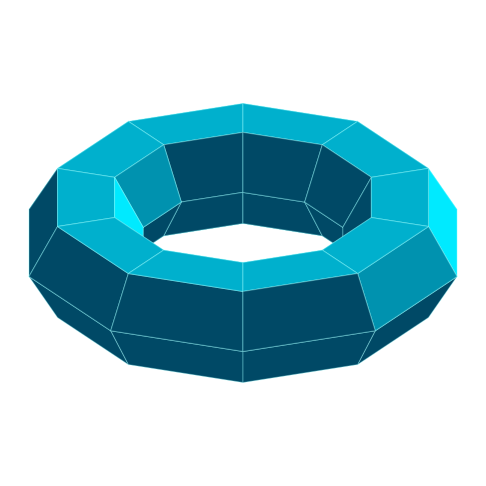
    Copy link
  4. The following decisive corrections to the code improve functionality, and introduce the missing elements for the orientation of the generator geometry of the toroidal cross-section.


    "Toroidal Polyhedron" (by Dr. Ozan Yarman @ http://www.ozanyarman.com )

    Based on the original "Torus" code by Mark Meyer @

    https://www.nodebox.net/code/index.php/Mark_Meyer_|_Parametric_surfaces_|_torus

    size(486, 486)
    background(1)
    nofill()
    stroke(0.6, 5.6, 2.7, 0.65)
    strokewidth(0.5)

    translate(WIDTH/2, HEIGHT/2)

    n defines how many vertices we find: the number will be n^2.

    Large values of n can take a while to render!

    Utilize only integer numbers for n and m.

    n = 10 # number of sides along the axis of revolution
    m = 6 # number of sides around the poloidal axis
    k = 4 # normalized phase of generator around the axis of revolution
    q = float(n)/m
    w = float(n)/n

    --- TORUS EQUATION --------------------------------------------------------

    Define parametric equations for each axis.

    Although we define an z coordinate,

    it is only used in transformations and shading;

    it is not used in the drawing

    (although it could be if you wanted to add perspective).

    r1 = 155
    r2 = 60
    def x(u, v): return (r1 + r2 * cos(v)) * cos(u)
    def y(u, v): return (r1 + r2 * cos(v)) * sin(u)
    def z(u, v): return r2 * sin(v)

    def fit_to_domain(u, v):
    u = w * u/n * pi2
    v = q * v/n * pi
    2 + ((kpi)/(2m))
    return u, v

    from Numeric import *
    def matrix(u, v, index):
    u, v = fit_to_domain(u, v)
    return where(index==0, x(u, v),
    where(index==1, y(u,v),
    where(index==2, z(u,v), 1)
    )
    )

    --- MATRIX ROTATION ------------------------------------------------------

    def rotate_matrix(matrix, x, y, z):
    rot_x = array(
    ([0, cos(pix), -sin(pix)],
    [0, sin(pix), cos(pix)],
    [1, 0, 0]
    ), Float
    )
    rot_y = array(
    ([cos((pi/e2)*y), 0, sin((pi/e2)*y)],
    [-sin((pi/e2)*y), 0, cos((pi/e2)*y)],
    [0, 1, 0]
    ), Float
    )
    rot_z = array(
    ([sin((pi/e)*z), cos((pi/e)*z), 0],
    [cos((pi/e)*z), -sin((pi/e)*z), 0],
    [0, 0, 1]
    ), Float
    )
    matrix = matrixmultiply(matrix, rot_x)
    matrix = matrixmultiply(matrix, rot_y)
    matrix = matrixmultiply(matrix, rot_z)
    return matrix

    --- VECTOR NORMALIZATION -------------------------------------------------

    def length(vector):
    return sqrt(vector[0]**2 + vector[1]**2 + vector[2]**2)

    def normalize_vector(face):
    """ Calculate the normal vector between -1 and 1 for a flat surface """
    norm = cross_product((face[0,0] - face[1,1]), (face[1,0] - face[0,1]))
    return norm / length(norm)

    --- ORTHOGRAPHIC PROJECTION ----------------------------------------------

    def project(rows):
    """
    Go through the array and draw rectangles.
    There is probably a more efficent way to do this.
    """
    for i in range(len(rows) -1):
    for j in range(len(rows[i])-1):
    face = rows[i:i+2, j:j+2]
    normal = normalize_vector(face)
    light_angle = (dot(normal, light))
    if (light_angle < 0):
    light_angle = 0
    fill(
    light_angle - 0.3,
    light_angle + 0.28,
    light_angle + 0.4,
    0.975
    )
    # Draw only forward facing facets.
    if (dot(view, normal) > 0):
    beginpath(
    face[0, 0, 0],
    face[0, 0, 1]
    )
    lineto(
    face[1, 0, 0],
    face[1, 0, 1]
    )
    lineto(
    face[1, 1, 0],
    face[1, 1, 1]
    )
    lineto(
    face[0, 1, 0],
    face[0, 1, 1]
    )
    path = endpath()
    # Save z with path for later z sorting.
    path.z = face[1,-2,2]

    --- ROTATION SLIDERS -----------------------------------------------------

    var("rot_x", NUMBER, 1.00, -pi, pi)
    var("rot_y", NUMBER, pi/4, -pi, pi)
    var("rot_z", NUMBER, -e, -pi, pi)

    --- LIGHTING SLIDERS -----------------------------------------------------

    var("light_x", NUMBER, 0.50, -1.0, 1.0)
    var("light_y", NUMBER, -0.60, -1.0, 1.0)
    var("light_z", NUMBER, -0.25, -1.0, 1.0)

    light = array([light_x, light_y, light_z], Float)

    --- FACET CULLING --------------------------------------------------------

    Draw only forward facing facets.

    view = array([0, 0, 2], Float)

    sphere = fromfunction(matrix, (n+1, m+1, 3))
    sphere = rotate_matrix(sphere, rot_x, rot_y, rot_z)
    project(sphere)

    z-sort to avoid problems with overlapping surfaces:

    sorted_grobs = list(canvas)
    sorted_grobs.sort(lambda p1, p2: cmp(p1.z, p2.z))
    canvas._grobs = sorted_grobs

    Copy link

Know something that helps?

Sign in with your email address to reply. No password needed.

Sign in to reply