When I start NodeBox 3.0.43 on OS X 10.10.2, the Starting NodeBox window appears with a progress bar, then a second later it crashes. The crash report is attached.
I have Apple's java as well as 1.8.0_31 installed.
How can I fix this?
The new NodeBox forum is live! Everything from support.nodebox.net moved here: sign in with the same email to pick up your old posts. Something not working? Write to forum-support@nodebox.net.
NodeBox 3From the old forum
When I start NodeBox 3.0.43 on OS X 10.10.2, the Starting NodeBox window appears with a progress bar, then a second later it crashes. The crash report is attached.
I have Apple's java as well as 1.8.0_31 installed.
How can I fix this?
I also get the attached crashlog in my home directory.
Hi,
I've heard other people report problems on this before, but I can't reproduce it. Could you try creating a new user account on your Mac and starting NodeBox from there?
Best,
F
I would rather not create an extra user account ... then I'd have to figure out how to cleanly remove it.
But I have tested on a different Mac computer (2014 Mac Pro) and it crashes there as well.
I can try to remove all settings if you let me know how (anything else than ~/Library/NodeBox?) Also, can I run NodeBox with some other Java version than the embedded one?S
Deleting an account is just a matter of removing the home folder. OS X will ask what to do when you press "delete". But I understand that you don't want to do that.
The embedded version was created precisely so we won't have these issues :-) We don't want people to worry about Java, or if they have it installed.
If you're handy with the Terminal you could try running it from there. You need Xcode and Homebrew installed. Then:
brew update
brew install maven ant
git clone https://github.com/nodebox/nodebox.git
ant run
I'll look into the crash logs next week.
I tried a new account. It doesn't crash there. Does this give any hints about what I need to do to make it run on my main account?
I should note that the previous version I had, 3.0.3x, did run without problems. But unfortunately I deleted that one ... Is there a way to download older versions?
That’s why I asked about the account – I’ve seen this with other people as well. Not yet sure why that is….
Here’s a link to all downloads:
https://secure.nodebox.net/downloads/
Best,
F
Frederik,
I tried your suggestion of cloning the github repo and executing ant run. It does not crash when run this way.
However, if I build the app with ant dist-mac, then try to run the app, it will crash the same again.
That's really weird! The dist-mac command is what we use to build NodeBox as well. Again, does dist-mac work on a newly created user account?
Best,
F
What I meant to say is this:
ant run does run nodebox, and it does not crash.
ant dist-mac does correctly build an application bundle. Running this application bundle crashes.
I assumed that ant dist-mac will build exactly the same application bundle that nodebox.net carries, so this behaviour was not a surprise. The surprise was that ant run works, and suggests that the crash is due to how the app bundle is packaged.
I did not use Homebrew, I installed the dependencies using MacPorts.
What is it precisely that you need me to test on a fresh user account?
Frederik,
Would it at all help if I tested older versions to find out which is the oldest one that still crashes?
You could try that. I'm assuming it's the first one that bundles Java 1.8. (3.0.42, according to the release notes )
3.41rc1 works, 3.41rc2 doesn't start at all (nothing visible happens) and 3.41rc3 crashes the same as 3.42 or 3.43.
I notice that the app bundle structure is singificantly different between 3.41rc1 and 3.41rc3 or later. This could be a cause of the crash too ...
3.0.41-rc1 doesn't bundle Java 8 yet, whereas, starting from 3.0.41-rc3, we did bundle Java 8. This is necessary since Apple didn't include Java anymore in newer versions of OS X, and also removed the "auto-install" option.
The app bundle is different since we're using Oracle's own Appbundler in the latest release, which should do a proper job of bundling Java 1.8. For most users, this works without a hitch, so I'm not really sure why it would be different in your case.
Okay, wild hunch, but could you try putting it in a folder without spaces? I noticed from the crash report you put NodeBox in the "Applications/Generate Art" folder; I've found that spaces in the name could cause weird errors. I'm wondering if they have anything to do with it.
Also, does your user name, or use directory, have any non-ASCII, accented characters?
No, there are no special characters. It's not due to the spaces either (it crashes regardless of location).
So what else could it be?
You mentioned that others complained too.
For me it crashes on two different computers.
It could be a conflict with something that's installed? I do have a JDK installed, but I'm not sure how to remove it fully. Deleting /Library/Java/JavaVirtualMachines/jdk1.8.0_40.jdk/ doesn't fix the problem. I also have Apple's Java installed because actually OS X Yosemite still prompts to install it if programs need it, and there are a few I use that do need it. I also have MacPorts, but it's supposed to keep the system unmodified except for /opt/local, so I don't see how it would cause a conflict (applications don't see the PATH I set in my .profile, so shouldn't be able to see MacPorts).
It also seems that NodeBox will only crash when running it app bundle. ant run won't crash.
A final piece of information: the I tested 3.41rc1, just before the crash a window came up showing some Java errors (not the usual OS X crash report). It was only a split second, so I couldn't see what was there. The crash happens only just before the main NodeBox window would come up, the startup progress bar is still displayed after starting the app.
Well, I managed to capture a screenshot of that Java error before it disappeared. This is wit 3.41rc3 (not rc1 as I wrote above, that was a mistake). Right after showing this it crashes.
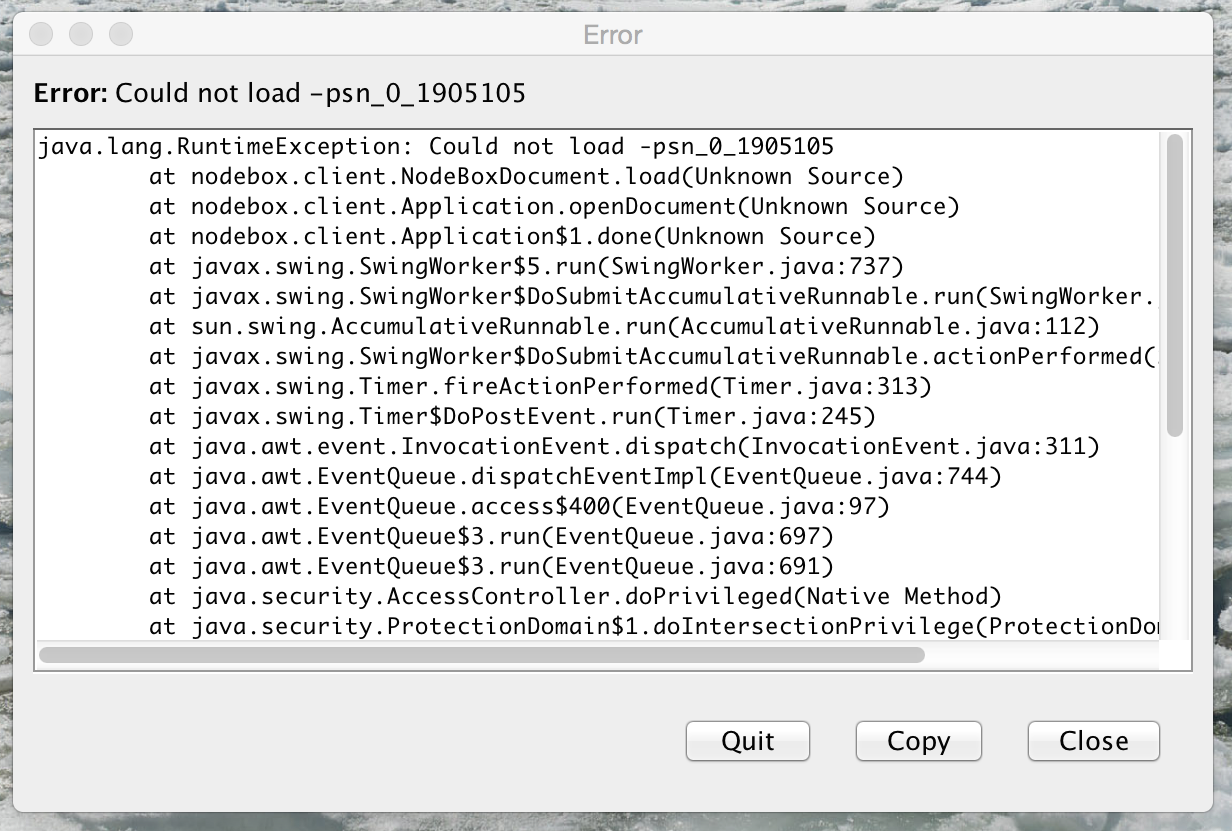
Thanks for looking into this. Unfortunately this refers to a bug that
was already fixed (https://github.com/nodebox/nodebox/commit/5645463e9b2149c34ab59bc8f6bfa4d0b0c4899b).
Reading through the crash report again, it seems that Java has an issue
with locales. What locale is your system set in?