Francesco,
I hadn't noticed this before, but you're right: freehand only seems to work when handles are enabled.
This seems to be a hardwired NodeBox behavior, so I don't see any easy fix unless the program can be updated. However, I do have a workaround that might work for you.
With just a few nodes you can capture the path created by the freehand tool and redraw it using the frame node. This creates an animation that you can export to an MP4 file. That video animation will not show the cursor!
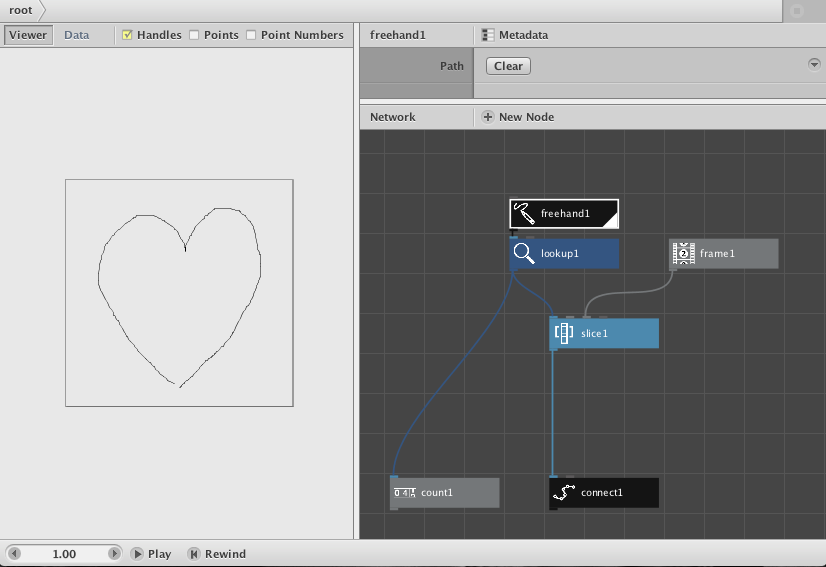
I have attached an example of this technique with the NodeBox file, a screenshot, and an MP# recording of a drawn heart.
To capture the path created by the freehand tool I attached a lookup with the key set to "points". I then used the Metadata dialog for the lookup node to change its setting (output) from value to list. This list feeds into a slice node which uses the frame counter to create increasingly larger slices of that list which I then draw using a connect node.
Here is how to use this example to redraw whatever you want:
- Double click on the freehand node to render it. Clear the screen if necessary.
- Draw whatever you want.
- Double click on the connect node to render that. Screen should clear.
- At bottom of window hit rewind to make sure you are starting on frame 1
- Hit play. You should now see your drawing redrawn before your eyes.
- Double click on the count node and notice the number displayed in the upper left corner of the view window. This is the number of frames you will need for your movie.
- Double click on the connect node again so that it will render for your movie.
- Choose Export Movie... from the File menu.
- Choose a file name and enter the total number of frames from step 6
- Hit the Export button. You will soon have a cursor free animation!
This is just a simple example, but the basic technique should work for you. Instead of simply redrawing the freehand path, you can use the data from the freehand path to draw whatever you want and then replay the whole thing. As an added bonus, NodeBox's export movie feature produces extremely compact MP4 files, MUCH smaller than anything made by a screencast recording.
Note: this simple example assumes you are drawing a single connected path. If you need to lift your mouse and draw multiple paths you will either have to add logic to detect multiple "contours" (maybe by noticing larger than usual jumps in the path) or find some other way of combining multiple redraws.
I set the document size to 500x500 to create a small sample movie. Reset document size (Document Properties under the File menu) to whatever frame size you want for your movie.
Hope you find it useful. The rest of us may also find situations where this technique could come in handy.
John
P.S. I will be offline for the next few weeks so will not be able to respond further till I return. Have fun without me fellow NodeBoxers!