The new NodeBox forum is live! Everything from support.nodebox.net moved here: sign in with the same email to pick up your old posts. Something not working? Write to forum-support@nodebox.net.
HI guys, Nodebox is really a great software! i'm learning a little bit of it and i see the potential.
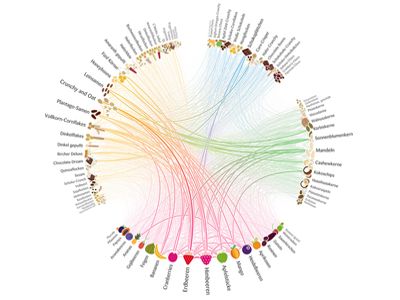
the problem is that i strongly need a diagram similiar to the one visible at the end of the Data tutorial (about metallica with multiple circular colored links between words). Can someone please share with me something similiar so i can learn a little bit on how to make circular diagrams with nice curved links between elements ?
i tried using grasshopper but it takes me too much, i tried downloading circos but it's too hard, i saw Nodebox as the right and simpliest choice to do the kind of diagram that is attached here..
the deadline is too near to learn from scratch how to do it, i just need someone who shares his process so i can learn how things works!
thank you!
FB
FBFrederik De BleserNodeBox team
The example is available under File > Open Examples, choose "Topics", "Data Visualisation", "Zipmap".
Hope that helps,
F
MA
MAMARCO
great! i didn't know that! Thanks! I hope to be able to ride this horse alone ;)
HH
HHhhyon
Is it possible to see the Metallica_Database.csv file? I'd like to see how the data is organized..
john
If all you want to do is examine the structure, just double-click the csv node to render it, then switch from Viewer to Data. As long as you are inside examples you can see the contents of any csv file that way.
But If you have made your own copy of the example and want to extend it, you'll need access to the file itself.
If you are on a Mac you can see this and all the other resources used by examples by doing the following:
Control-click on the NodeBox app icon
Choose "Show Package Contents" from the contextual menu
Open the Contents folder
Open the Java folder
Open the examples folder
Then work your way down, in this case to 02 Topics / Data Visualization / Zipmap.
Metallica_Dataset.csv is in that folder.
In case you are not on a Mac, I am attaching the file. (I assume Frederik won't mind.)
On PC, the file is under your users folder, AppData, NodeBox, Java, Examples.
Note that the application is open-source, so you can also see all files on GitHub. For example, here's the Metallica dataset.
F
HH
HHhhyon
Hi Frederik or John, I appreciate your response, thank you.
On another note, I've been attempting to start new discussions in regards to some questions regarding Nodebox 3 and Data Visualization, but all my posts have been ignored..
Is there a way that I can have help with my recent discussion/questions?
Or is there another forum/platform that I should try to access?
john
The same thing happened to me earlier this week. I wrote to Frederik (who is on holiday) and he suggested trying again. My second posting went through OK. So you might try again and see if your luck improves.
Frederik uses a third-party solution for this forum and it's been acting up lately. He said that when he returns he might look into finding a better solution.
Hope you are able to get your post through. I think NodeBox is a great tool for data visualization and have many ideas for improving it.
John
Know something that helps?
Sign in with your email address to reply. No password needed.