A followup…
The curious thing about the five nodes in drop_1st_col is that they only work correctly after they’ve been grouped into a subnetwork. Their behavior before grouping appears chaotic and bears no resemblance to the final output of their group.
I think this is worth exploring because it gets to the heart of why Nodebox subnetworks can be so confusing.
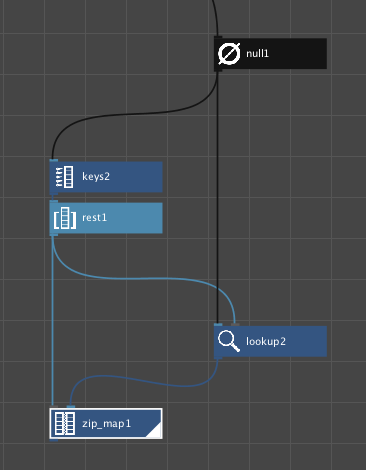
The first 3 nodes are straightforward:
- null simply passes through the import of the csv file; this allows drop_1st_col to have a single input port.
- keys retrieves the four column headers from the csv file.
- rest tosses the first key, leaving a list of three keys which represent columns 2, 3, and 4 of the original table.
The lookup node is when things get strange. If you render it you will see a list of 10 values, one for each row of the csv table. But the values are not from any one column of the table; instead they cut a wrapping diagonal path:
- the first value of column 2
- the second value of column 3
- the third value of column 4
- the fourth value of column 2,
- etc.
What a mess! How did that happen?
First, you need to understand that a table (data map) is not a single thing like a matrix or array, but is rather a list of zip_maps. Everything in NodeBox is a list.
Second, when you point a lookup node at a zip_map, you get the value associated with each key you provide.
Third, when any node (like lookup) gets multiple inputs, it produces one output for each input item. If a node has more than one input port it will generally (but not always - you’ll see an exception in a minute) be controlled by whichever input has the most items.
In this case our lookup node is getting 10 items (zip_maps) in its list port and 3 items (keys) in its key port. So it’s going to do one lookup for each of those 10 list items. That is, it does one lookup on the zip-map for each row of the csv table. Meanwhile, the three key values cycle through in a modular fashion, referencing columns 2, 3, 4, 2, 3, 4, 2, 3, 4, 2.
Hence our winding diagonal mess. Seems pretty useless, but let’s keep going.
The zip_map node takes a list of keys and a list of values and zips them into a single thing: a vector-like zip_map. In this case, its getting three items in its keys port and ten items in its values port.
So how many items does it output? Generally, you might expect it to produce one output for each item in the longest input list, but zip_maps are an exception to the rule. They always produce a single vector with n columns where n is the number of items in the shortest input list; if there are more values than keys, the excess values are ignored.
(This explains why a zip_map, unlike other nodes, will only produce a single output even if you set its output range to “list”. And that, in turn, is why it may seem hard to make a multi-row data map.)
So if you render the zip_map node (in data view) you will see a single row with three columns. The three columns are correct, but because our lookup node is gibberish, the values in our zip_map are simply the first three items in that list of gibberish. Garbage in, garbage out.
Now for the magic trick. With the zip_map still rendered, select all five nodes and right-click on “Group into Network”. Voila!
All the gibberish is gone. We get not one column with 10 rows of nonsense, not one row with 3 columns of nonsense, but a perfect data map table! It has three columns with the correct key values as headers and ten rows with all the right values in all the right places. Even after six months of playing with NodeBox I was surprised when this actually worked.
So what is going on here? Garbage in, order out? How could simply grouping these nodes cause such a miraculous transformation?
First, here are three essential and undocumented truths about Nodebox subnetworks:
-
Subnetworks do not simply hide complexity; they sometimes change behavior of the nodes they contain. This is not mentioned anywhere in Nodebox documentation; even the subnetwork tutorial defines them simply as folders used to reduce the apparent size of big networks. But Nodebox subnetworks are not just folders; they are transformative.
-
The transformative nature of Nodebox subnetworks is sometimes the only reasonable way to accomplish basic tasks. Our current example is a good case in point: easy to do using a subnetwork, almost impossible without (as far as I can see). Whenever you can’t figure out how to do something simple in Nodebox, try using a subnetwork!
-
Subnetworks behave like any other node: they execute their function (that is, their rendered node) for each item in their published input ports (generally the input with the most items). In a nutshell: their node behavior trumps their grouping function. This is where behavior changes come from.
So, now that our brave little quintet of nodes is now a single subnetwork, it’s going to fire once for each input, that is, for each row coming in from the original csv table. And the thing it is going to produce each time will be a zip_map. Let’s take it one row at a time.
The first row has all the keys, so the keys and rest nodes work just as they did before. The zip_map node is also going to produce a single zip_map with three columns as before, and it’s going to take the first three values it gets from the lookup node.
But the lookup node no longer has access to all ten rows of the csv table. It only gets one row per cycle, in this case the first row. So now it has three keys coming in but only one list item: the zip_map for row one. Instead of producing ten items it will produce three - three different lookups from that same first row.
The zip_map happily slurps up those three items and produces its first zip_map. Now cycle two begins with row two of the table. Everything is as before except that now lookup only has row 2 to work with. When all ten cycles are complete, drop_1st_col has produced ten zip_maps to form a perfect 10-row data map.
The moral of this story: if you need to make your own data maps you will need to create a subnetwork with a zip_mqp as the rendered node. And you won't be able to pull victory out of the mouth of defeat until the very last moment.
My apologies for the length of this note. I hope those of you who find subnetworks as confusing as I do will find it helpful.