The new NodeBox forum is live! Everything from support.nodebox.net moved here: sign in with the same email to pick up your old posts. Something not working? Write to forum-support@nodebox.net.
I am very new to Nodebox, but I feel like I am getting the hang of things -- but I am having trouble creating animations that allow for a variety of sequences/scenes over the course of the animation. I wish there was a node that capped the frame node from continuing to grow past a certain number. (I apologize if I am being silly and somehow there is already a node for this.)
My question:
Is there a way to set up the frame node to an ellipse to make it grow and eventually stop growing? Would this involve a very complex subnetwork? A special equation? Do I need to get smarter and figure this out like an adult?
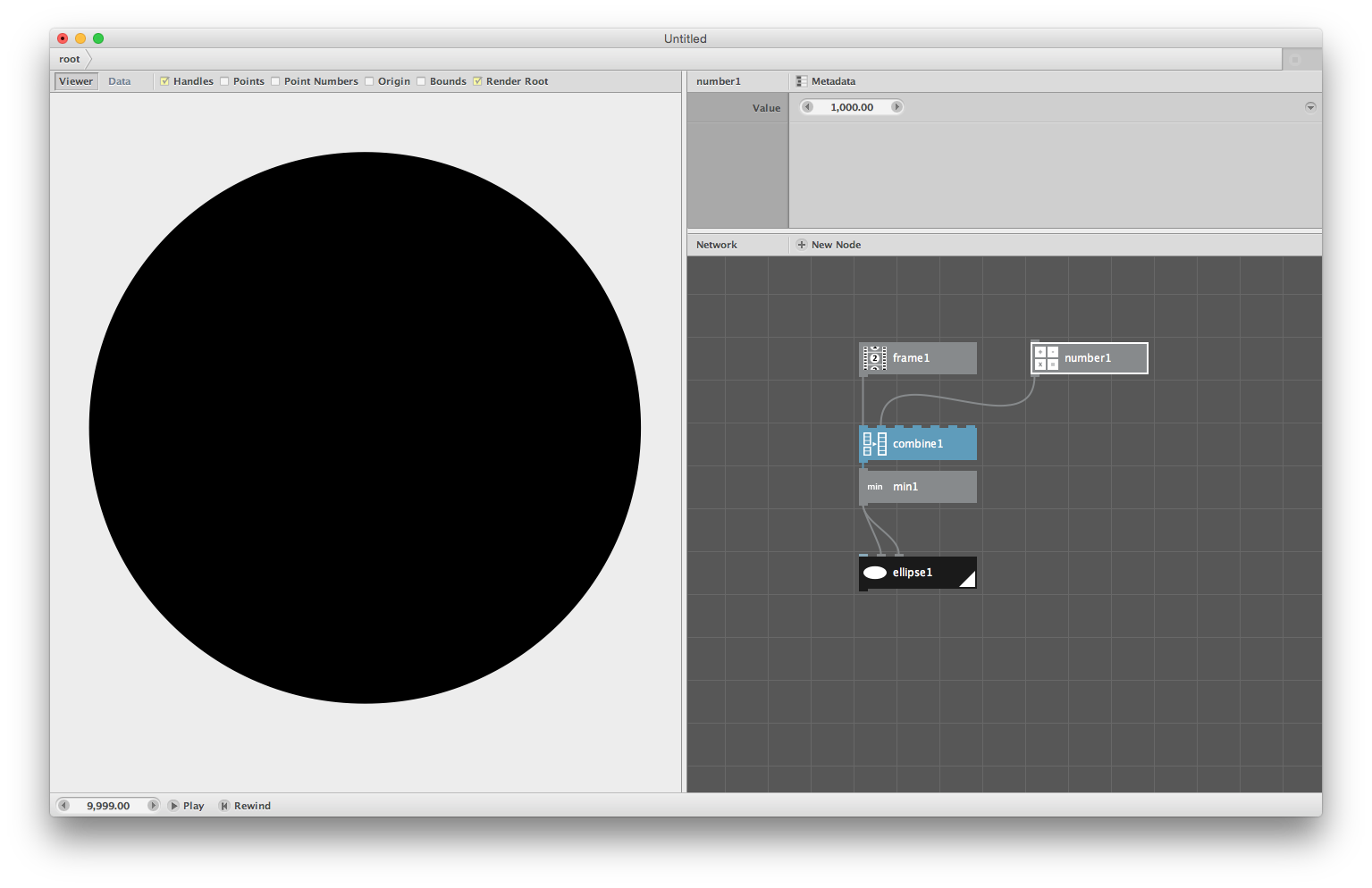
I included my project below. In the animation, I wish for the circle to stop growing at frame 1,000.
The frame node, by itself, just keeps growing. The trick is to append a node after the frame node to do what you want. I see two possible options:
Use a mod (for "modulus") node. Connect frame to the first port (value1). For the second port, use the maximum value you want to use. The mod takes the remainder of the division, and as such, will never be larger than the second value. That means that when the frame reaches zero, the mod node will wrap back to 1.
Use a min node. This takes the minimum of a list of values. So if your frame is 1200 and your fixed value is 1000, the minimum will be 1000. Since the min node takes a list, you'll have to build a list first using a number node and a combine node. The screenshot below demonstrates that.
Of course, for both approaches, you can use the output to do something different: for example, divide that value by 10, or add a certain number, or whatever.
I've attached a network that shows both approaches.
Thank you for this. It really has helped me get over a bump in the road!
I really appreciate the prompt response.
Best,
Shane
john
Dear Shane,
Welcome to the NodeBox community! I've been here for about six months and have gotten into all sorts of mischief.
I do a lot of projects with complex, multi-stage animations and along the way I've developed a few techniques to make it easier. Frederick's suggestion of using a Min node is a simple solution to your immediate problem, but there is another node you should know about: Convert Range.
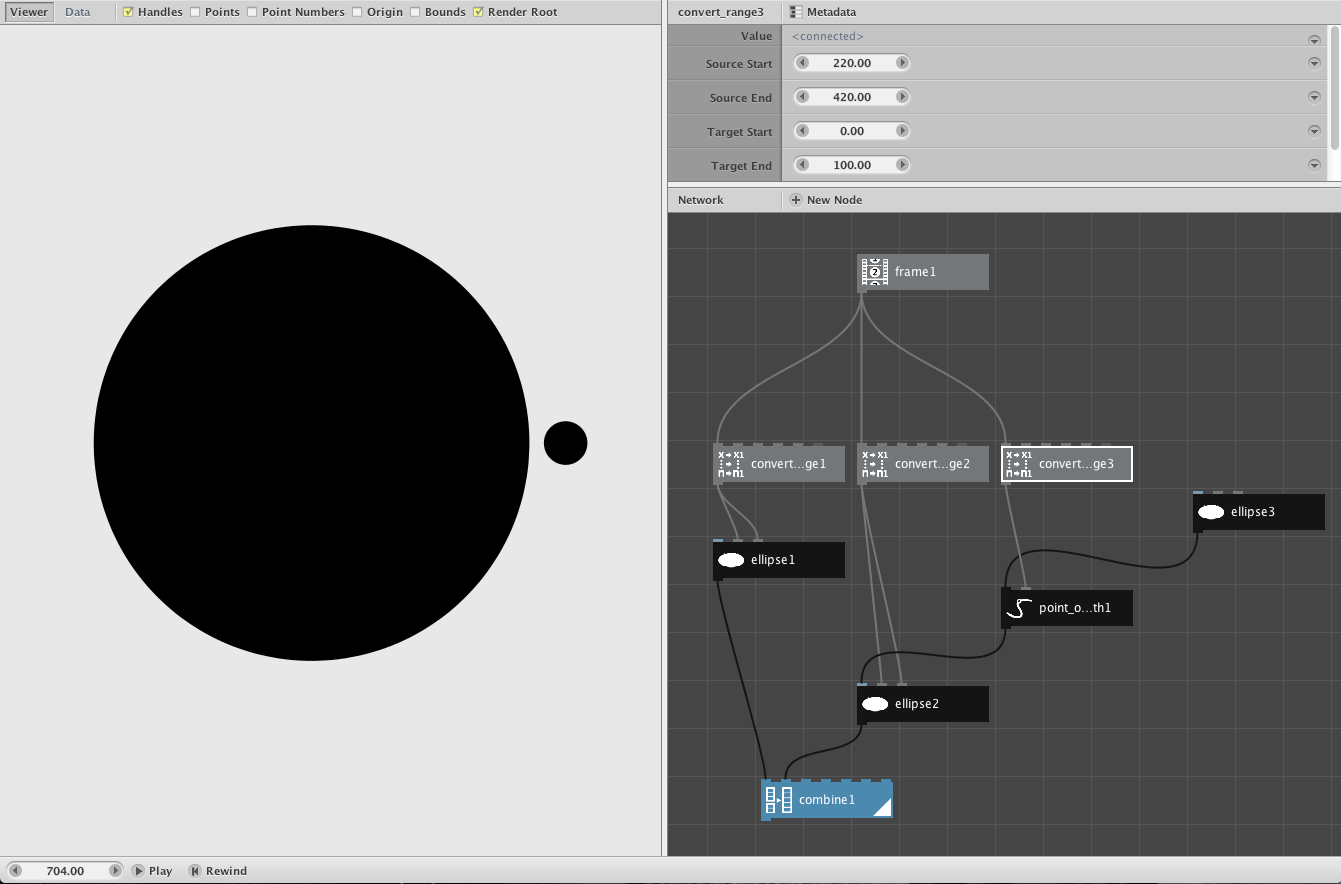
The Convert Range node takes one range of values and interpolates it into a second range. If you feed it a Frame node, you can use it to precisely control your animations. Set Source Start to the frame you want to begin at and Source End to the frame you want to stop at. Set your Target Start and End to whatever values you need to make your animation do its thing.
To illustrate my point I made a quick three-part animation similar to your growing dot. I have attached the animation as an MP4 file along with a screenshot and the NodeBox network that made it. The choreography is as follows:
Frames 1-50: a small dot sits on the screen not moving
Frames 50-150: the dot swells in size from 10 to 300
Frames 150-200: a second dot appears to the right and grows to size 30
Frames 200-220: a brief pause to build suspense
Frames 220-420: the second dot orbits the first
Frames 420 on: the show is over
All of this was done with three Convert Range nodes to define how long each movement lasts. The entire thing was done with only nine nodes. The Convert Range node makes animation a lot easier!
I look forward to seeing some of your animations in the Show Your Work forum.
This is exactly what I was looking for! (https://vimeo.com/136345713)This is what came out from using the MIN node which ended up working out really well, but as you mentioned – it resulted in a very thick bush of nodes (I should have made a subnetwork, but I was a bit too “in the moment” when designing it)
I will give a new animation a try using this node. Thanks again! Is there a Nodebox area for submitting nodebox made work? I really wish I could see what everyone (such as yourself and Fredrick) are working on.
Best,
Shane Jezowski
www.shanejezowski.com
john
Shane,
Glad you found that helpful. I enjoyed your video and also checked out your site. Nice stuff! I think you will have a blast with NodeBox.
The section next to this one in the NodeBox Forum is called "Show Your Work". That's the place to share your latest creations. You can attach MP4s, screenshots, and ndbx files if you want. I've posted various things there, more to share concepts than show art, but that's just me. It's one of the best ways of learning how to do things. I would post more often if we had a more active community.
John
LU
LUlucasnijs
Hi John,
Brilliant solution!
Lucas
Know something that helps?
Sign in with your email address to reply. No password needed.