The new NodeBox forum is live! Everything from support.nodebox.net moved here: sign in with the same email to pick up your old posts. Something not working? Write to forum-support@nodebox.net.
I'm trying to split a CSV file with 5 days and per day 3 categories to create 5 separate pietarts (so one per day) - have tried everything but cannot seem to make it work....
Hope you guys can help...
Have attached the files and a custom python script which I thought would help.
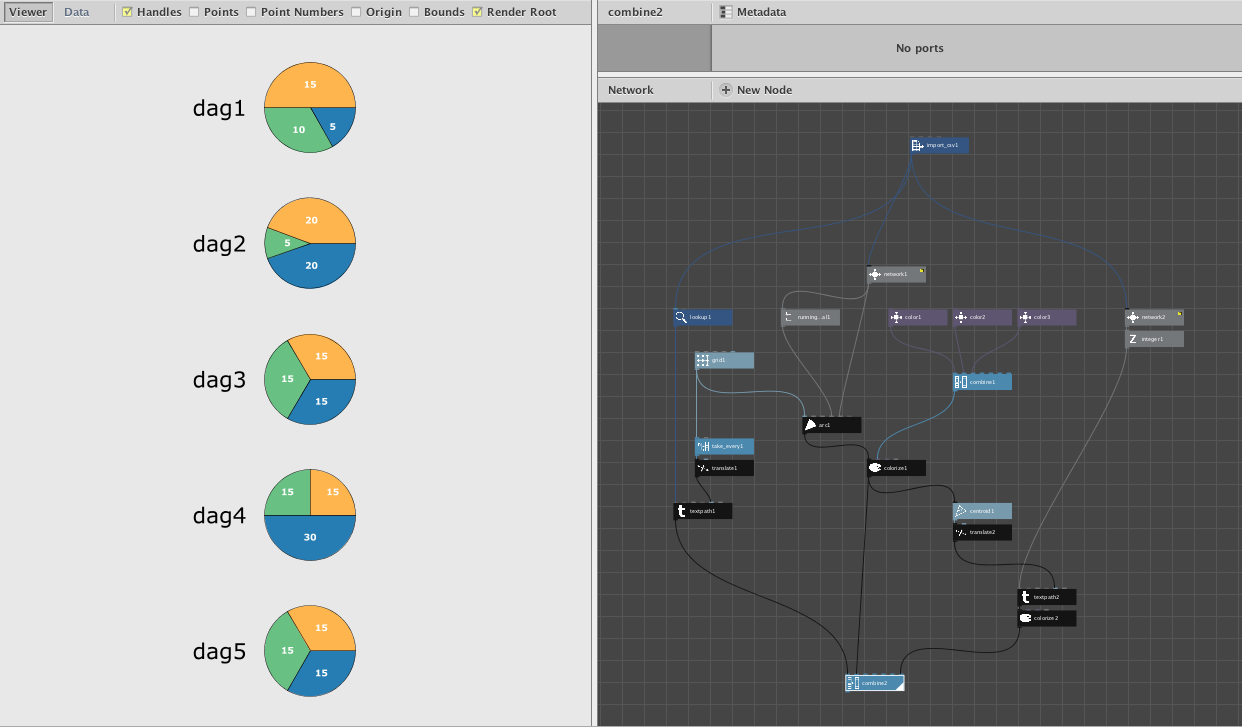
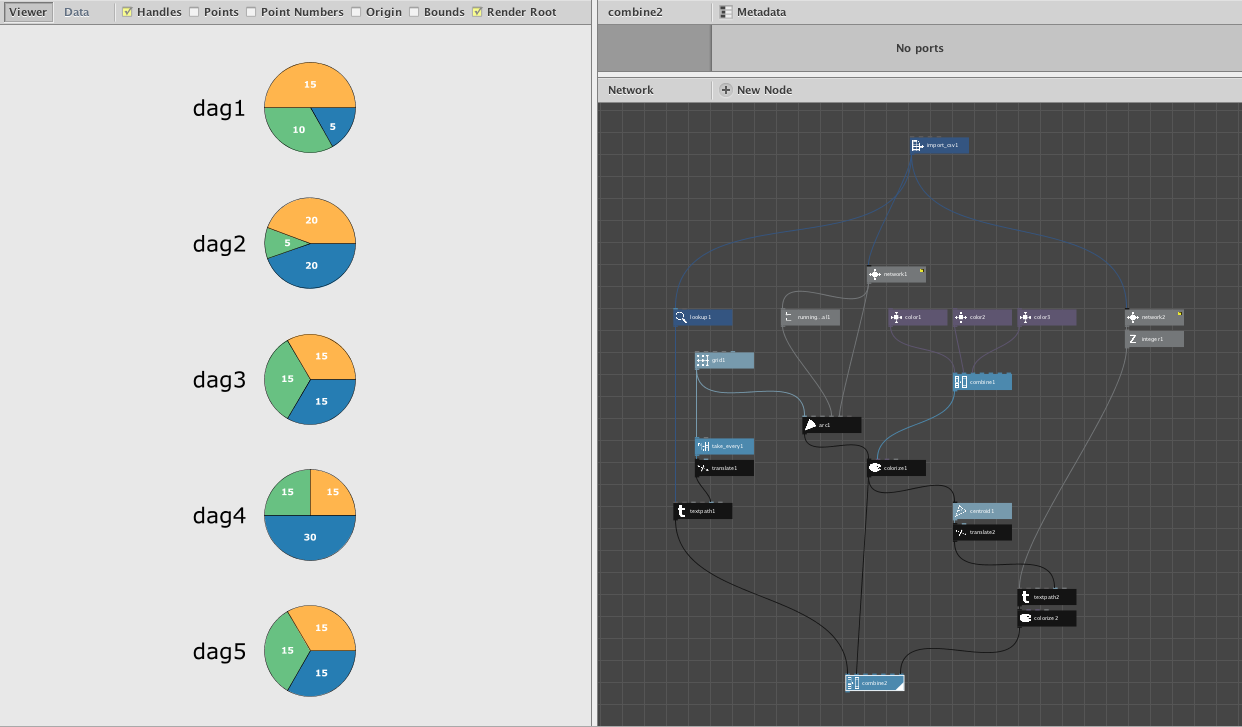
Your NodeBox file refused to open on my machine, but I got the gist of your idea. Attached is a simple NodeBox network which draws your five pie charts along with a screenshot.
If you play with my network, rendering one node at a time, you will see how it works. The key trick is performed by subNetwork1: it sucks in one row at a time and, for each row, spits out three proportional angles which sum to 360 degrees. From there it's just a matter of using the arc node to draw each pie wedge and the grid node to arrange them into five pies.
The grid node is a bit crafty: it's 3 columns by 5 rows but 0 pixels wide. This causes all wedges to share the same X coordinate and each trio of wedges to be drawn at the same Y coordinate; the height of the grid allows you to space out the Y coordinates for each pie to your taste. If you want to show your pies horizontally instead of vertically, just rotate the grid 90 degrees.
I went to the extra trouble of adding pie labels from the "dag" column of your CSV and placed labels for the actual hours in the center of each pie wedge. You can adjust this to your taste.
This would have been hard for me to do when I first started NodeBox due to the weirdness of subnetworks (which are necessary to extract the three values from each row). If you look inside it you'll see the nodes inside are quite simple. But if those nodes were not wrapped inside a subnetwork they would behave entirely differently. The subnetwork is what makes the "chunking" of one row at a time possible because it fires once for each row feeding into it.
Hope you find this helpful. I had fun making your pies!
This solution was crafted to work with your CSV file, which assumes exactly three wedges for each of five pies. If you want a more general solution for any number of days with a different number of wedges in each pie, you should restructure your CSV file so that each row reprsents a single data point, not a single day.
Under this scheme your current data would consist of 15 rows, each with a day (dag) column, and hours column, and whatever other columns you need (e.g. client). The first three rows would occur on day one, the next three on day two, etc.
Once your data is in this format, things in NodeBox become more straightforward. You can use the filter node to gather all the data points for a given day. You can then do a lookup on that filtered list to retrieve the individual hour values, count them, sum them, and produce one pie chart at a time (using the group node to join the wedges into a single pie).
This gives you a subnetwork that turns a given day into a pie chart. To create a grid or list of pies, you simply do a lookup on the day column, run it through the Distinct node to eliminate duplicates, and send that list into your pie chart subnetwork.
John
Know something that helps?
Sign in with your email address to reply. No password needed.