Hi,
Is there a way to count similar strings from a csv file?
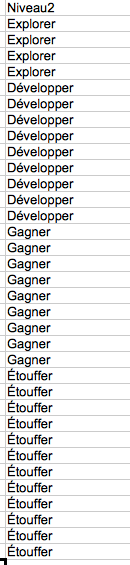
In other words, I would to automatically track the number of repetitions of each same words from a list (see attached file).
Anyone have a solution?
Thanks!
OB.
The new NodeBox forum is live! Everything from support.nodebox.net moved here: sign in with the same email to pick up your old posts. Something not working? Write to forum-support@nodebox.net.
NodeBox 3From the old forum
Hi,
Is there a way to count similar strings from a csv file?
In other words, I would to automatically track the number of repetitions of each same words from a list (see attached file).
Anyone have a solution?
Thanks!
OB.

Dear Olivier,
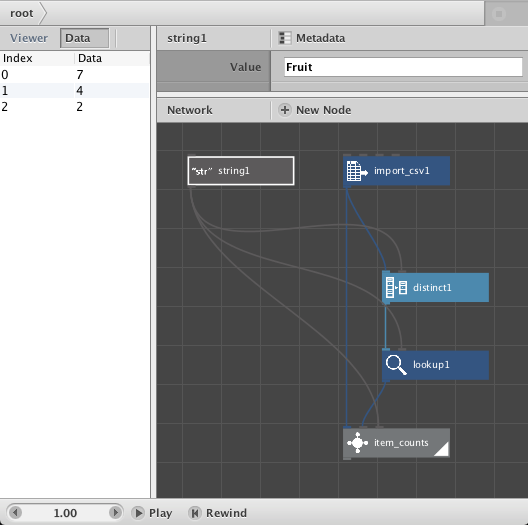
This is fairly easy. First use a Distinct node and a Lookup to get a list of the distinct items. Then, for each item, filter the original file for that item and do a count.
The only tricky bit is the "for each item" part. To pull that off you need to make a very simple subnetwork. First wrap the filter and count nodes into a 2-node subnetwork. Then, in order to make sure you read one value at a time against the whole list for each count, select the subnetwork, open the MetaData dialog, set the data port to "list" and the value port to "value".
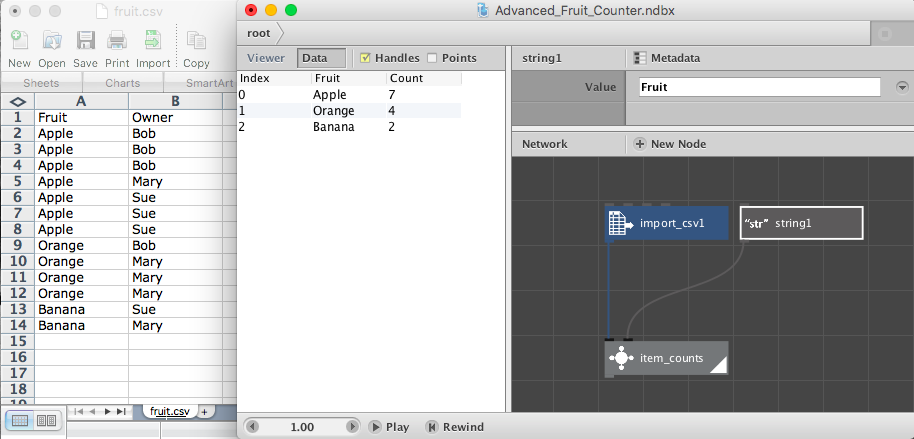
I have attached a simple network, Fruit Counter, to demonstrate this. I made a simple csv file with two columns, "Fruit" and "Owner". There are 13 fruits (7 apples, 4 oranges, and 2 bananas). Bob owns a total of 4 fruits (3 apples and an orange), Mary 5 fruits, and Sue 4 fruits.
You choose which field you want to count by setting the string node on top to either "Fruit" or "Owner". The Distinct and Lookup nodes apply this key to produce a list, either "Apple, Orange, Banana" or "Bob, Mary, Sue". We then feed that list of values (along with the original cvs file and the key) into the "item_counts" subnetwork.
For "Fruit" the result (as shown in the screenshot) is 7,4,2. For "Owner" the result is 4,5,4. If need be, you could tie the output of the Lookup Node and the output of the item_counts node into a Concatenate node to produce "Apple = 7, Orange = 4, Banana = 2"
Hope that helps!
John
Update...
The above item_counts subnetwork is very simple and works fine for small (<1000 row) csv files. But for larger files it may prove inefficient.
Attached is a more advanced version of item_counts. It uses a completely different algorithm that is more complex but runs up to 100 times faster.
NOTE: its output is different than the original version. Instead of outputting the raw counts, this node creates a mini-table: column 1 is the name of the field, column 2, "Count", contains the counts for each unique item in that field. ALSO, this table is automatically sorted from most to least frequent. This format makes it easier to compute Top 10 lists.
Attached is the network and a screenshot showing the output against the same simple csv file from the previous example.
If you need to get item counts from large tables, feel free to use this version instead.
Enjoy!
John