Hi Rory,
I figured out how to do this on a previous project.
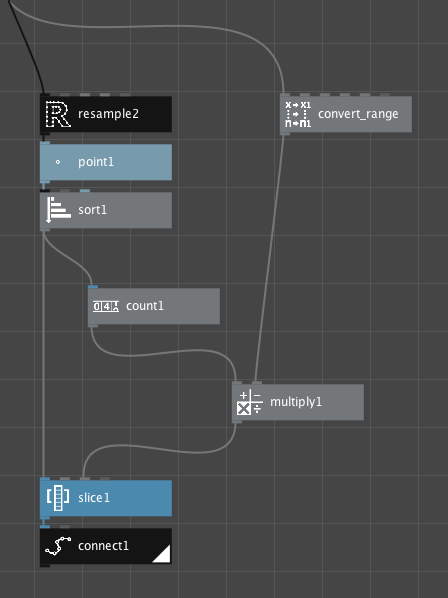
The trick is to first Resample (I resample by length for consistent results), convert to a list of points, sort those points, then slice and reconnect. Sorting by x coordinate fixes the random resampling weirdness that occurs with some shapes and works well for west-to-east arcs; reverse the sort to fly the other direction.
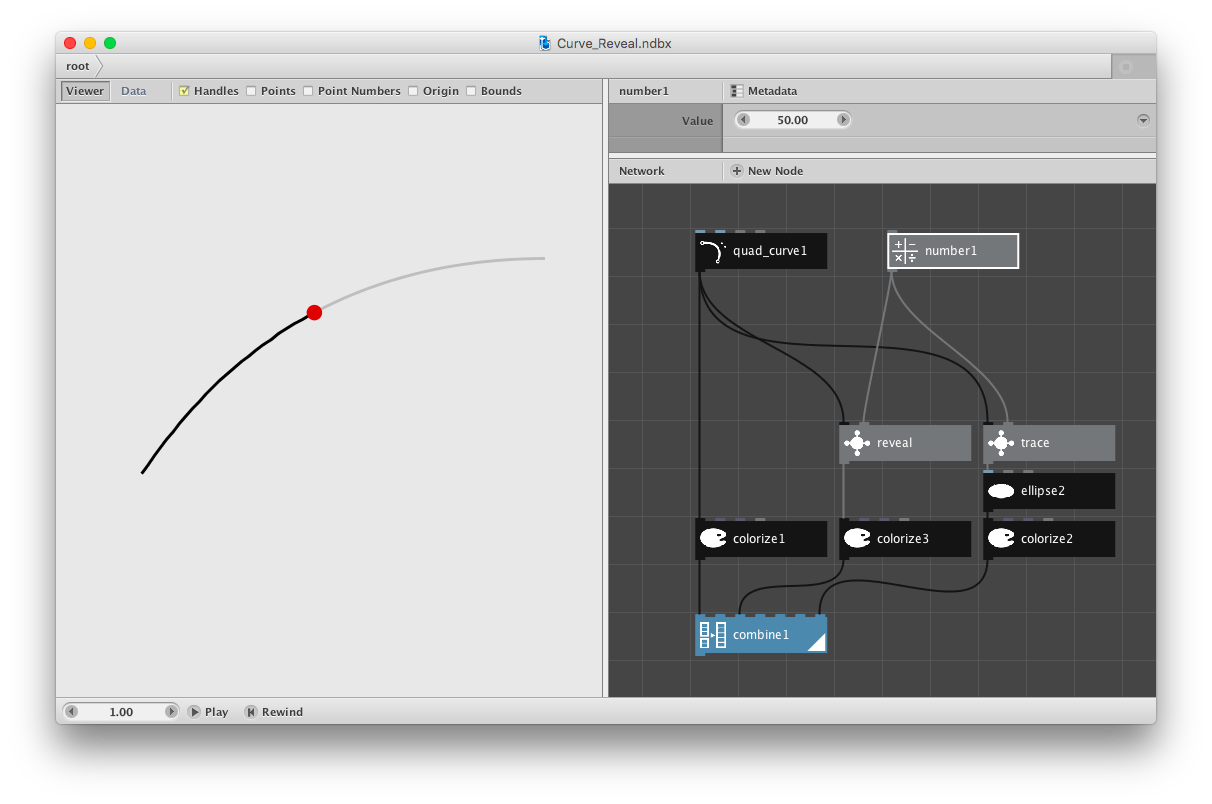
I am attaching a demo network that draws the entire arc in gray, reveals a percentage of that arc in black, and also shows a marker moving along the arc. The Reveal subnetwork reveals a percentage of the arc using the above method. The Trace subnetwork provides the marker position; it uses a similar technique except that it returns a "point on path". You can either combine all three, or use the Reveal or Trace subnetworks independently.
You control the animation by changing the value of the number node from 0 to 100 - just feed in a frame node to create an MP4. Both subnetworks take a path as input; I used a random quadratic curve.
Also attaching screenshots of the overall network plus the Reveal subnetwork.
Hope that helps!
John
NOTE: For some reason I am unable to attach the NodeBox network file. I've tried everything I can think of without success. So here, in desperation, is the actual text of the NodeBox file. Please copy paste it into a text editor and save the resulting file with a .ndbx extension. NodeBox should be able to open it. Please reply and tell me if this worked:
<?xml version="1.0" encoding="UTF-8" standalone="no"?>
<ndbx formatVersion="21" type="file" uuid="5514cbdd-5998-408e-acc8-c492d9d4461f">
<property name="canvasHeight" value="1000"/>
<property name="canvasWidth" value="1000"/>
<property name="canvasX" value="0"/>
<property name="canvasY" value="0"/>
<node name="root" prototype="core.network" renderedChild="combine1">
<node name="colorize1" position="4.00,13.00" prototype="corevector.colorize">
<port name="fill" type="color" value="#00000000"/>
<port name="stroke" type="color" value="#bebebeff"/>
<port name="strokeWidth" type="float" value="3.0"/>
</node>
<node name="colorize2" position="10.00,13.00" prototype="corevector.colorize">
<port name="fill" type="color" value="#df0000ff"/>
</node>
<node name="colorize3" position="7.00,13.00" prototype="corevector.colorize">
<port name="fill" type="color" value="#00000000"/>
<port name="strokeWidth" type="float" value="3.0"/>
</node>
<node name="combine1" position="4.00,15.00" prototype="list.combine"/>
<node name="ellipse2" position="10.00,12.00" prototype="corevector.ellipse">
<port name="width" type="float" value="16.0"/>
<port name="height" type="float" value="16.0"/>
</node>
<node name="number1" position="8.00,7.00" prototype="math.number">
<port name="value" type="float" value="50.0"/>
</node>
<node name="quad_curve1" position="4.00,7.00" prototype="corevector.quad_curve">
<port name="point1" type="point" value="-177.00,42.00"/>
<port name="point2" type="point" value="236.00,-179.00"/>
<port name="distance" type="float" value="-124.0"/>
</node>
<node name="reveal" position="7.00,11.00" prototype="core.network" renderedChild="connect1">
<node name="connect1" position="76.00,19.00" prototype="corevector.connect">
<port name="closed" type="boolean" value="false"/>
</node>
<node position="81.00,10.00" prototype="math.convert_range">
<port name="target_end" type="float" value="0.99"/>
</node>
<node name="count1" position="77.00,14.00" prototype="list.count"/>
<node name="multiply1" position="80.00,16.00" prototype="math.multiply"/>
<node name="point1" position="76.00,11.00" prototype="corevector.point"/>
<node name="resample2" position="76.00,10.00" prototype="corevector.resample"/>
<node name="slice1" position="76.00,18.00" prototype="list.slice"/>
<node name="sort1" position="76.00,12.00" prototype="corevector.sort">
<port name="order_by" type="string" value="x"/>
</node>
<port childReference="resample2.shape" description="The input shape." label="" name="shape" range="value" type="geometry" widget="none"/>
<port childReference="convert_range.value" description="" label="" name="offset" range="value" type="float" value="50.0" widget="float"/>
<conn input="point1.value" output="resample2"/>
<conn input="sort1.shapes" output="point1"/>
<conn input="count1.list" output="sort1"/>
<conn input="slice1.size" output="multiply1"/>
<conn input="slice1.list" output="sort1"/>
<conn input="connect1.points" output="slice1"/>
<conn input="multiply1.value1" output="count1"/>
<conn input="multiply1.value2" output="convert_range"/>
</node>
<node name="trace" position="10.00,11.00" prototype="core.network" renderedChild="point_on_path">
<node name="connect1" position="53.00,-1.00" prototype="corevector.connect">
<port name="closed" type="boolean" value="false"/>
</node>
<node position="57.00,-4.00" prototype="math.convert_range">
<port name="target_end" type="float" value="99.9"/>
</node>
<node name="point1" position="53.00,-3.00" prototype="corevector.point"/>
<node position="56.00,1.00" prototype="corevector.point_on_path">
<port name="t" type="float" value="58.0"/>
</node>
<node name="resample2" position="53.00,-4.00" prototype="corevector.resample"/>
<node name="sort1" position="53.00,-2.00" prototype="corevector.sort">
<port name="order_by" type="string" value="x"/>
</node>
<port childReference="resample2.shape" description="The input shape." label="" name="shape" range="value" type="geometry" widget="none"/>
<port childReference="convert_range.value" description="" label="" name="offset" range="value" type="float" value="50.0" widget="float"/>
<conn input="point1.value" output="resample2"/>
<conn input="sort1.shapes" output="point1"/>
<conn input="connect1.points" output="sort1"/>
<conn input="point_on_path.shape" output="connect1"/>
<conn input="point_on_path.t" output="convert_range"/>
</node>
<conn input="colorize1.shape" output="quad_curve1"/>
<conn input="combine1.list1" output="colorize1"/>
<conn input="colorize2.shape" output="ellipse2"/>
<conn input="combine1.list7" output="colorize2"/>
<conn input="ellipse2.position" output="trace"/>
<conn input="trace.shape" output="quad_curve1"/>
<conn input="trace.offset" output="number1"/>
<conn input="reveal.shape" output="quad_curve1"/>
<conn input="reveal.offset" output="number1"/>
<conn input="colorize3.shape" output="reveal"/>
<conn input="combine1.list3" output="colorize3"/>
</node>
</ndbx>