The new NodeBox forum is live! Everything from support.nodebox.net moved here: sign in with the same email to pick up your old posts. Something not working? Write to forum-support@nodebox.net.
Hi all, FYI I'm currently adding socket connectivity to the app to control basic stuff like file ops, reload graph, playback etc. Nodebox will act like a server that other apps (like After Effects :) ) will be able to send commands to. Then I will also implement a similar server in Python so the graph can send/recieve data in a similar fashion to the HTTP Get node. I should have a first pass pushed to my Github account in a week or so. Any feedback or feature requests would be appreciated :)
Also I'll be looking for someone to test this on a Mac.
TNKS!
G
FB
FBFrederik De BleserNodeBox team
Sounds awesome!
Are you making this into a pull request?
GE
GEgeordiemoffatt
I'll use my Github as a staging server first but yep once I'm ok with the changes I will :)
I'm new to Java so might need some advice on threading at some point. I've swapped it around so Nodebox will be the client not the server. This way someone could even write a network render server if they wanted.
Where I'm at:
Adding an entry in the settings dialog to enable/disable sockets
Got a thread running that looks for a server and connects when one's present. Thread's being spawned from the document class so should be easy to hook up socket "events" so they trigger app functions.
GE
GEgeordiemoffatt
PS this is the work/data flow I envisage:
External App (After Effects etc) want's to get some kind of dynamic layout or graphics from Nodebox. It starts up a socket server (probably via node.js) and then open Nodebox with commandline arguents to use sockets + port + server.
After Nodebox opens it tries to connect to the server. If it connects there's a handshake etc
Server then sends Nodebox a message to load a file. Once it's loaded Nodebox sends a "Loaded file Complete" message back to the Server.
The loaded Nodebox file has "Socket Send Data" and "Socket Receive Data" nodes which will push and pull data from the same server but they will need separate socket management in Python (unless I can work out how to call Java functions from Python).
Server then sends a "Seek Frame" message to Nodebox which forces Node box to eval the graph at frame N which in tern triggers the nodes to push and pull data from the server.
After the Server has received the data from Nodebox after the graph eval it can use it to render stuff etc
FB
FBFrederik De BleserNodeBox team
Exciting stuff! Some remarks:
NodeBox uses Jython internally, a version of Python that runs on the Java Virtual Machine. It has access to all of Java. (See here)
External nodes are written in Jython or Clojure, but since you're adding core functionality you can just as easily create them in Java. See here for a list of core functionality implemented in Java.
If I would design this I would make NodeBox the server, so that I have an API over sockets that I can talk to. Then I could just access NodeBox as a remote control: open this file, go to this frame, return me the output. This would mean that the Application object would open a socket on a user-definable port, and that it could be controlled from there. Opening a new document would give you a handle that you can pass in subsequent requests (a unique id or (hash of an) absolute file path will do).
Making NodeBox the server might also obviate the need to create send and receive nodes, though I'm haven't thought through all the possible use cases.
GE
GEgeordiemoffatt
Thanks for the feedback!
Cool I'll look into the Jython stuff, I've used a lot of .Net -Python interop but not Java.
So I could make a sockets API available to the nodes instead of creating a native python server/client? That sounds far better.
Yup I agree on the serve/client stuff. I originally was thinking more along the server lines but the model I'm going after is more treating Nodebox like a satellite renderer, an app could have multiple Nodebox instances active at the same time, even feeding the output of one into the input of another etc. But I don't really care, whatever works best :)
JO
JOjohn
I have a use case for this.
Once a quarter I use NodeBox to create a deep-zoom PDF of a differential org chart for our organization. This allows us to track changes to our org over time.
I was recently asked if I could automate this and had to say no. But it would not take much...
To create these PDFs I:
Download a pre-defined csv report from our corporate directory system
Rename the file and store it in a special directory
Open my org chart network in NodeBox
Change the input on a CSV node to the new csv file
Change a String node to update the report date in the chart's subtitle
Export the rendered chart to a PDF
So I guess that in addition to launching a specific NodeBox network file, I would also need the ability to update a few specific node parameters within the network before triggering an export.
Could the proposed APIs handle this use case?
Thanks for keeping us all in the loop!
John
FB
FBFrederik De BleserNodeBox team
I think updating parameter values through the socket API is quite important.
In NodeBox Live (the Web version currently in development) this function has the signature setValue(node, parameter, value).
GE
GEgeordiemoffatt
I've been able to do a bit of work on this. I'm exploring the client workflow first then add server support. Got new connect to server and send message nodes working. Added them to the network catigory. Can send a string to an echo server and get it back. I have the socket object running on it's own thread but I think I might put this in the main thread for graph related sockets as I want them to block so the graph processing order is respected. I can imagine all sorts of hell trying to make a message que and syncing another thread to main. App control is a different story as we obviously cant have it block the main thread. Thinking I might have two sockets, one for app control and another for graph I/O.
GE
GEgeordiemoffatt
Ok made some progress on this. After trying a couple of different raw socket tests I implemented a websocket/JSON interface, it's waaaay more simple and also globally compatible with any language. I have a static class with send and get message functions. send message creates a random UUID which it passes to the server along with the message and also returns the UUID to the calling code. the static class then implements a thread safe map where it dumps received messages with their id. Then you just need to poll get message to get the message with a specific id. This way any part of Nodebox can send and receive messages in a thread safe manner and also block till a message is received if needed. I have a special id of APP which will control Nodebox commands, implementing that next.
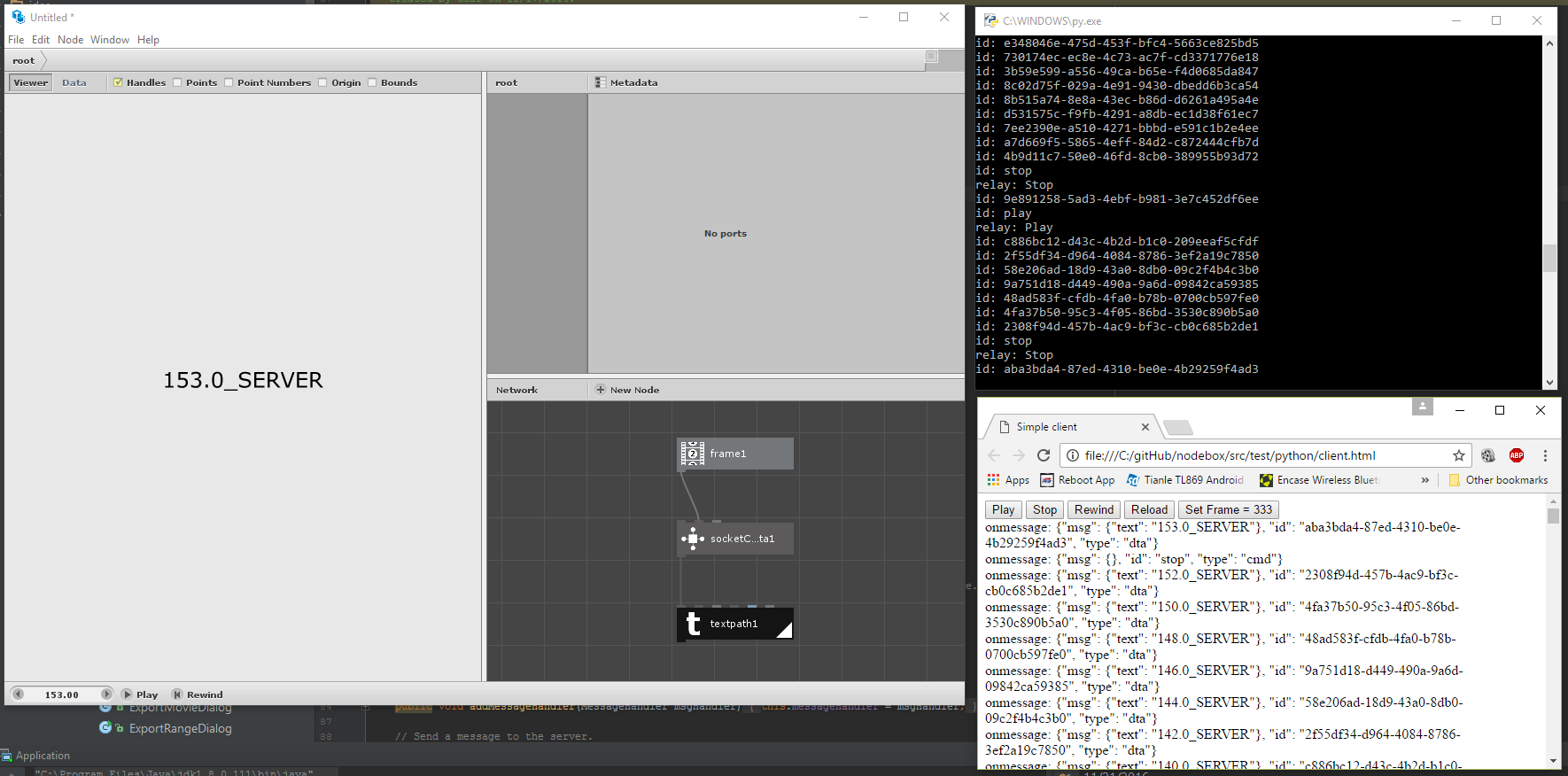
Got a first pass of commands working and a test Python websocket server. Server will add "_SERVER" to the end of a string passed to it for example the current frame number. Can also send "relay" messages which pass through the server and to Nodebox. This way you can hang third party controllers off the server, in this case a web page.
FB
FBFrederik De BleserNodeBox team
Wow, this looks awesome!
Is your intention for it to control NodeBox, like AppleScript (or VBScript on Windows?) E.g. open a file, choose, play, export, create new nodes, ....
GE
GEgeordiemoffatt
Yup, any command that's already in nodebox can be easily added as a socket command. My personal goal after I've got the Nodebox side complete is to make a node.js server in After Effects and use Nodebox as a data processor
I've got everything working in the app code. Gracefully handles things like the server dropping out and will auto reconnect etc. Had some threading issues between the sockets and renderer but got it working nicely.
Now I need to do a bit more work on the node code. I should have a pull request ready in the next couple of days.
GE
GEgeordiemoffatt
Frederik what's the best way to contact you? Want to chat about some threading issues.
FB
FBFrederik De BleserNodeBox team
Email: frederik AT debleser DOT be.
GE
GEgeordiemoffatt
OK I'm almost ready for a pull request, worked out the final issues last night. I think there's still more work to be done on creating a nice restful interface for commands but this is a good first try.
Here's the basic additions and how it works:
I've added a new entry in Preferences to enable/disable websockets and the server address.
When Nodebox starts it creates a static websocket connection that can be accessed from graph nodes. I've added several node type:
Network -> SocketSendData
This is similar to HTTP Get but using the websocket interface. It's input is a JSON string. It sends it's input string to the server and then waits for a response which is the node's outputs as JSON. This works by assigning a unique ID to each request, then the node blocks until a response with a matching ID is found to ensure node cooking order is maintained (lots of threading moving parts here). You can then use the exiting query json node to get at the received data.
Network(?) -> GeometryToJson
This takes any geometry/shapes/paths etc as input and encodes it to JSON. This can be used to send geometry information to the server for processing. TODO: Build a JsonToGeometry node.
Network(?) -> CookGraph
This node allows you to cook part of a graph while still outputting geometry. This can be used to force the system to send data to the server while still flowing the geometry through the graph.
Each open document has a command websocket used to send commands and requests.
Current list of commands:
PLAY
STOP
REWIND
SETFRAME
RELOAD
LOAD
EXPORTRANGE
List of requests:
GETFRAME – Returns the current frame number
GETDOCS – Returns an array of all open documents
GETDOC – Returns info about the current document
I’ve created a test server in Python. It would be pretty easy to implement a server in node.js or any other framework/language you like.
Server supports relay commands, this way you can have a control client which can send data to Nodebox. This is more for test purposes right now but could easily be turned into something more useful. Currently it just broadcasts commands to all open documents.
Please let me know if you’d like any other commands or requests added.
Thanks!
Geordie
GE
GEgeordiemoffatt
PS: The commands are queued and vaguely wait for all rendering/exporting to finish before executing the next command. So you can fire off multiple commands quickly. I want to add return messages so the system tells the server it's finished rendering etc.
FB
FBFrederik De BleserNodeBox team
This looks awesome! For other web-based purposes, it would be interesting to export an SVG. However, this functionality is not in NodeBox itself (it is in NodeBox Live), so we'll first have to implement / port it.
GE
GEgeordiemoffatt
Yeah that would be a good idea, then say a Nodejs server could ask for SVG code from Nodebox as part of a HTTP request.
GE
GEgeordiemoffatt
OK I just created a pull request, I've never done this before, Frederik, do I have to add you as a reviewer or anything?
FB
FBFrederik De BleserNodeBox team
I saw it and commented on the PR.
JO
JOjohn
Hi Geordiemoffatt,
Are you still active on this? What is the current status?
I recently posted a question on integrating NodeBox with Jupyter notebooks and I wonder if your work would apply to that: