Hi, I am trying to apply for numbers only vertically in wiggle offset. Is there any way to separate offset value? Do I have to make new node for it? Can you please help me? Thanks.
Chung
The new NodeBox forum is live! Everything from support.nodebox.net moved here: sign in with the same email to pick up your old posts. Something not working? Write to forum-support@nodebox.net.
General DiscussionFrom the old forum
Hi, I am trying to apply for numbers only vertically in wiggle offset. Is there any way to separate offset value? Do I have to make new node for it? Can you please help me? Thanks.
Chung
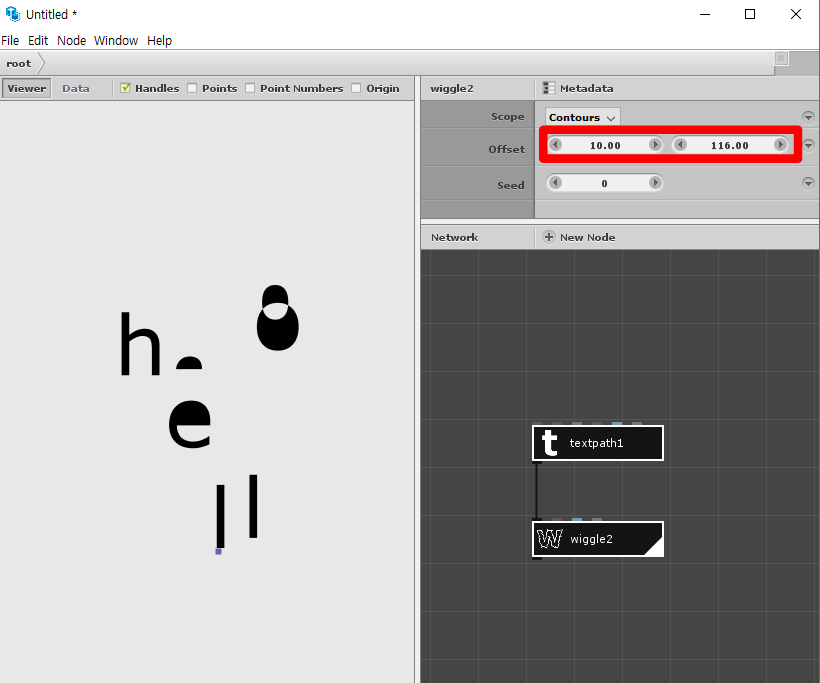
I am not exactly sure what you are asking. But if you want to adjust a number label randomly up or down you need to:
You can then vary the seed value to watch the label jump up and down at random.
You can set the second Y part of the offset value by hand. But if you need to set it programmatically (by attaching the output of some other node to the wiggle offset port)
you can do this using a make point node.
Make Point takes two separate inputs, X and Y. Leave X at 0 and hook whatever you want into Y. The result is a point with an X value of 0 and a Y value of whatever. Feed that into the offset port of your wiggle node.
If you have more questions about the wiggle node let me know. A few things to note:
You can use it to jiggle the individual points of a connected shape, the contours (like the inside path of a letter o or e vs. the outside path), or the entire path.
If you want to wiggle the letters of a text path separately, you will need to first break it into individual paths.
Random seeds can be tricky; if you want different objects to wiggle independently you may need to feed in different seeds.
Please let me know if that was helpful.
John
The offset of the wiggle node is a point value (x,y). If you use a makepoint node you can feed the x and y value separately and attach that makepoint node to the input port of the offset.
Thank you so much, John and Lucasnijs~! It is so helpful and I got what I wanted to know.