The new NodeBox forum is live! Everything from support.nodebox.net moved here: sign in with the same email to pick up your old posts. Something not working? Write to forum-support@nodebox.net.
I was asking myself, how much can I customize the file format through the "Document properties" panel? For example I noticed that Nodebox exports videos at 25fps and let's say I need it to be at 30fps. Is there a way I could change that? And what are other examples of tweaks I can implement using this panel?
Thanks for your attention,
Seba
JO
JOjohn
Hi Seba,
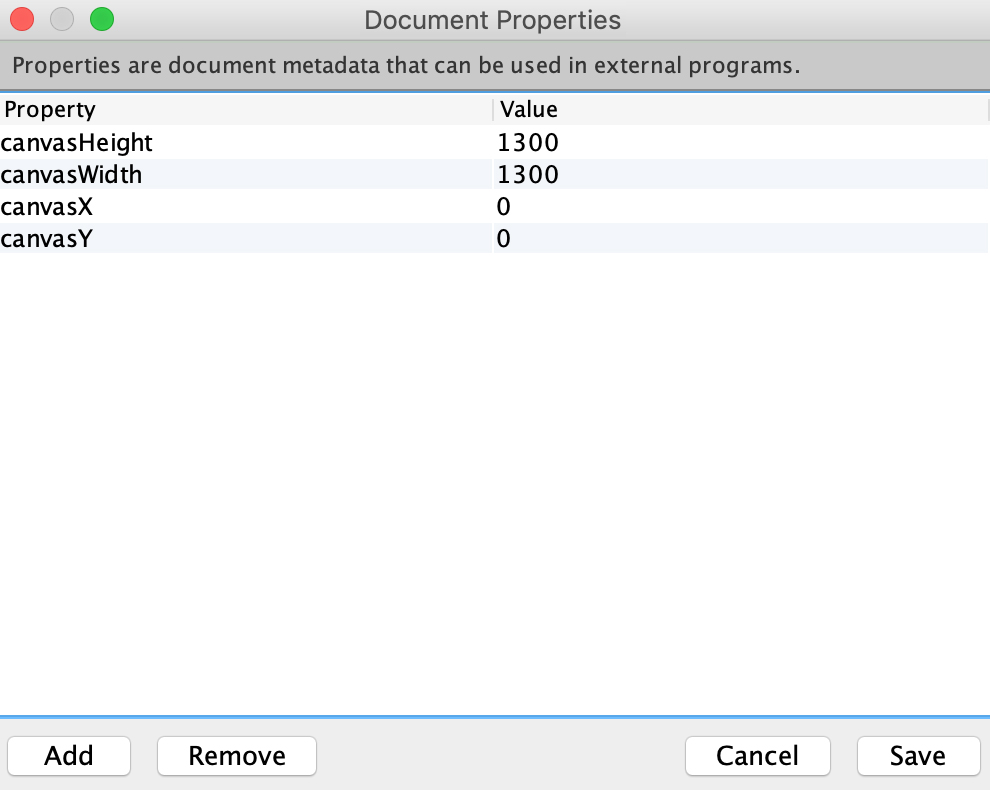
My understanding is that only the four listed properties currently have any effect in the NodeBox runtime environment. So you can use document properties to change the size of the canvas (which controls where clipping occurs when exporting PNGs, etc. and defines the dimensions of an exported movie). You can also adjust the center point of the canvas. (You can achieve an equivalent effect using a translate node; I've never had a reason to use canvasX and canvasY).
You can add additional metadata labels and values. These will be added as properties inside the .ndbx file (which is just an XML doc), but, as far as I know, will have no effect. So, for example, you could add an "author" property and set its value to your name to have that information included whenever you save that NodeBox network. If you wrote your own app that could import .ndbx files you could use this mechanism to pass additional information.
I suspect this technique could also be used by Frederik or by someone using a branched version of the open source code to easily add new functionality. But mere mortals can only dream of such things.
A number of people over the years have asked for a way to adjust the frame rate when exporting movies. Frederick logged this as issue 382 back in February of 2014, but to date has done nothing about it: https://github.com/nodebox/nodebox/issues/382