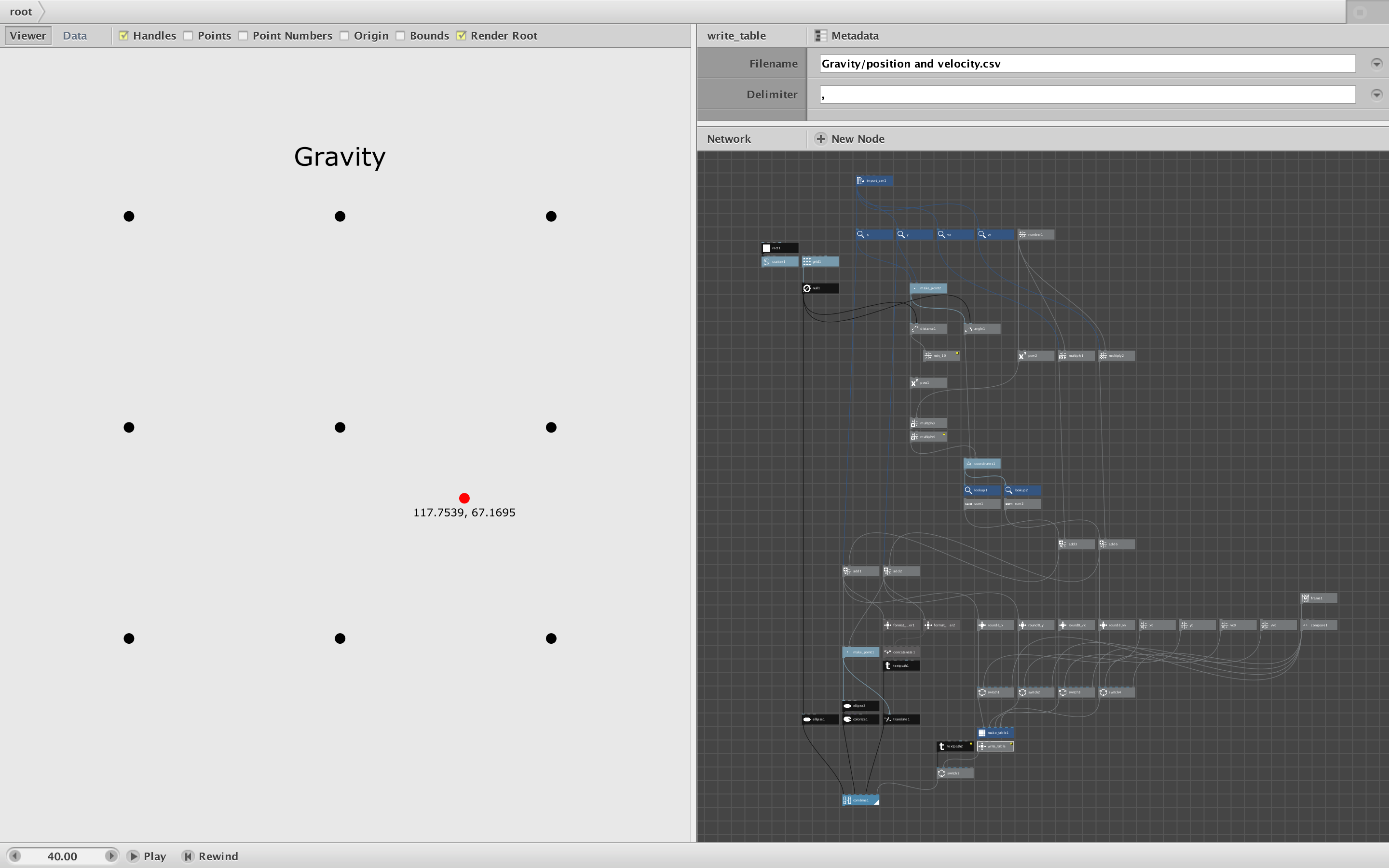
Simone,
This is WONDERFUL!
No need to apologize for diverging from "the purpose of NodeBox" by the way. The purpose of NodeBox is to do whatever you want with it.
One advantage of being a newbie is that you attempt things that more experienced users think is impossible. That's what you've done here. NodeBox is stateless, that is, it has no built-in way of storing a previous state. This makes debugging much easier, but prevents recursive processes like your gravity simulator.
You overcame that by writing your own python node to write the previous state into a text file and then read that same file each time the frame advances. I arrived at a similar solution a few years ago when I made a NodeBox version of Conway's Game of Life:
https://forum.nodebox.net/t/16486912/conway-s-game-of-life
As you mentioned, you ran into the same problem I did: how to avoid hard-coding the full path to the file. This is a surprisingly hard problem, but I eventually found a solution.
To demonstrate, I created a new version of your project (attached). I moved the part of your python code that initialized starting values into the NodeBox network and replaced your Node1 with my general purpose write_table node.
Write_table requires it's own python module (write_table.py) that uses the Python os package to find the root of the directory and derive a file path relative to the user's Desktop. This works for both Macs and PCs and can be used for any project. Peek inside write_table.py to see how it works.
Inside the Nodebox network I wrapped the write_table node inside a write_table subnetwork. The subnetwork uses a clever trick to discover the relative path from the current network and feeds a portion of that into the write_table node. As a result, you can now rename the folder (I changed your "json" to "gravity") and place it anywhere (inside any other folder) you want - as long as it lives somewhere on or below your desktop. You just need to make sure the state table (position and velocity.csv) stays in the same folder as the network (new_gravity.ndbx).
Write_table uses CSVs instead of JSON, but everything else is pretty much the same. I tidied up the nodes to make the network more compact and easier to read.
I also added two fun options which you can activate by changing a few node connections. Instead of a grid of nine gravity dots, you can use a random scattering of dots - see attached movie.
And by wiring in the min_10 node you can prevent the red dot from landing less than 10 units away from any black dot. This makes sense (if the red dot gets closer than 10 units it would overlap a black dot) and prevents the slingshot effect that quickly hurls the red dot into outer space. (The red dot can still achieve escape velocity at normal gravity but it's much more unlikely, so you can have hours of fun watching the red dot wander about.)
Note: NodeBox will trigger write_table twice each time when you save a movie (same result but twice as fast). This is an annoying NodeBox behavior. I like your solution of including the frame number in the data and checking it in the Python code, but didn't want to add project-specific code into my general purpose node. I don't think it matters too much, but you could always add that test back in if you want.
I do have a question for you. You mentioned that you can also change time scaling and gravity. I think I see where you change gravity (the multiply4 node, normally set to 100, that magnifies the distance value). I'm guessing the number node in the upper right corner is supposed to be your time scaling value but I don't understand how it works. If you change that value to anything above 1 (even 1.01) the red dot will quickly accelerate away; anything less (even 99.9) and it will grind to a halt. As currently constructed this scaling value actually changes the stored velocity, so the effect quickly compounds. Is this a bug or am I missing something?
This is such a cool project - thanks again for sharing it. Do you have plans to take the idea further (e.g. have gravity dots of varying size and mass, allow the gravity dots to move, have the red dot leave a trail, etc.)?
John