Masha,
My apologies. I normally get email notifications when anyone posts to the forum but for some reason that stopped working last week, so I am only now seeing your note.
Even worse, I cannot open your attached file. I see that it has a ndbx file and an svg file, but I get a message that the files are corrupt and cannot be extracted.
Could you please try sending those file again? If possible, try sending them as ZIP files instead of RAR files.
I will be able to give you specific help once I can see your files. In the meantime, though, I can give you some general answers to your questions.
Question 1. Speed...
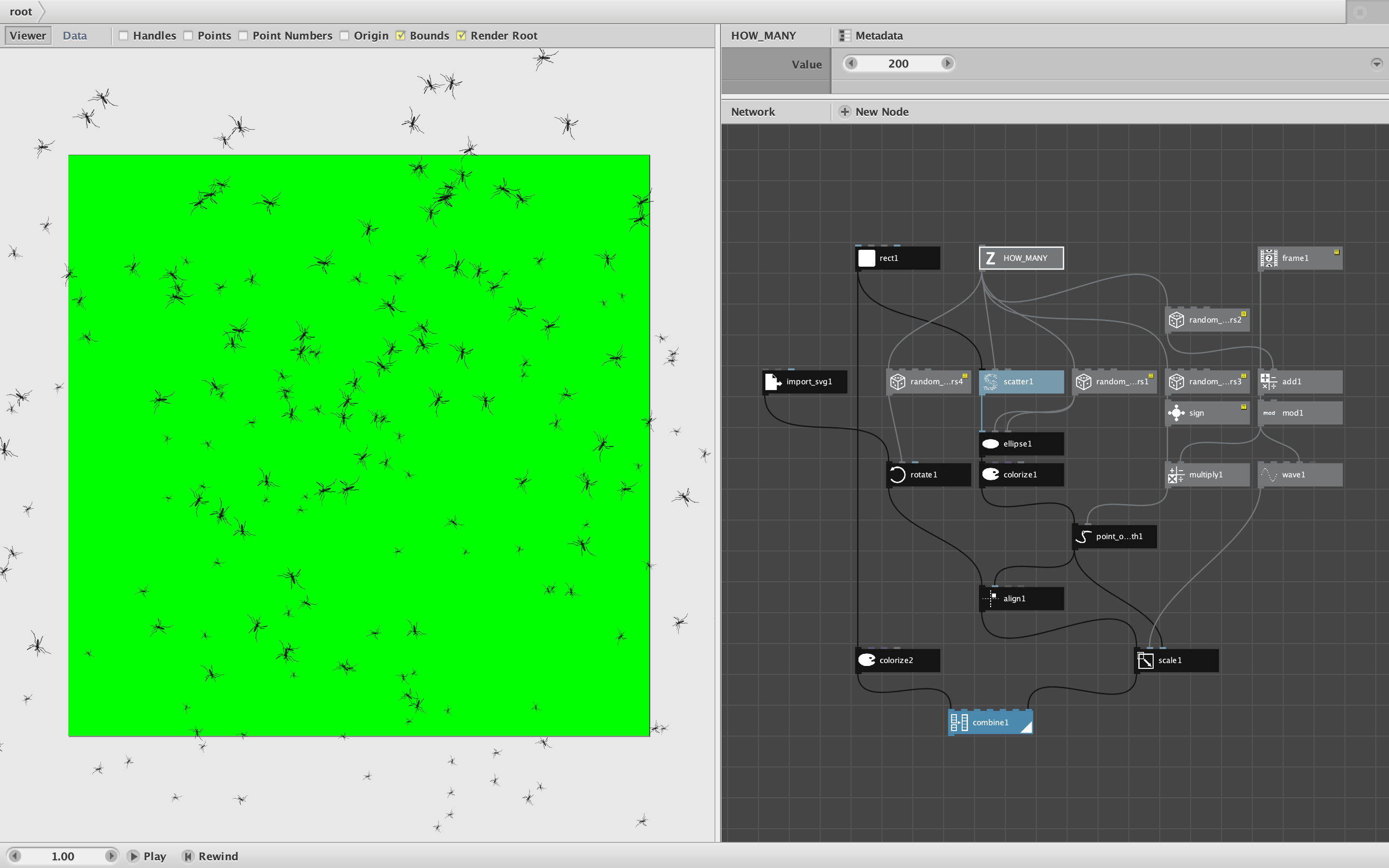
Animations in Nodebox are created by feeding the output of the frame node into the rest of your network. This produces one frame for each value in the range you specify when you export a movie.
An easy way to speed up or slow down your movie is to multiply or divide the output of the frame node. Just add a multiply node to the output of your frame node and feed the output of the multiply node to the rest of your network. If value2 of the multiply node is set to 1, the movie will play at normal speed. If value 2 is set to 2, Nodebox will export every other frame, which will make the movie seem to run twice as fast. If you set value 2 to, say, .25, the movie will produce four times as many frames, making it seem to play four times more slowly.
Question 2. Rotate each mosquito
This is done with the rotate node. Feed the shape corresponding to each mosquito into a rotate node before combining it into the final output. To control the speed of rotation, feed your frame+multiply node into a convert range node so that incoming frame values are converted to angles. For a hundred frame movie if you convert source values of 0 to 100 to target values of 0 to 360, each mosquito will do a complete clockwise rotation during the course of the movie. If you set target values to 0 to 720, it will do two full rotations. 0 to -360 will do a counterclockwise rotation. And so forth.
When using the rotation node it is very important to also set the origin parameter. You will need to compute the current location of each mosquito (with the centroid node if you don't already have it) and feed that into the origin port of the rotation node.
You can randomize the speed and direction of each mosquito's rotation by adding random values to the target end port of your convert range node (generate a list of random numbers equal to the number of mosquitoes).
Question 3. Zooming
You can make individual mosquitoes appear closer or farther away by using the scale node. Set the scale value to less than 100 to shrink the mosquito (making it seem farther away) of to more than 100 to enlarge it and make it seem closer. You can generate random scale values for each mosquito to shrink or enlarge each one separately.
To make this effect seem realistic, you will want to slowly increase and decrease scale values over time, not jump around from one frame to the next. This can be done using the wave node to generate sine waves for each mosquito and feeding the frame into the wave offset to retrieve rising and falling values to feed into the scale node. This is a bit tricky so will require some experimentation to get the effect you want.
As for exporting movies with transparent backgrounds and combining that with other video clips to produce overlays, that is something I've never tried. The Export Movie option produces an MP4 output which probably does provide a solid background even if you don't provide one.
As you suggested, it might be possible Export Range instead of Export movie and output individual frames. The PNG format does support transparency. So one thing to try would be to combine your final output with a rect equal to the canvas size inserted underneath the rest of your content. Colorize that rect with a fill set to alpha 0. I don't know if that will work, but it's worth a try.
I realize these suggestions may be a bit confusing. If I can get ahold of the files you originally tried to attach, I could provide you with an example of these techniques to get you started. So please resend.
Also, if you do try my overlay idea and it works with whatever video app you are using, could you please a note describing what you did? I'm sure other Nodebox movie makers would appreciate learning how to do overlays.
John
P.S. Thanks, edgeofinnerspace, for offering to help. Please feel free to jump in at any time.