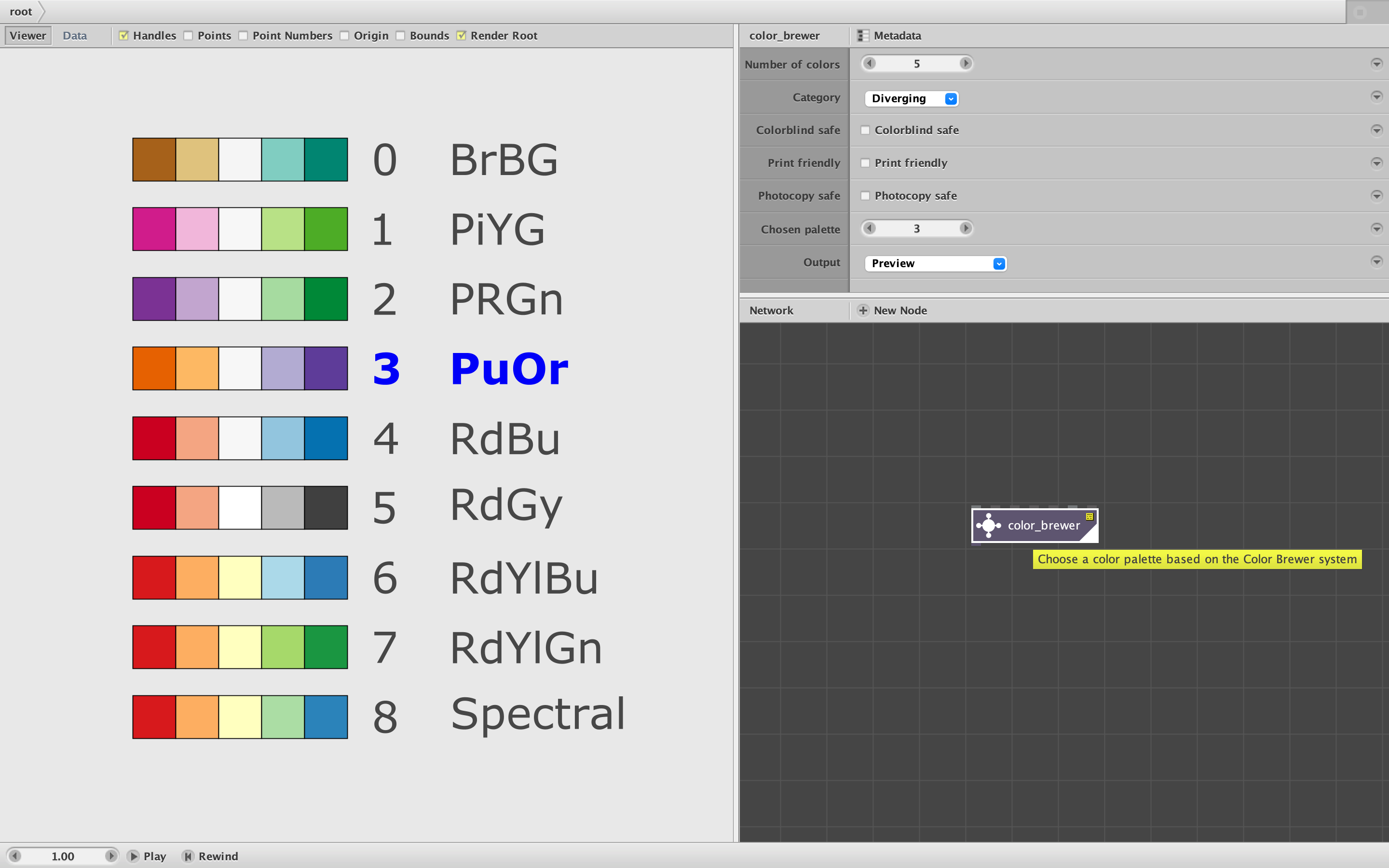
Attached is yet another new color node. Color_brewer allows you to choose a color palette based on the widely used ColorBrewer system.
The Color Brewer system was developed by Dr. Cynthia Brewer at the Pennsylvania State University: https://en.wikipedia.org/wiki/Cynthia_Brewer
It was developed especially for cartography, but is useful for a wide range of data visualization tasks. It provides three categories of color palettes (Sequential, Diverging, and Qualitative) with different color combinations tuned for use with a specific number of data classes from 3 up to 12. Each set of palettes can be further filtered to only show only those which are colorblind safe, print friendly, and/or photocopy safe (can survive conversion to grayscale).
The system is available on the web at this address: https://colorbrewer2.org
Many data visualization users in NodeBox are familiar with the ColorBrewer system. In order to use one of these palettes, they would have to find the online tool, filter to select a particular palette, export or copy the color string, edit it to remove quotes, and paste it into a make_strings node. If they then wanted to see the final results of their map or chart using a different ColorBrewer palette, they would have to repeat this process each time.
The color_brewer node eliminates this hassle. The node lets you quickly filter and select any of the 265 possible palettes and then output the selected palette as either a color string or a color list - all without ever leaving NodeBox. Using this node you could step through different palettes and see the final effect with a single click for each change. The node is entirely self-contained; no need for an external CSV file.
The node makes it easy to see and filter the various palettes in a few easy steps:
- Make sure Output is set to "Preview".
- Choose the number of colors you want.
- Choose a category (or select "Show All").
- Check or uncheck any combination of the three filters (Colorblind, Print, or Photocopy).
- Pick your chosen palette from the numbered chart. Your choice is shown in blue.
- Before hooking to other nodes, change Output to either Color String or Color List
That's it. This should be a big time saver for data visualizers, and will also be handy for anyone needing a quick, well-balanced palette. If you want, you can hook it into my new palette node (see previous post) and use that to turn your simple color_brewer palette into a much larger palette or even a full spectrum for gradients.
John
NOTE: This color_brewer node is my own derivation and is not in any way sponsored by or affiliated with Dr. Brewer or Pennsylvania State University. I have written Dr. Brewer to notify her of this node and get her permission to use the name color_brewer. I have not yet heard back from her; if she has any objection to the name of the node, I will change it.
The ColorBrewer data I used was released under an Apache 2.0 license. Following are the required disclaimers and conditions of use:
Apache-Style Software License for ColorBrewer software and ColorBrewer Color
Schemes
Copyright (c) 2002 Cynthia Brewer, Mark Harrower, and The Pennsylvania State
University.
Licensed under the Apache License, Version 2.0 (the "License"); you may not
use this file except in compliance with the License. You may obtain a copy of
the License at
http://www.apache.org/licenses/LICENSE-2.0
Unless required by applicable law or agreed to in writing, software
distributed under the License is distributed on an "AS IS" BASIS, WITHOUT
WARRANTIES OR CONDITIONS OF ANY KIND, either express or implied. See the
License for the specific language governing permissions and limitations under
the License.
Redistribution and use in source and binary forms, with or without
modification, are permitted provided that the following conditions are met:
-
Redistributions as source code must retain the above copyright notice, this
list of conditions and the following disclaimer. -
The end-user documentation included with the redistribution, if any, must
include the following acknowledgment: "This product includes color
specifications and designs developed by Cynthia Brewer
(http://colorbrewer.org/)." Alternately, this acknowledgment may appear in the
software itself, if and wherever such third-party acknowledgments normally
appear. -
The name "ColorBrewer" must not be used to endorse or promote products
derived from this software without prior written permission. For written
permission, please contact Cynthia Brewer at cbrewer@psu.edu. -
Products derived from this software may not be called "ColorBrewer", nor
may "ColorBrewer" appear in their name, without prior written permission of
Cynthia Brewer.
A link to the text of this license is also present inside the color_brewer node.