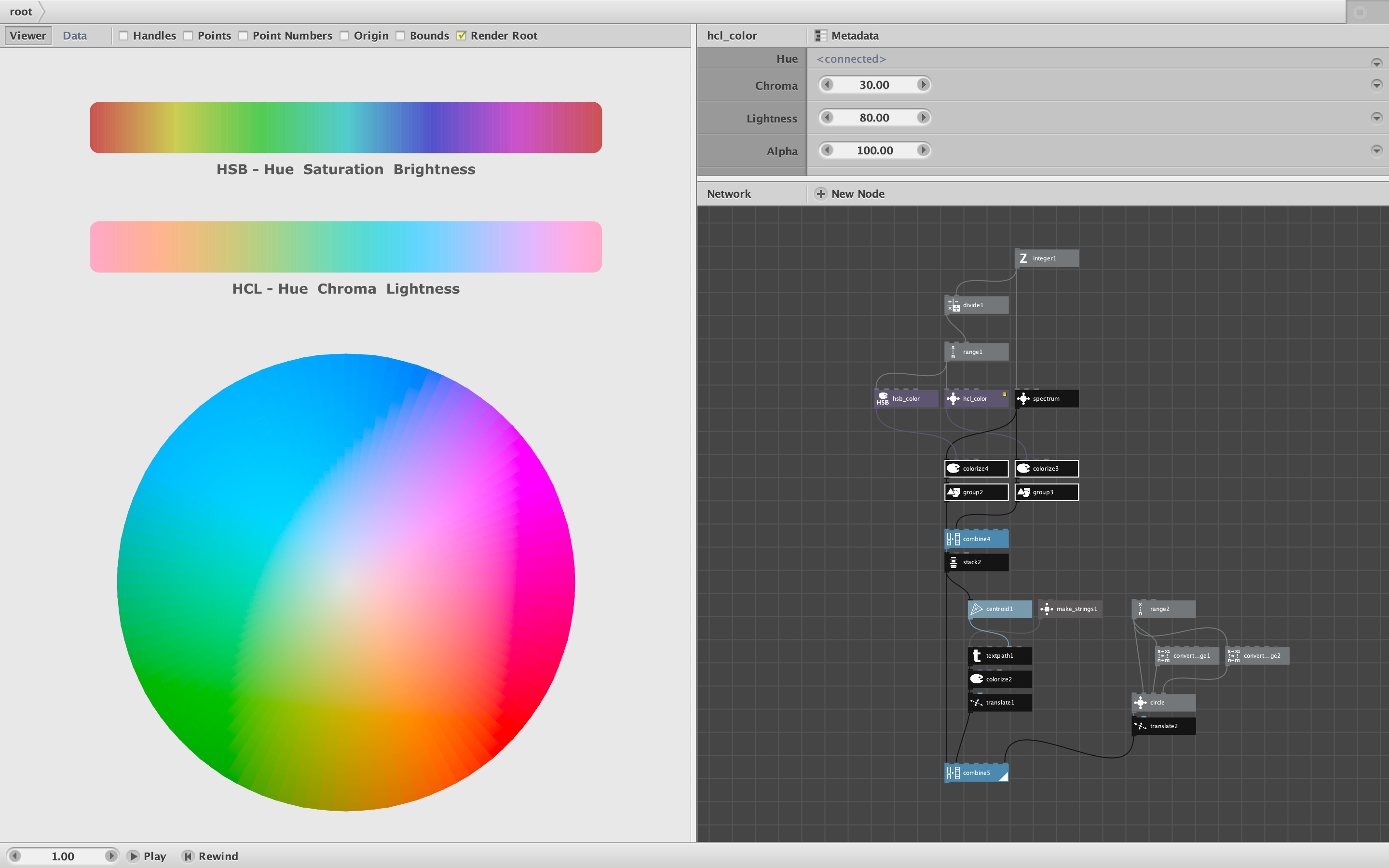
In addition to adding the CLH / HCL color space to my update of the palette node, I am also releasing it as a separate node.
The HCL_Color node works very much like the RGB_Color and HSB_Color nodes: They let you directly specify the parameters (Hue, Chroma, Lightness, Alpha) to create a color object. The range for all values is set to 100.
Unlike the palette node, which produces colors based on an arbitrary initial color list, the HCL_Color node produces entirely HCL-based colors, so can be used to create a pure spectrum which shows the true nature of the space.
For the attached demo, I recreated the color spectrum comparison from this CHL web page: https://atmos.style/blog/lch-color-space
The top spectrum shows the hues available in the standard HSB space. The lower spectrum shows a similar spectrum for the HCL space, made by simply feeding a range of hues into the HCL_Color node while keeping the other parameters fixed. You can see that HCL is softer and smoother than HSB.
Just for fun I also added a HCL color wheel - easy to make with the HCL_Color node.
If you like working in the HCL (or LCH) color space, you can drive all your colors using this node.
John
Thanks to Pushkine and Stack Overflow for the formulas: https://gist.github.com/pushkine/c8ba98294233d32ab71b7e19a0ebdbb9