If you ever need the sum of a list of numbers, you have the sum node. And if you need a running total of a list of numbers, there is the running_total node (or my running_start node).
But what if you need a product, or a running product? abc*d instead of a+b+c+d? In a normal language, with loops and global variables, such a function would be fairly easy to make. But in Nodebox, with no loops and no persisting state, it requires some cleverness.
Behold! The products node (attached)!
This node is really two nodes in one. Feed it a list of numbers and will output a list of running products (like the running_total node). Check the "Final only" checkbox, it will just spit out the total product (like the sum node).
The node has two other options. If you are dealing with fractions, you can control the precision (how many digits after the decimal point). This is useful because the node uses logarithms that occasionally return slightly inexact values (like 1.99999999 instead of 2). If this is a problem, try adjusting the precision.
You also have the option to ignore zeros. This is not a problem with sums. But with a chain of multiplications, a single zero will turn everything after that into a zero. This will not come up very often, but if it does, instead of filtering out zeros before feeding your list into this node, you can just check the "Ignore zeros" checkbox. It will treat any zeros (actually, anything with an absolute value less then one ten-thousandth) as a 1 for multiplication purposes. That is, it won't change the overall product.
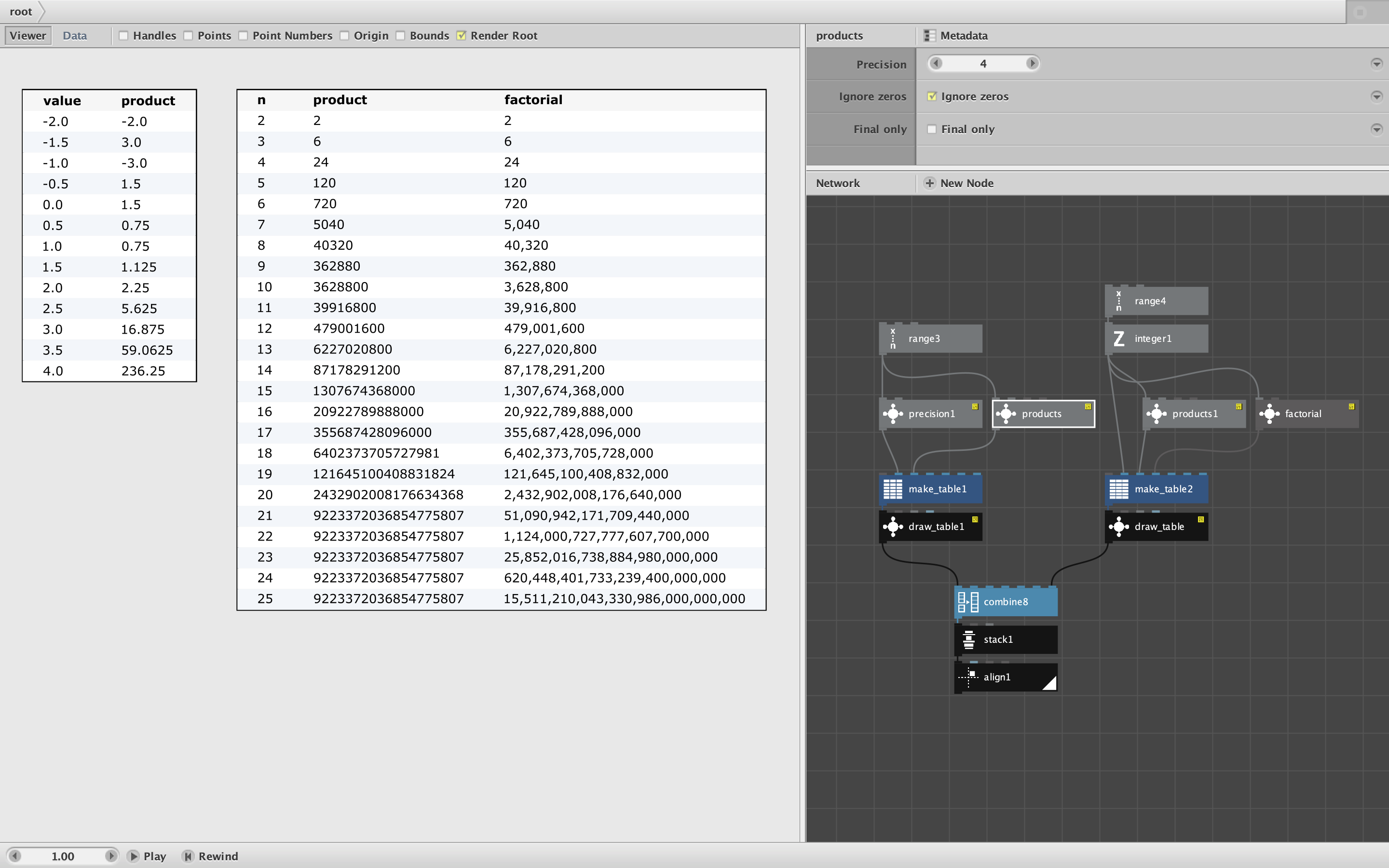
The attached demo shows two scenarios.
In the table on the left, I feed in a range of numbers from -2 to 4 in steps of .5. Notice that the running product changes back and forth from negative to positive depending on whether there are an odd or even number of negative values in the multiplication chain. Also, in this case we hit a zero when we cross from negative into positive numbers. I checked the "Ignore zeros" option, so the zero does not alter the subsequent calculations. If I had checked the "Final only" checkbox, I would have received the final product, 236.25, instead of the list.
In the table on the right we see what happens when you try to find the product of the positive integers, that is, the factorial. Products actually does a fine job with this - up to a point. Unlike sums, products tend to grow exponentially and soon surpass the limits of your computer's floating point system. You can see this start to happen at n=18, when the final digits are just slightly off. Things go quickly off the rail after that, and by n=21 you have passed the largest number that can be fully represented.
The moral of that story is to be careful when dealing with the products of many numbers greater than 1. They can grow very fast and will hit a wall at some point. This example shows just how amazing my factorial node is - it can provide exact values (with commas if you want!) WAY beyond this point.
A final note. I made this node some time ago, but wasn't planning to include it in my library because I didn't think it would get used very often. But then I came across a need for it for some of my color theory experiments. You don't need this products node very often, but if you do need it, you need it bad!
Happy multiplying!
John