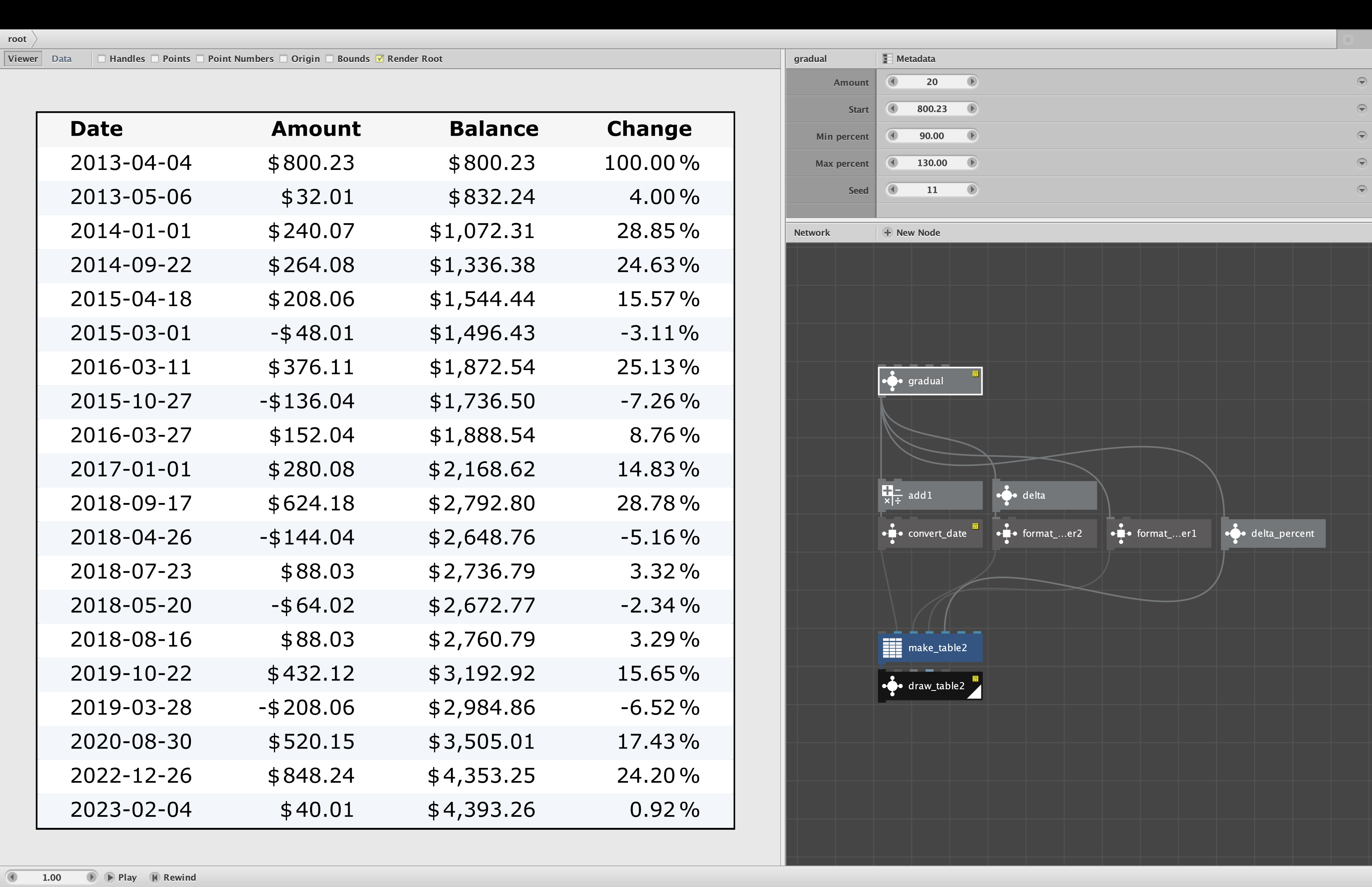
Attached is an improved version of my draw_table node.
Draw_table converts a data table to a graphical object that you can include in your output. It produces a table that looks somewhat like the data view, but with cleaner column spacing.
Like Nodebox's data view, all columns are left-justified. This can make columns of floating point numbers harder to read. Hence, my new option: "Align numbers".
If you check this option, draw_table will detect which table columns are numeric and align the numbers in those columns to their decimal points. It will automatically handle numbers with dollar and percent signs (placing minus signs in front of dollar signs when needed). For larger numbers it will insert separators (comma or period) every three digits depending on local region.
The attached demo and screenshot show one example. Try clicking the "Align numbers" option on and off to see the difference. The date column is recognized as non-numeric (even though all entries contain nothing but numbers and dashes). The other three columns are recognized as numeric and correctly aligned despite the dollar and percent signs.
Detecting and aligning numeric columns is tricky. I tried to anticipate many possible variations, but some unusual tables may fool my node. So if anyone out there uses this node and finds a case where this new option fails, I would really appreciate you sending me the example.
Enjoy!
John
Note: the demo requires dateformat.clj to quickly generate fake dates, but no external libraries are required by the draw_table node.