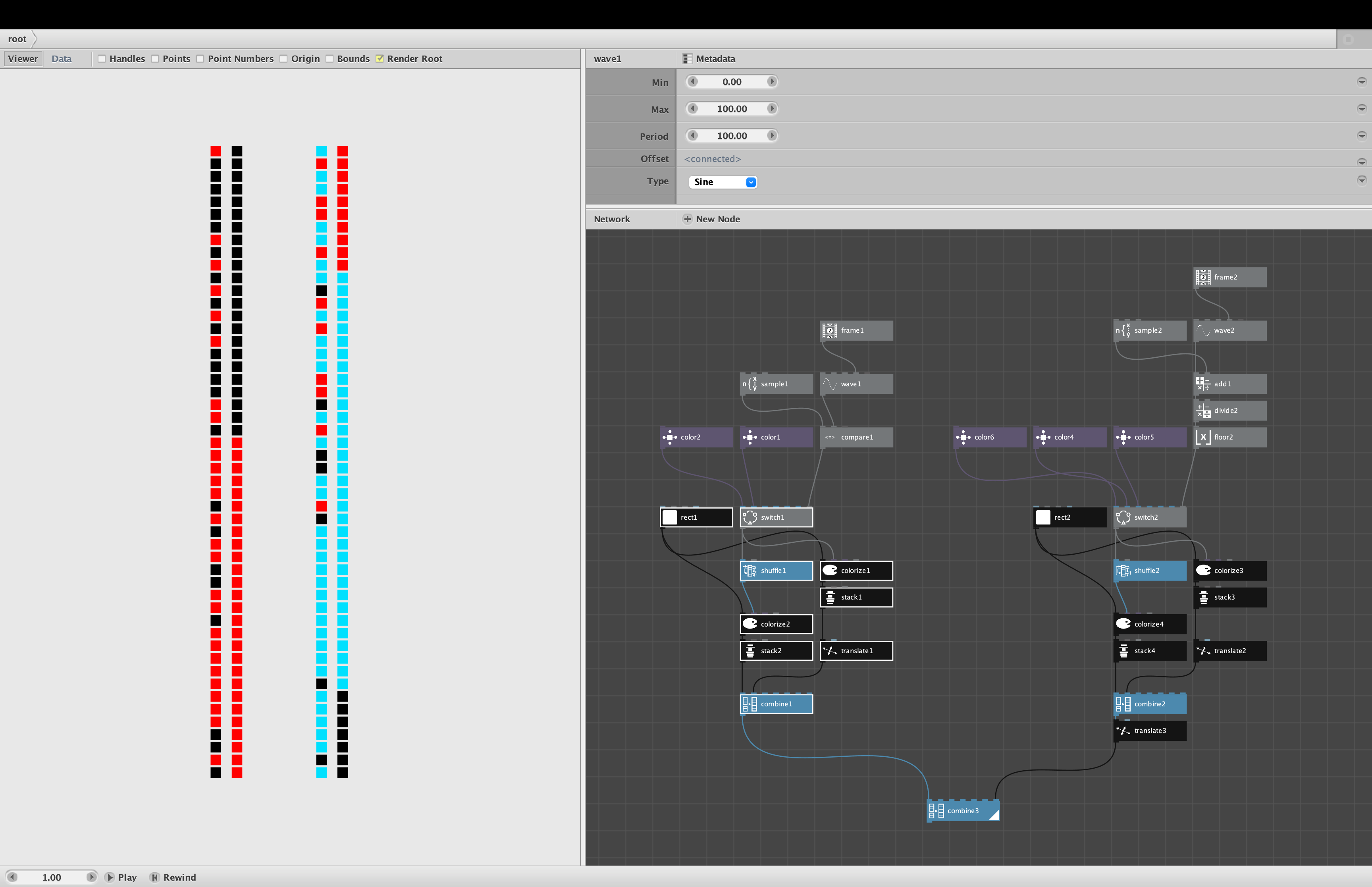
Nodebox artist Gabriel_Simi posed the following question on his Instagram account:
Nitty Gritty Conditional Programming. Paint with red or black if a number (sine function of frame number) is above or below a certain threshold. Right hand side is paint them in order, Left hand side is paint them shuffled (randomized). In text programming, this is an easy if/then statement. Here I could not figure out how to do this without 2 compare nodes, 2 combine nodes, and 2 slice nodes. The problem with this setup is how do I now add a third color? It would really be "if then else" in a text based language, but I don't know how to do that in Nodebox.
My response:
Gabriel,
I was able to recreate your two column animation using only 15 nodes (vs. your 30), with only one compare node, 1 combine node, and no slice nodes. See screenshot and sample network (attached).
The demo includes a separate network which adds a third color. I also attached MP4 animations for both the original 2 color and 3 color verisions.
The basic trick to doing conditionals in Nodebox is the switch node. Switch is similar to a case node in many textual languages, and a case statement with only two cases is equivalent to an IF/THEN/ELSE statement.
IF <condition> THEN x ELSE y
is handled in Nodbox by feeding x into input2 of the switch node, y into input1, and <condition> into the final index port. Note that the first port is the False (ELSE) condition and the second port is the True (THEN) condition
If your conditional is a boolean value, Nodebox will treat false as 0 and true as 1. An index of 0 will pass through whatever you feed into input 1; an index of 1 will pass through whatever you feed into input2.
You can also use switch to perform case statements with up to 6 cases. Instead of feeding a boolean value into the index port, just feed in any value from 0 to 5. That index will determine which of the 6 inputs will be output from the switch node.
Hope that clears things up. The switch node is fundamental. You can't do much serious coding without it.
You also asked about adding a third color. The basic idea there is to use a case statement instead of an IF THEN ELSE ELSE IF statement. That is, use the same switch node, but instead of feeding in TRUE or FALSE, feed in an index of 0, 1, or 2.
I can think of various ways to break your design into three colors. The demo includes one such way. Basically I just add the sine and sample values divide by 67, and round down; this yields a 0, 1, or 2 (see second animation).
One final note. There is nothing wrong with using a sin node as you did. But I found it easier to use a wave node set to sine waves. This lets you easily define min, max, and period without needing to do any extra math.
I will leave a note on Instagram pointing you to this note. Please reply here so I know you found it.
John