I did some RIDICULOUS coding tonight in order to get around some OBSCURE NodeBox limitations - all to make a MINOR improvement to a single, seldom-used node.
WARNING - the following commentary is nerdy even for me. STOP READING NOW unless you are hardcore.
My factorial node can compute exact values up to 170! (a 7 with 306 digits after it) and has an option to add separators (commas or periods depending on your locale) every three digits for easier reading. The problem is that, if you calculate factorials for N=22 or greater, the comma option will start to round the value after about the 20th digit.
The reason for this involves some obscure limitations to the math package built into any modern 64-bit computer.
In Nodebox, you can't represent any floating point number above 2^1023 (about 10^308) or any integer above 2^63 - 1 (about 9 quintillion). If you calculate 2^1024 the result will be "infinity". If you then try to round infinity, or feed infinity into an integer node, you will get 9,223,372,036,854,775,807 (2^63 -1), which is far less than infinity. And you will get that same value for the integer part of any number higher than 2^63. And even for values less than 2^63 but greater than 10 million, Nodebox will automatically switch to scientific notation, making the exact value of large integers hard to see.
All of this can cause problems when you want to put separators into those long numbers to make them more readable.
Adding separators should be easy. Nodebox provides a format node which can format numbers using Java Format String Syntax. Unfortunately, Nodebox only implemented the floating point part of that syntax, so even when you use it to format integers, values are treated as floating point numbers. You can easily add separators using the syntax "%,.0f". And that's what I did to implement the commas option in my Factorial node. But once the Factorial value gets above N=21, the format node quietly converts the integers to floating points and begins to round to the nearest power of 10 (only if the "Add commas" option is checked).
So, to fix this VERY obscure but annoying little bug, I need to dump the format node and add the separators myself. But here we run into ANOTHER Nodebox limitation.
NodeBox provides an easy way of turning a long string into a list of smaller strings: the make_strings node. But it provides NO way to reverse that process. That is, you can't take a list of small strings and concatenate them all together back into a single long string. It does provide a concatenate node, but that only lets you concatenate up to SEVEN specific strings.
Concatenating a list of strings into a single string is not something you need to do very often, but when you need to do it, you REALLY miss not having a general purpose concatenator. Once of those times is NOW, when I need to chop a long string into 3-digit chunks, add commas (or periods), and concatenate them all together.
I long ago came up with one solution to this problem: my concat_list node. And I could certainly use that here. But there's a catch: this node requires an external code module, concat_list.py. And I REALLY don't want to force my users to add that module to their code library just to calculate a simple factorial.
For YEARS I have been wracking my brain trying to find a way to concatenate a list without using Python. I could think of only one way, but was not desperate enough to use it - until tonight.
The workaround is to use the sad little concatenate node to concatenate an arbitrarily long list 7 items at a time, and do this recursively until the list is completely concatenated. But, sadly - and bizarrely for a Lisp-like functional language - NodeBox doesn't do recursion. UNLESS you hardwire the recursion by feeding a subnetwork into a copy of itself, and that one into another copy, and that one into another copy, and so on.
As a one-time professional coder it almost makes me cry to even think of such a silly thing to do. But over the years, Nodebox has broken me.
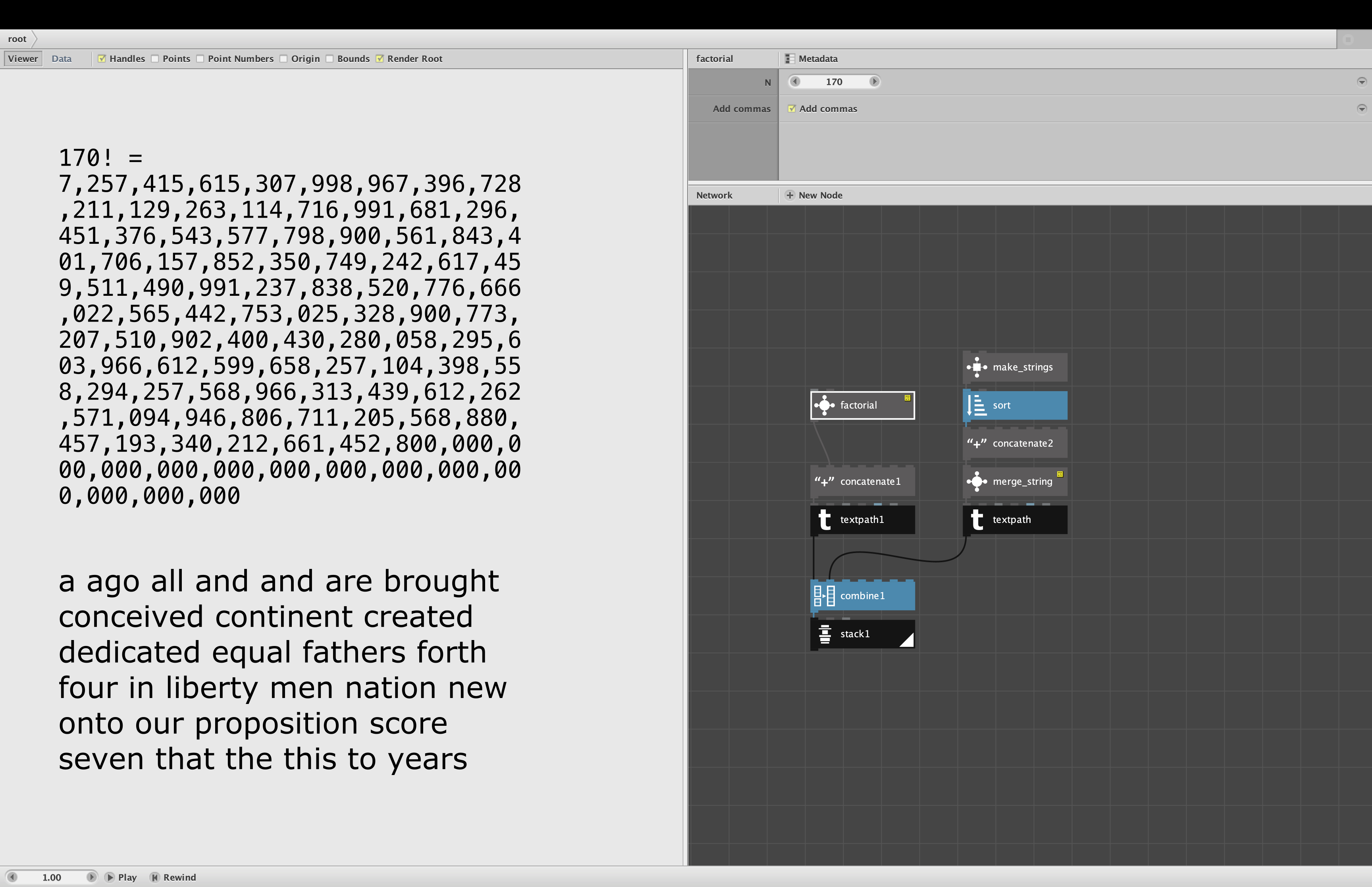
So behold: the merge_string node. Merge_string takes an arbitrarily long list of strings and returns a single string with everything concatenated together. You can see it in the demo (attached). I take the first sentence of the Gettysburg Address, sort all 30 words into alphabetical order, than concatenate them all back into a single string so that I can use textpath to format it into a paragraph.
If you select the merge_string node and control click it to Edit Children you will see something strange. The subnetwork consists of nothing more than a solid block of ONE HUNDRED reduce subnetworks all joined into a single long chain. Each reduce subnetwork concatenates another six items in the list; once everything is reduced to a single string it just passes that along. Most of the time you will only need a few of these reduce nodes, but I make you go through a hundred of them anyway. This allows me to handle any list UP TO 601 items long. (If you need more than that, you can just copy paste more reduce nodes and add them to the chain.)
No external code required.
I am so ashamed of this monstrosity that I'm not going to release it as a separate node in my library. Instead, I will hide it inside the demo of the concat_list node. If you ever need it (and I doubt anyone but me ever will), just open that demo (starting with the next release of my library) and copy it from there.
What does all this have to do with my original problem?
Go to the demo and look inside my new, improved factorial node. Inside that you will find ANOTHER new node: separators. Separators adds commas or periods (depending on locale) to a number without relying on the flawed format node. If you look inside that, you will find an add_commas node. And if you look inside THAT you will find our new friend, merge_string.
As you can see in the attached screenshot I demonstrate both nodes by first displaying 170 factorial in all its glory (using factorial v3.4) and then the sorted Gettysburg (using merge_string).
And that, gentle reader, is what I did with my precious time tonight.
John
P.S. If ANYONE actually reads this thing all the way through, and is brave enough to admit it, I would really appreciate it if you would reply and simply say, well, anything. If nobody replies I will just assume I am talking to myself (as usual).