Hi Tony,
This is an all-too-common occurrence whenever people use external code modules. The problem is that when people make their Nodebox projects, they add the code module located in a particular directory, and then later move their project relative to the code module or move the module relative to their directory or enclose one in a new directory or whatever.
OR they download a Nodebox project with a reference to a particular directory in the file path of the person posting the project which, of course, doesn't exist on their system.
Sadly, Nodebox does not react well to these little mishaps. It simply refuses to open the Nodebox file at all and belches forth an inscrutable error message. This is why I try to avoid using external code modules whenever I can.
Fortunately there is a fairly easy fix.
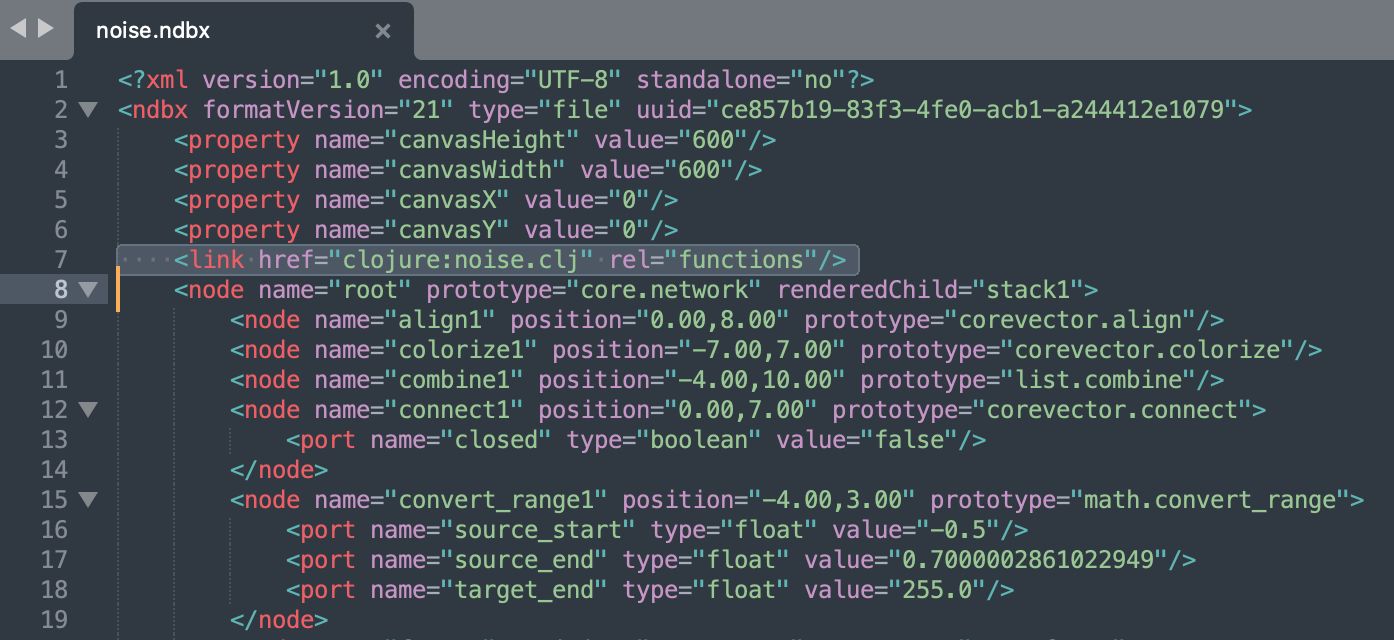
Just open your NDBX file using a text editor. SEE ATTACHED PHOTO for an example.
An NDBX file is just an XML file and can be safely edited. All you need to do is remove the line or lines which reference the code module. This will normally be line 7, or several lines starting at line 7 if you have more than one code module in your library, The lines will begin <link href="code module" where code module is the name of your module, e.g. clojure:noise.clj.
Just select that line or lines and delete it or them (being careful not to delete anything else). Save, relaunch your NDBX file, and it should open fine. You will then need to RE-ADD your module(s) using the normal File/Code Libraries... menu.
I have no idea how or why the module reference could be chained together four times, but just try removing the whole thing in your text file then re-adding the CLJ module.
My advice to avoid this kind of thing whenever you want to add a module:
- STOP
- SAVE
- EXIT Nodebox
- Create a folder just for your project
- Move your NDBX file into that folder
- Move a COPY of your module (your .py or .clj file) into the same folder
- Reopen your Nodebox file
- Add the module referring to the copy in the same folder
In this way your module will always live in the same folder as the Nodebox file and the link won't break even if you move that folder or put it into another folder. And if you want to share your project, ZIP THE ENTIRE FOLDER. That way the project and any code modules it needs will always stay together, even on other people's systems.
BY THE WAY
I recently added a version of this very same Perlin Noise algorithm into my Cartan Node Library as a node you can just copy and paste. My node uses the same module but wraps it with an extra scale parameter that will save you a little work each time. You will still need to add a COPY of the noise.clj module and wrap everything together in a folder:
https://forum.nodebox.net/t/5130532072/perlin-noise
Let me know if this solves your problem!
John