SEE UPDATE BELOW for new node and module names...
Almost 10 years ago I created a node called write_table that, when rendered, would write a CSV file:
https://forum.nodebox.net/t/16827547/write-table-node
This was before Frederik added the ability to export CSV files; in fact this node helped persuade him to do that. Once that export option was added, there was almost no need for my original write_table node.
Almost.
Turns out it is still useful for some unusual situations:
- Creating and then reading a file repeatedly as part of some process like Conways's Game of Life (see https://forum.nodebox.net/t/16486912/conway-s-game-of-life)
- Dividing a table into sub-tables and then automatically saving all of them with individual names
- Writing hundreds of kodi media stub text files (mentioned in conversation thread above)
- Creating a set of interlocking html files
I recently needed to do the last example and found that my old write_table node needed a few modifications. The original node took tables as an input, but for HTML files I wanted to just give it lines of text with no table headers. I also needed a cleaner way to create multiple HTML files named in a particular way. Hence, write_table V2.
Write_table now takes the following inputs:
- Data. Can now be either a table or a list. If a table, the output file will include headers; if a list, it will not.
- Directory. A file path to a directory. This field uses the file widget which lets you browse to any directory. But since the file widget forces you select a file, you will need to point to a directory with at least one file in it. The file itself doesn't matter; its only purpose is to define the directory.
- File Name. The name of your new file, which normally includes a file extension (e.g. hello.html, read me.txt, data.csv, etc.). This file name will be appended to the directory path you identified.
- Delimiter. Only needed when saving CSV files; ignored when you pass a list as data. The default comma works for most situations, but some other delimiter may be needed when the table cells contain commas.
When this node is rendered, it will save the file and, if no errors occur, return a "{filename} Saved" message. If you feed it multiple file names, it will return a separate message for each file created.
Note. If you are using this node as part of a larger process which involves writing and then reading these files, you will need to force this node to render. One way of doing this is to feed a downstream node and the write_table node into a switch node with the switch set to 0. This will pass the node you want further downstream while also forcing the write_table node to silently fire.
The attached demo shows two use cases.
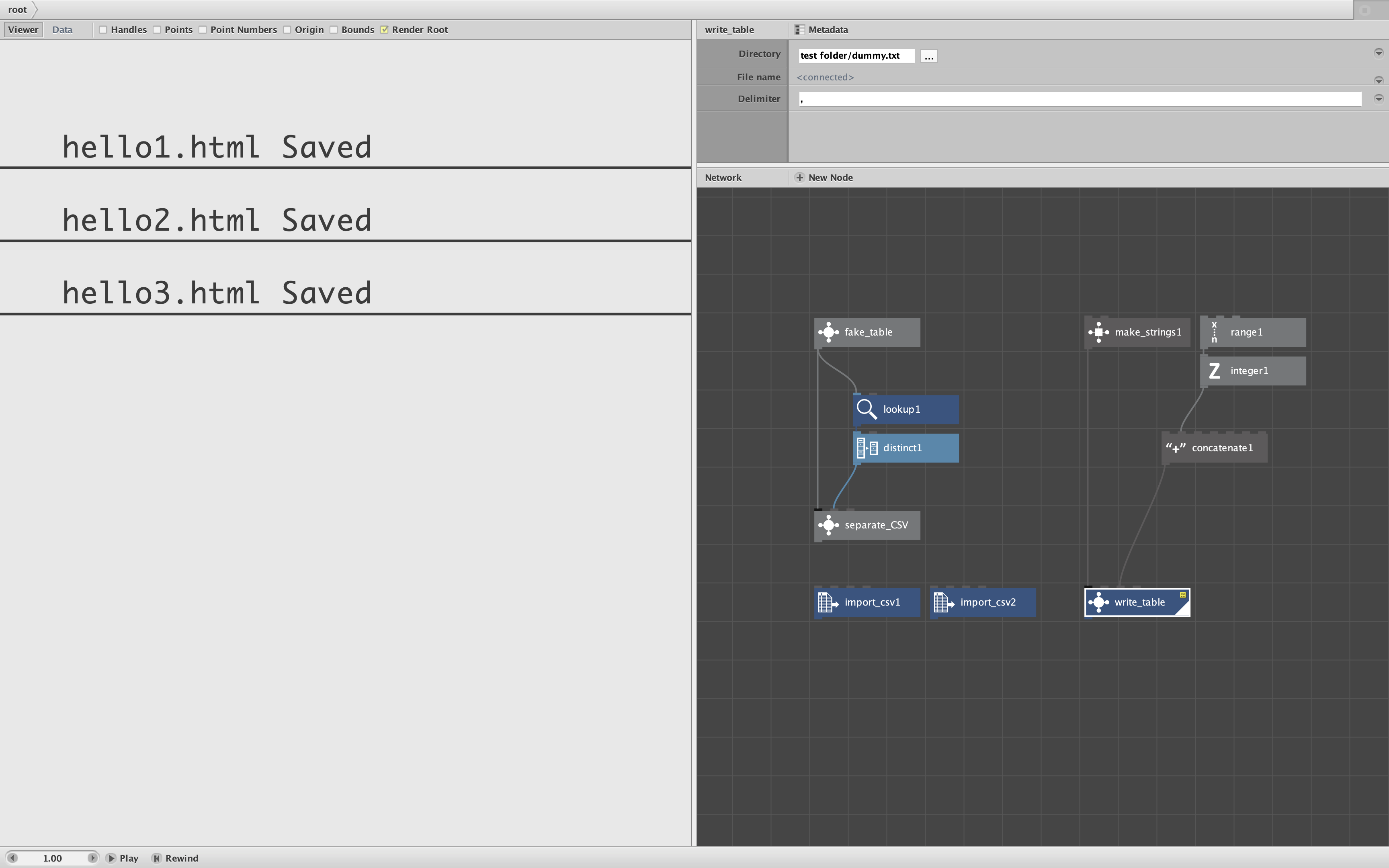
Case 1. I create a fake table with data for two countries, Brazil and India. I then feed this into a separate_CSV subnetwork which filters the data by country and then creates a separate CSV for each country in the dataset. Look inside the subnetwork to see the write_table node. The node identifies a test folder which contains a dummy.txt file; you can select dummy.txt with the Directory file widget to identify that directory. Once you render the separate_CSV subnetwork you will see two file saved messages. The two import_csv nodes below can then be used to view each of the two CSV files created.
Case 2. I create a dummy HTML file with a make_strings node, create 3 file names with a range node, the feed them into a write_table node to create three identical HTML files with individual names inside the same test folder. The screenshot shows the 3 messages produced when the node is rendered. You can open any one of the HTML files in a browser to see that they work. This example creates three identical HTML files. In most situations you would modify the template to create a different web pages for each file name. Note that because we are feeding in a list of strings instead of a table, the resulting HTML files have just the template text with no headers.
The zip file includes a folder with the demo, the new Python file, and a sub-folder with a dummy file.
This node requires a NEW version of the external write_table module, now called write_table_v2. You will need reference this module in your code Library to use the new node. If you look at the Python code inside that module, you will see that I also improved how the file path gets resolved. If you need to pass file paths to your own modules, this can serve as an example.
If ANYONE see this note, and actually has a use case for this unusual node, please let me know!