The new NodeBox forum is live! Everything from support.nodebox.net moved here: sign in with the same email to pick up your old posts. Something not working? Write to forum-support@nodebox.net.
I’m a bloody newbie so please forgive me for any silly questions, but after several hours I’m too desperat to keep trying on my own:
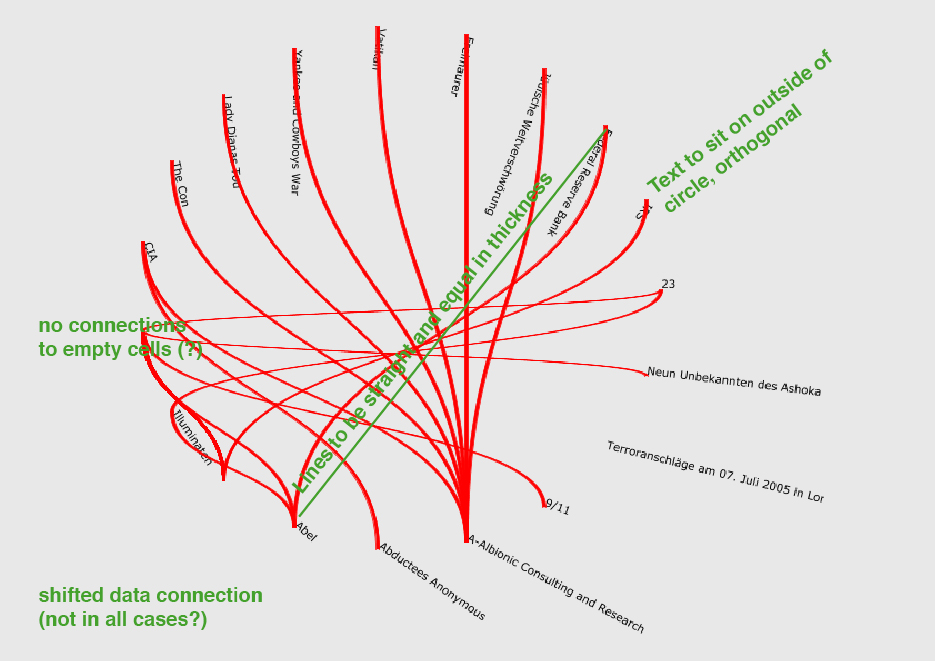
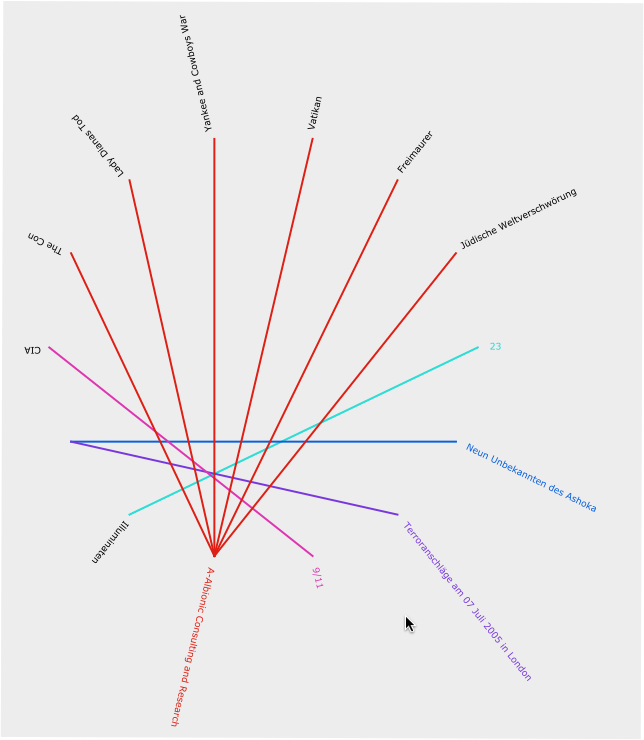
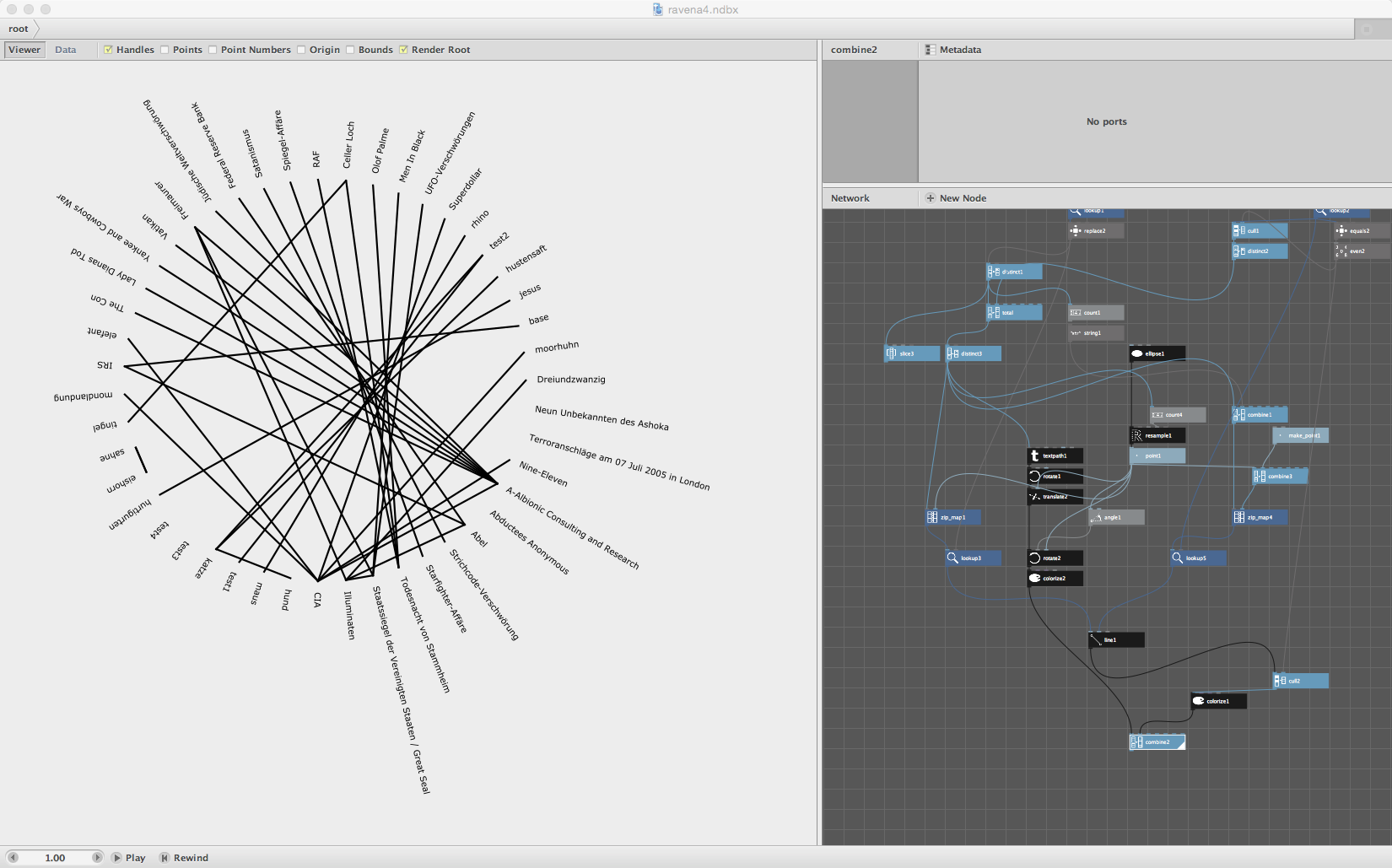
I’m trying to set up a circle shape which links connections between the data. This is just a pre-version with a small set of data to give it a first shot. The following will contain about 200 connections. I found this thread "linking data in an ellipse shape" ( https://forum.nodebox.net/t/14171593/linking-data-in-an-ellipse-shape ) which helped a lot regarding the basic structure. non the less I’m still having the following issues:
the data connects in the wrong way and seems to be shifted
i'd prefer the connecting lines to be straight instead of the wavy shape, so they won’t vary in thickness
the text is turned in an illegible way and shifted behind the lines, it’s supposed to go outside the circle and sit orthogonal to the circle outline at each point
if there is no connection ( so there is no data in the "Verbindung" cell ) it still creates a connection as it doesn’t receives the empty spot as empty? is there a way, that it doesn’t open up a new, empty data point at the circle? the no-connection-data needs to remain in there somehow, just without any connections. but at the same time it doesn’t happen with the "Terroranschläge..."-one
I would highly appreciate any help! Thanks in advance!
Hi Lucas!
So far this looks great, thanks!
Would you mind to save it down for nodebox 3 so i can have a look into the file itself? that would be great, thank you very much!
ravena
LU
LUlucasnijs
Hello,
Sorry for that i'm using a slightly new version ;-) the good news: you can do that yourself! Just open the ndbx file with a text editor and change version 20 to 19. Being sure to change only these two numbers, save it and voila it should open in your version
Kind regards
Lucas
RA
RAravena
Hope I’m not posting this twice, my other post seems to got lost...
Thanks for your help again. I had another look at the file and added some more data to see if everything goes well. I also deleted the colors, I know it gets confusing, but it’s supposed to (yes, i see the irony here ;) ). Therefore (but probably anybody does) I’m trying to get it to work smoothly before filling in all the data. Checking its correctness later might wind up impossible or at least quite a pain. If it helps while editing, please feel free to put the colors back in though!
my issues:
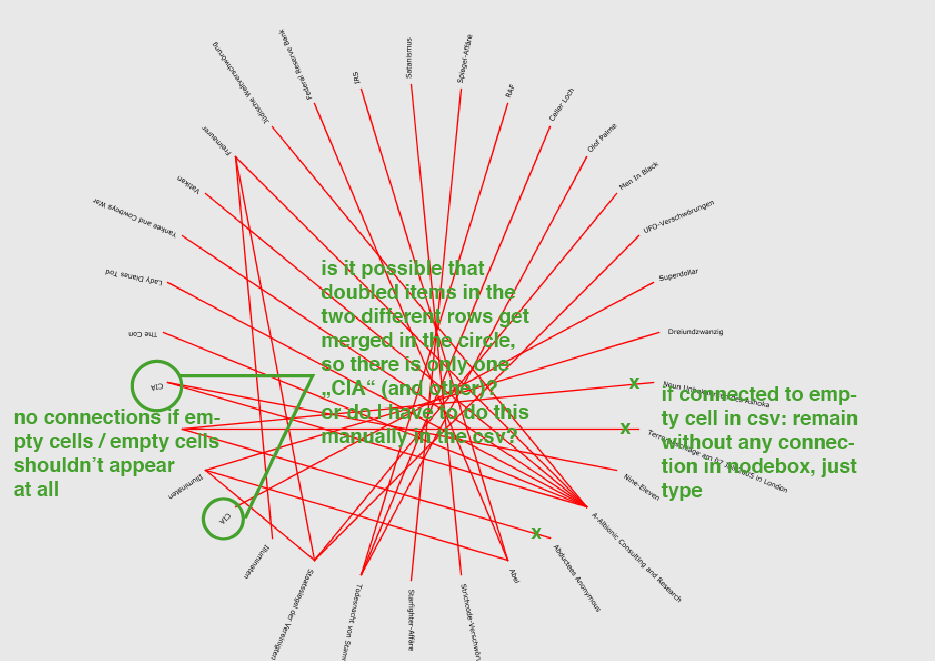
empty cells shouldn’t appear at all at the circle, neither should there be a connection to them. If a filled data cell is corresponding with an empty cell, I’d like to have just the type of the filled cell sitting at the circle with no connections at all.
i was also wondering, if doubled-data (as it happens for example with CIA in the current status) can be merged. meaning if CIA appears in the first row and in the second, can there still be just one CIA, covering both connections? a quick content explanation might clear this up: this is a visualization of references in an conspiracy theory encyclopedia. as there will be references at both entries, they also appear doubled in my csv so far. I could delete those doubles manually, but was wondering if there is node for this kind of things.
Once again I’d be very thankful for any kind of help! Thanks in advance,
ravena
It is good to know the whole problem.
It is also good to have "clean" data in datavisualisation as you will find out when you will throw the whole bunch at it. E.g. Are you sure there are not more then 360 categories or that the Illuminati are in there as "the illuminati". ILLUMINAT, Illumin. Etc?
Anyway you can compare lists, resulting in a list of booleans which you can use to cull the lists of lines eliminating the empty spot lines e.g.
I have a jury today so not sure if i can make you a quick example, regards
Lucas
RA
RAravena
Not perfectly sure if it is less than 360 since I’m still collecting data, but shouldn’t be. Descriptions won’t vary. Most of the data still needs to be set up and it’s all me doing that, so I can make sure everything will match.
and did I get that right, comparing and culling will take care of both, doubled data and the empty spots? I’ll have a look into it, eventhough I failed with culling yesterday, sort of guessed that might be the right thing.
no worries about your jury, no problem at all if you don’t find the time today, I’m glad to get feedback at all, so I don’t demand it in time :)
all the best,
ravena
LU
LUlucasnijs
Here's a sample where I omit the blanks as you asked. I use a "equals" node to find the empty ones and from that boolean list I take the even ones so all the zeroes become true (1) and the ones become false (0). This list can be used to cull the total list and omitting the empty ones.
best,
Lucas
RA
RAravena
Hi!
Thanks for the file!
Unfortunately I’ve trouble opening it. I saw you saved it for "19" already. Last time I had to put it on 17 to have it working. This time, no matter what i put in from 16-19, I get the following error when I try to open the file in nodebox.
ParseError at [row,col]:[2,21]
Message: Open quote is expected for attribute "{1}" associated with an element type "formatVersion".
looks like its having trouble with the manually changed version. do you have any idea how to make it work?
Thanks in advance!
Ravena
LU
LUlucasnijs
Yeah it is the wrong quote character before and or after the formatVersion number. Just use straight quotes and it will work.
Regards
thank you so much ! will have a look into it over the weekend :)
RA
RAravena
thank you so much! this looks good. Almost there.
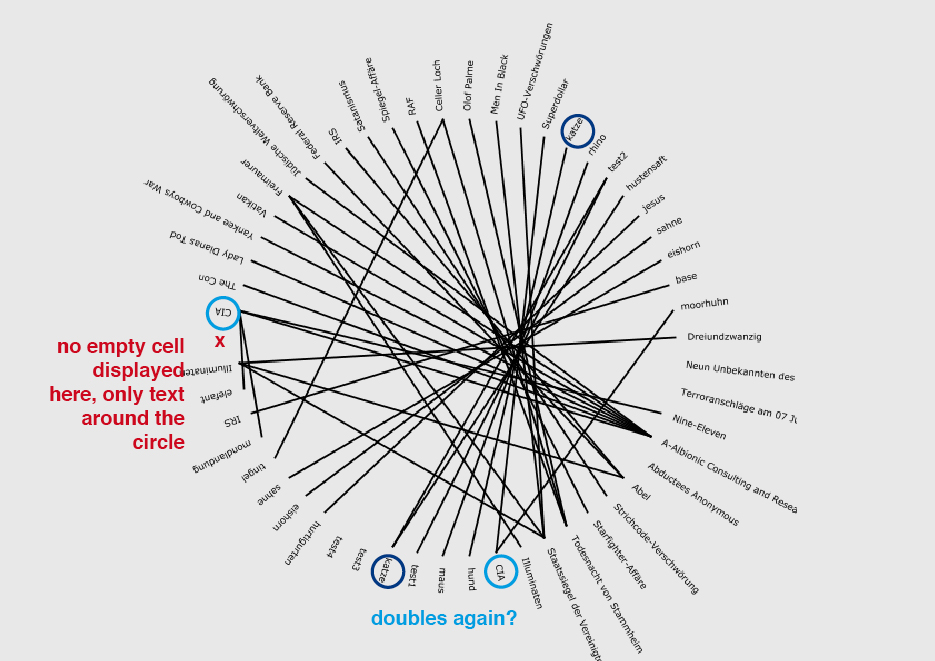
With that function, can one also cull or delete the remaining empty space at the circle? I tried, but couldn’t figure it out. At the moment there remains one empty spot where all the empty cells get matched together to one, which remains displayed, but would be nice to have only actual filled in cells surrounding the circle.
I also put in some more data and the doubling of information (that happened before) reoccured. I have multiple „CIA“s on both sides of the csv. it also happened with „katze“. I thought it might be just a value that needs to be changed in one or two nodes, because it seems to still work at the head of the table, but couldn’t figure out which ones or what else.
I’m really sorry, that i literally have to ask about everything, but I keep struggling, hope it doesn’t bother too much. In any case, I wish you Merry Christmas and once again many thanks!
ravena
Hi Ravena,
here you go. Had to change tactics a little bit. The trick is in zipmapping the empty point as well by adding an empty item to the total distinct list and adding an extra point for that item, it does not matter where since we will be throwing those out later on.
Anyway look at the file. No empty places, no doubles.
Good luck,
Lucas
PS: With a little help from your friend (Joe Cocker RIP)
best christmas present!
looks and works exactly as i imagined it :)
thank you so much lucas!
have a merry christmas and a good start to 2015
all the best & thanks again!
ravena
Know something that helps?
Sign in with your email address to reply. No password needed.