The new NodeBox forum is live! Everything from support.nodebox.net moved here: sign in with the same email to pick up your old posts. Something not working? Write to forum-support@nodebox.net.
Hello,
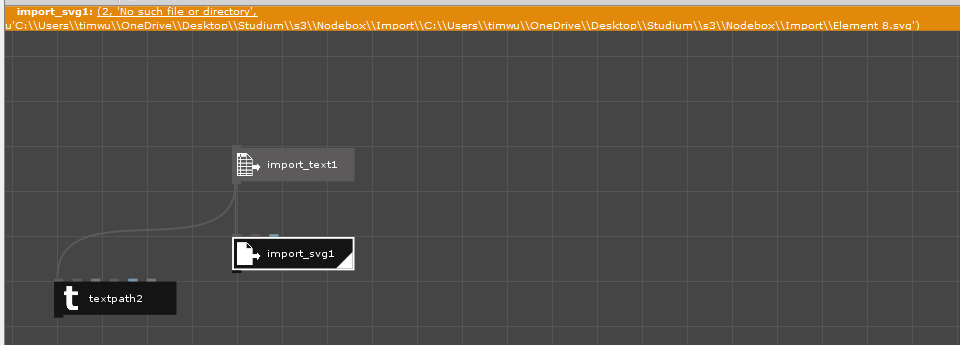
I'm not able to import svg's via the path of the file on windows.
I've tried to put them in the same folder, but it doesn't seem to do anything. The textfile with the paths gets imported correctly as well, it just can't seem to find the files it should be loading.
Does anyone have an idea what the error could be?
Thanks, Tim
TW
TWTim Würz
If the path does get read correctly, which I managed by deleting everything but the names of the svg files in the text file, there appear some other errors.
JO
JOjohn
Tim,
It sounds like you want to do some kind of batch operation using multiple SVGs and have run into two entirely different problems: passing valid SVG file paths and actually reading the SVG files.
I gather you managed to solve the first problem by editing your text file so it contains only clear path names. If you continue to have problems in this area, an alternative is to use a custom node I posted some time ago that can read in the contents of a subdirectory and feed those paths into an SVG node. That way you don't need to type file paths into a text file; you can just put all your SVGs in a folder and point the custom node at that folder. Since it is a custom node (written in Python) you need to add the list_dir.py file to your NodeBox code library. Details here:
It's hard for me to know exactly what is causing your second error without seeing the SVG file in question. But I have experienced similar problems in the past dealing with SVG files. NodeBox uses an old SVG library that will throw errors unless the SVG is written in just the right way.
My solution to this is to run SVGs files through Sketch. Sketch can read any SVG you throw at it and export it back out in a format NodeBox can accept. Unfortunately for you, Sketch is only available on the Mac. I have heard of a free PC equivalent called Lunacy which might do the same thing, but have never tried it. Information here:
If that doesn't help, and if you are able to share one of your SVGs, reply and attach it; I can have a look at it and see if I can find a way to read it.
Good luck!
John
Know something that helps?
Sign in with your email address to reply. No password needed.